
この記事はSpring 6の研究を進め、書いたコード中心の実践的な記録です。
1. JDBCの基礎#
1.1 JDBC APIの概要#
JDBCが登場した背景と必要性#
アプリケーションを開発する際に重要なデータはほとんどデータベースに保存されます。
クライアントがアプリケーションサーバを介してデータを保存または照会すると、アプリケーションはデータベースと以下の通信プロセスを介してデータを送受信する。
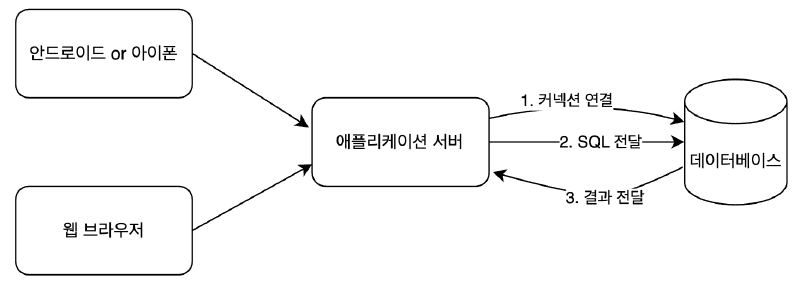
問題は?それぞれのデータベースごとにコネクションを接続する方法、SQLを渡す方法、そして結果を渡す方法の両方が異なるということ。
したがって、データベースを別の種類のデータベースに変更した場合は、アプリケーションサーバーで開発されたデータベース使用コードも一緒に変更する必要があります。
このような問題を解決するため、1997年にJDBCというJava標準が登場した。
JDBCコアクラスとインタフェース#
JDBC(Java Database Connectivity)は、Javaがデータベースに接続できるようにするJava APIです。
代表的には Connection 、 Statement 、 ResultSet をインタフェースとして定義して提供する。
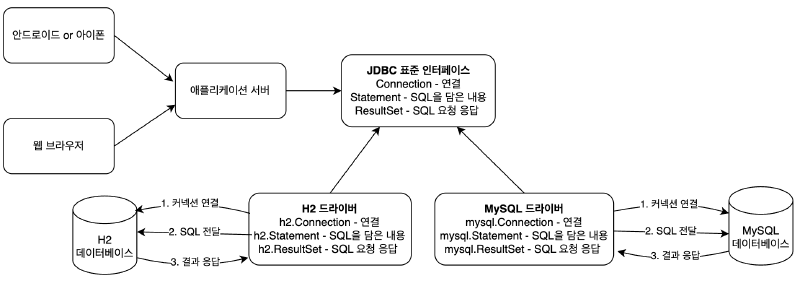
ところがインタフェースだけでは動作しない。各データベース会社は自分のDBに合うようにJDBCのインタフェースを実装して提供するが、これをJDBCドライバという。
JDBCを使用するタスクの一般的な順序は次のとおりです。
- DB接続用の
Connectionを取得します。 - SQLを含む
Statement(またはPreparedStatement)を作成します。 - 作成された
Statementを実行します。 - 照会の場合、SQL照会の実行結果を
ResultSetとして受け取り、情報を保管するオブジェクト(User、Post、…)に移動します。 - ジョブ中に作成された
Connection、Statement、ResultSetなどのリソースは、ジョブの完了後に必ず閉じます。 - JDBC API が生成する例外 (
Exception) をキャッチして直接処理するか、メソッドにthrowsを宣言して例外が発生した場合、メソッドから投げるようにする。
DBコネクションという制限的なリソースを共有して使用するサーバーで動作するJDBCコードには、必ず守るべき原則がある。まさに例外処理だ。
通常のJDBCコードの流れに従わず、途中で何らかの理由で例外が発生した場合でも、使用したリソースを必ず返すように作成しなければならないからだ。そうしないと、システムに深刻な問題が発生する可能性があります。
Statement vs PreparedStatement
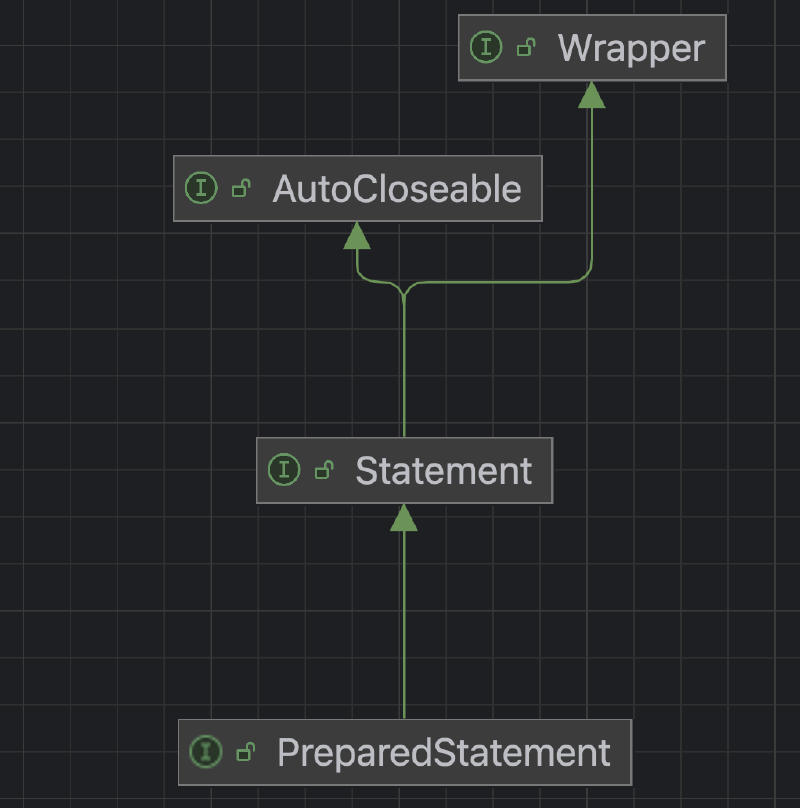
PreparedStatementはStatementの子型ですが、疑問符(?)を介したパラメータバインディングを可能にします。
SQLインジェクション攻撃を防ぐには、PreparedStatementを介したパラメータバインディング方式を使用する必要があります。
DriverManagerは、使用するアプリケーションのライブラリに登録されているJDBC(Java Database Connectivity)ドライバのセットを管理し、接続を取得する機能を提供します。
JDBCが提供するDriverManagerクラス
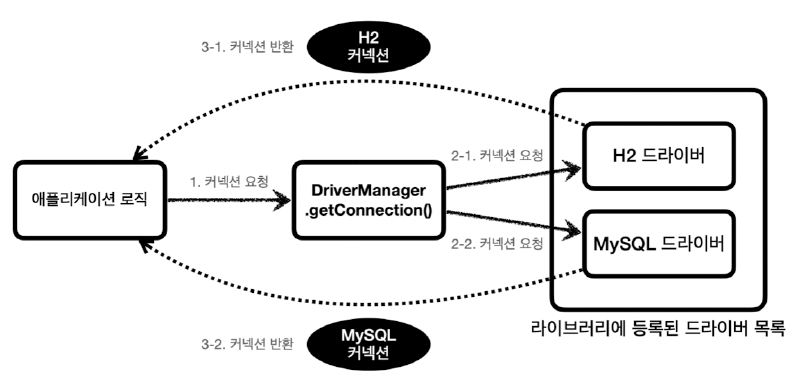
出典:キム・ヨンハンのSpring DB 1編
整理
JDBCの登場により、アプリケーションロジックはJDBC標準インタフェースにのみ依存しています。
したがって、データベースを別の種類のデータベースに変更したい場合は、JDBC実装ライブラリを変更するだけです。
JDBCを使用したH2 DBアクセス#
H2 データベースのダウンロード
https://www.h2database.com/html/download-archive.html
MAC ユーザー
ディレクトリの移動:cd bin
権限設定: chmod 755 h2.sh
実行:./h2.sh
WINDOW ユーザー
実行:h2.bat
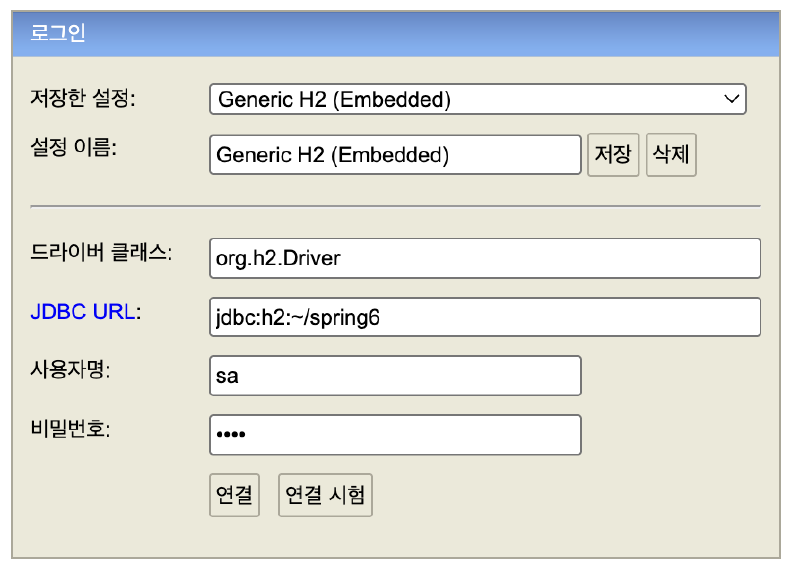
データベースファイルの作成方法
JDBC URL: jdbc:h2:~/spring6
ユーザー名: sa
パスワード:1234
データベースファイル作成後の接続方法
JDBC URL: jdbc:h2:tcp://localhost/~/spring6
テーブルの作成とデータの挿入
drop table post if exists cascade;

create table post (
		post_id bigint primary key,
		title varchar(255) not null,
		content varchar(255) not null,
		likes int not null
);
Postクラスの作成
@Getter
@EqualsAndHashCode
public class Post {
    private final Long postId;
    private final String title;
    private final String content;
    private int likes;

    private Post(Long postId, String title, String content, int likes) {
        this.postId = postId;
        this.title = title;
        this.content = content;
        this.likes = likes;
    }

    // 新規作成時に使用(良いデフォルト0強制)
    public static Post create(Long postId, String title, String content) {
        return new Post(postId, title, content, 0);
    }

    // DBなどからロードするときに使用
    public static Post of(Long postId, String title, String content, int likes) {
        return new Post(postId, title, content, likes);
    }
}
PostRepository クラスの作成
@Slf4j
public class PostRepository {

    public void save(Post post) throws SQLException {
        Connection con = null;
        PreparedStatement pstmt = null;

        try {
            con = DriverManager.getConnection("jdbc:h2:tcp://localhost/~/spring6", "sa", "1234");
            pstmt = con.prepareStatement("insert into post(post_id, title, content, likes) values(?, ?, ?, ?)");
            pstmt.setLong(1, post.getPostId());
            pstmt.setString(2, post.getTitle());
            pstmt.setString(3, post.getContent());
            pstmt.setInt(4, post.getLikes());
            pstmt.executeUpdate();
        } catch (SQLException e) {
            log.error("db error", e);
            throw e;
        } finally {
            if (pstmt != null) {
                try {
                    pstmt.close();
                } catch (SQLException e) {
                    log.error("prepareStatement close error", e);
                    throw e;
                }
            }
            if (con != null) {
                try {
                    con.close();
                } catch (SQLException e) {
                    log.error("connection close error", e);
                    throw e;
                }
            }
        }
    }

    public Post findById(Long id) throws SQLException {
        Connection con = null;
        PreparedStatement pstmt = null;
        ResultSet rs = null;

        try {
            con = DriverManager.getConnection("jdbc:h2:tcp://localhost/~/spring6", "sa", "1234");
            pstmt = con.prepareStatement("select * from post where post_id = ?");
            pstmt.setLong(1, id);
            rs = pstmt.executeQuery();
            rs.next();
            return Post.of(rs.getLong("post_id"),
                    rs.getString("title"),
                    rs.getString("content"),
                    rs.getInt("likes"));
        } catch (SQLException e) {
            log.error("db error", e);
            throw e;
        } finally {
            if (rs != null) {
                try {
                    rs.close();
                } catch (SQLException e) {
                    log.error("resultSet close error", e);
                    throw e;
                }
            }
            if (pstmt != null) {
                try {
                    pstmt.close();
                } catch (SQLException e) {
                    log.error("prepareStatement close error", e);
                    throw e;
                }
            }
            if (con != null) {
                try {
                    con.close();
                } catch (SQLException e) {
                    log.error("connection close error", e);
                    throw e;
                }
            }
        }
    }

    public void deleteAll() {
        Connection con = null;
        PreparedStatement pstmt = null;

        try {
            con = DriverManager.getConnection("jdbc:h2:tcp://localhost/~/spring6", "sa", "1234");
            pstmt = con.prepareStatement("delete from post");
            pstmt.executeUpdate();
        } catch (SQLException e) {
            log.error("db error", e);
            throw new RuntimeException(e);
        } finally {
            if (pstmt != null) {
                try {
                    pstmt.close();
                } catch (SQLException e) {
                    log.error("prepareStatement close error", e);
                    throw new RuntimeException(e);
                }
            }
            if (con != null) {
                try {
                    con.close();
                } catch (SQLException e) {
                    log.error("connection close error", e);
                    throw new RuntimeException(e);
                }
            }
        }
    }
}
PostRepositoryTestの生成
import static org.junit.jupiter.api.Assertions.assertEquals;
import static org.junit.jupiter.api.Assertions.assertThrows;

@SpringBootTest
class PostRepositoryTest {

    @AfterEach
    void clear() throws SQLException {
        PostRepository postRepository = new PostRepository();
        postRepository.deleteAll();
    }

    @DisplayName("PostRepository saveテスト")
    @Test
    void save() throws Exception {
        PostRepository postRepository = new PostRepository();

        Post post = Post.create(1L, "title", "content");

        postRepository.save(post);
    }

    @DisplayName("PostRepository getテスト")
    @Test
    void get() throws Exception {
        // given
        PostRepository postRepository = new PostRepository();
        Long postId = 1L;

        Post post = Post.create(postId, "title", "content");
        postRepository.save(post);

        // when
        Post savedPost = postRepository.findById(postId);

        // then
        assertEquals(post, savedPost);
    }

    @DisplayName("PostRepository deleteAllテスト")
    @Test
    void deleteAll() throws Exception {
        // given
        PostRepository postRepository = new PostRepository();

        Post post = Post.create(1L, "title", "content");
        postRepository.save(post);

        // when
        postRepository.deleteAll();

        // then
        assertThrows(Exception.class, () -> postRepository.findById(1L));
    }
}
1.2 DataSourceの設定#
DataSourceの概念と必要性#
従来はPostRepositoryがH2を直接使用するためにDB URL、USERNAME、PASSWORDなどの具体的な情報に依存している。
したがって、H2ではなくMySQLでデータベースを変更する場合は、PostRepositoryのコードを変更してください。
また、コネクションを取得する方法はコネクションプールを使用することもできる。この場合もPostRepositoryを直接変更する必要があります。
これらの問題を解決するために、DBコネクションを取得する機能をConnectionMakerインタフェースとして導入し、抽象化を進めてみよう。
ConnectionMaker インタフェースの導入により、PostRepository は、具体的な DB やコネクション獲得方法について知る必要なく、そのインタフェースにのみ依存すればよい。
ConnectionMaker
public interface ConnectionMaker {
    Connection makeConnection() throws SQLException;
}
DBConnectionMaker
public class DBConnectionMaker implements ConnectionMaker {

    @Override
    public Connection makeConnection() throws SQLException {
        return DriverManager.getConnection("jdbc:h2:tcp://localhost/~/spring6", "sa", "1234");
    }
}
PostRepository
@Slf4j
public class PostRepository {
    private final ConnectionMaker connectionMaker;

    public PostRepository(ConnectionMaker connectionMaker) {
        this.connectionMaker = connectionMaker;
    }

    public void save(Post post) throws SQLException {
        Connection con = null;
        PreparedStatement pstmt = null;

        try {
            con = connectionMaker.makeConnection();
            pstmt = con.prepareStatement("insert into post(post_id, title, content, likes) values(?, ?, ?, ?)");
            pstmt.setLong(1, post.getPostId());
            pstmt.setString(2, post.getTitle());
            pstmt.setString(3, post.getContent());
            pstmt.setInt(4, post.getLikes());
            pstmt.executeUpdate();
        } catch (SQLException e) {
            log.error("db error", e);
            throw e;
        } finally {
            if (pstmt != null) {
                try {
                    pstmt.close();
                } catch (SQLException e) {
                    log.error("prepareStatement close error", e);
                    throw e;
                }
            }
            if (con != null) {
                try {
                    con.close();
                } catch (SQLException e) {
                    log.error("connection close error", e);
                    throw e;
                }
            }
        }
    }

    public Post findById(Long id) throws SQLException {
        Connection con = null;
        PreparedStatement pstmt = null;
        ResultSet rs = null;

        try {
            con = connectionMaker.makeConnection();
            pstmt = con.prepareStatement("select * from post where post_id = ?");
            pstmt.setLong(1, id);
            rs = pstmt.executeQuery();
            rs.next();
            return Post.of(rs.getLong("post_id"),
                    rs.getString("title"),
                    rs.getString("content"),
                    rs.getInt("likes"));
        } catch (SQLException e) {
            log.error("db error", e);
            throw e;
        } finally {
            if (rs != null) {
                try {
                    rs.close();
                } catch (SQLException e) {
                    log.error("resultSet close error", e);
                    throw e;
                }
            }
            if (pstmt != null) {
                try {
                    pstmt.close();
                } catch (SQLException e) {
                    log.error("prepareStatement close error", e);
                    throw e;
                }
            }
            if (con != null) {
                try {
                    con.close();
                } catch (SQLException e) {
                    log.error("connection close error", e);
                    throw e;
                }
            }
        }
    }

    public void deleteAll() {
        Connection con = null;
        PreparedStatement pstmt = null;

        try {
            con = connectionMaker.makeConnection();
            pstmt = con.prepareStatement("delete from post");
            pstmt.executeUpdate();
        } catch (SQLException e) {
            log.error("db error", e);
            throw new RuntimeException(e);
        } finally {
            if (pstmt != null) {
                try {
                    pstmt.close();
                } catch (SQLException e) {
                    log.error("prepareStatement close error", e);
                    throw new RuntimeException(e);
                }
            }
            if (con != null) {
                try {
                    con.close();
                } catch (SQLException e) {
                    log.error("connection close error", e);
                    throw new RuntimeException(e);
                }
            }
        }
    }
}
BeanFactory
@Configuration
public class BeanFactory {

    @Bean
    public PostRepository postRepository() {
        return new PostRepository(connectionMaker());
    }

    @Bean
    public ConnectionMaker connectionMaker() {
        return new DBConnectionMaker();
    }
}
PostRepositoryTest
import static org.junit.jupiter.api.Assertions.assertEquals;
import static org.junit.jupiter.api.Assertions.assertThrows;

@SpringBootTest
class PostRepositoryTest {
    @Autowired
    private PostRepository postRepository;

    @AfterEach
    void clear() throws SQLException {
        postRepository.deleteAll();
    }

    @DisplayName("PostRepository saveテスト")
    @Test
    void save() throws Exception {
        Post post = Post.create(1L, "title", "content");

        postRepository.save(post);
    }

    @DisplayName("PostRepository getテスト")
    @Test
    void get() throws Exception {
        // given
        Long postId = 1L;

        Post post = Post.create(postId, "title", "content");
        postRepository.save(post);

        // when
        Post savedPost = postRepository.findById(postId);

        // then
        assertEquals(post, savedPost);
    }

    @DisplayName("PostRepository deleteAllテスト")
    @Test
    void deleteAll() throws Exception {
        // given
        Post post = Post.create(1L, "title", "content");
        postRepository.save(post);

        // when
        postRepository.deleteAll();

        // then
        assertThrows(Exception.class, () -> postRepository.findById(1L));
    }
}実際、Javaには、DBコネクションを取得するオブジェクトの機能を抽象化し、同様の目的で使用できるように作られたDataSourceというインタフェースがすでに存在している。
したがって、本番でConnectionMakerのようなインターフェースを作成して使用することはありません。
DriverManagerとDataSource
JDBCを使用する場合、DriverManagerとDataSourceは「DBコネクションをどのように管理するのですか?」という同じ問題に対処しますが、役割と抽象化レベルは異なります。
DriverManager はコネクションプールや高度な管理ロジックを含まない、**“**JDBCドライバをどのように呼び出すか”程度を抽象化したわけです。そしてクラスだ。
DataSourceインターフェースは、「エンタープライズ環境でコネクションを確実に取得する方法」の抽象化であり、実装によってはコネクションプールまで含めることができる。
SpringはDriverManagerもDataSourceを介して使用できるようにDriverManagerDataSourceというDataSourceを実装したクラスを提供します。
これで、アプリケーションロジックはDataSourceインターフェースにのみ依存します。おかげでDriverManagerDataSourceを介してDriverManagerを使用し、接続プールを使用するようにコードを変更してもアプリケーションロジックは変更する必要はありません。
ConnectionConst
public class ConnectionConst {
    public static final String URL = "jdbc:h2:tcp://localhost/~/spring6";
    public static final String USERNAME = "sa";
    public static final String PASSWORD = "1234";
}
BeanFactory
@Configuration
public class BeanFactory {

    @Bean
    public PostRepository postRepository() {
        return new PostRepository(dataSource());
    }

    @Bean
    public DataSource dataSource() {
        return new DriverManagerDataSource(URL, USERNAME, PASSWORD);
    }
}
PostRepository
@Slf4j
public class PostRepository {
    private final DataSource dataSource;

    public PostRepository(DataSource dataSource) {
        this.dataSource = dataSource;
    }

    public void save(Post post) throws SQLException {
        Connection con = null;
        PreparedStatement pstmt = null;

        try {
            con = dataSource.getConnection();
            pstmt = con.prepareStatement("insert into post(post_id, title, content, likes) values(?, ?, ?, ?)");
            pstmt.setLong(1, post.getPostId());
            pstmt.setString(2, post.getTitle());
            pstmt.setString(3, post.getContent());
            pstmt.setInt(4, post.getLikes());
            pstmt.executeUpdate();
        } catch (SQLException e) {
            log.error("db error", e);
            throw e;
        } finally {
            if (pstmt != null) {
                try {
                    pstmt.close();
                } catch (SQLException e) {
                    log.error("prepareStatement close error", e);
                    throw e;
                }
            }
            if (con != null) {
                try {
                    con.close();
                } catch (SQLException e) {
                    log.error("connection close error", e);
                    throw e;
                }
            }
        }
    }

    public Post findById(Long id) throws SQLException {
        Connection con = null;
        PreparedStatement pstmt = null;
        ResultSet rs = null;

        try {
            con = dataSource.getConnection();
            pstmt = con.prepareStatement("select * from post where post_id = ?");
            pstmt.setLong(1, id);
            rs = pstmt.executeQuery();
            rs.next();
            return Post.of(rs.getLong("post_id"),
                    rs.getString("title"),
                    rs.getString("content"),
                    rs.getInt("likes"));
        } catch (SQLException e) {
            log.error("db error", e);
            throw e;
        } finally {
            if (rs != null) {
                try {
                    rs.close();
                } catch (SQLException e) {
                    log.error("resultSet close error", e);
                    throw e;
                }
            }
            if (pstmt != null) {
                try {
                    pstmt.close();
                } catch (SQLException e) {
                    log.error("prepareStatement close error", e);
                    throw e;
                }
            }
            if (con != null) {
                try {
                    con.close();
                } catch (SQLException e) {
                    log.error("connection close error", e);
                    throw e;
                }
            }
        }
    }

    public void deleteAll() {
        Connection con = null;
        PreparedStatement pstmt = null;

        try {
            con = dataSource.getConnection();
            pstmt = con.prepareStatement("delete from post");
            pstmt.executeUpdate();
        } catch (SQLException e) {
            log.error("db error", e);
            throw new RuntimeException(e);
        } finally {
            if (pstmt != null) {
                try {
                    pstmt.close();
                } catch (SQLException e) {
                    log.error("prepareStatement close error", e);
                    throw new RuntimeException(e);
                }
            }
            if (con != null) {
                try {
                    con.close();
                } catch (SQLException e) {
                    log.error("connection close error", e);
                    throw new RuntimeException(e);
                }
            }
        }
    }
}
Spring BootでConnection PoolとDataSourceを設定する#
DriverManagerは、以前から存在していたJDBCの初期のクラスです。したがって、Connection Poolingなどの高度な機能は含まれていません。
DriverManagerDataSourceはSpringが提供するDataSourceインタフェース実装の1つで、内部的にDriverManagerを呼び出して毎回新しい接続を作成します。
データベースコネクションを獲得するときは、次のような複雑な過程を経る。
- アプリケーションロジックはDBドライバを介して接続を検索します。
- DBドライバはDBとTCP / IP接続を接続します。もちろん、この過程で3way handshakeのようなネットワーク動作が発生する。
- DBドライバは、TCP / IP接続が接続されると、ID、PWなどの他の追加情報をDBに転送します。
- DBはID、PWを介して内部認証を完了し、内部にDBセッションを作成します。
- DBコネクションは、作成が完了したという応答を送信します。
- DBドライバは接続オブジェクトを作成してクライアントに返します。
このように新しい接続を作成するのは時間がかかり、TCP / IP接続にネットワークリソースが毎回使用されます。
→ユーザーに悪い経験を与えることができる。
この問題を解決するために、接続を事前に生成して使用する接続プールというアイデアが現れました。
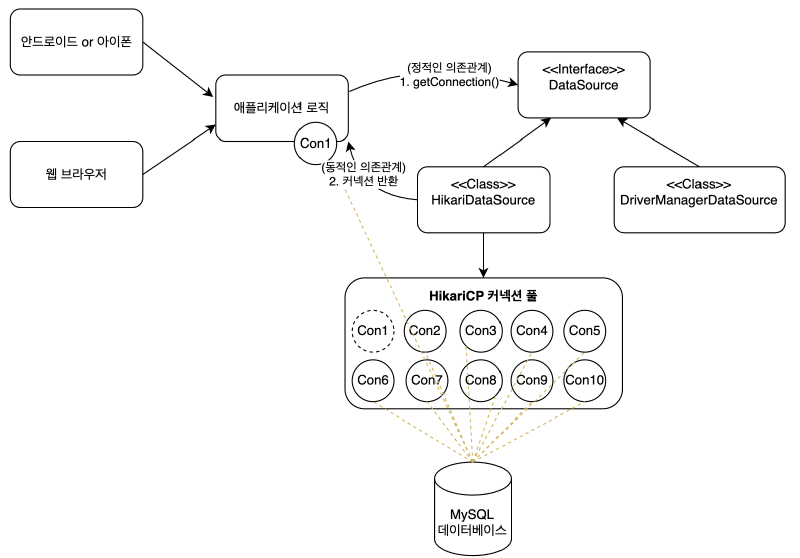
Spring Boot 2.0以降、デフォルトのDataSourceに設定されているHikariCPは直接DriverManager.getConnection()を呼び出さず、内部的にJDBCドライバのconnect()メソッドを介して物理接続を取得して管理します。
コネクションプールに含まれるコネクションはTCP/IPでDBとコネクションが接続されている状態なので、いつでもすぐにSQLをDBに渡すことができる。
HikariCPコネクション獲得テスト
@SpringBootTest
public class DataSourceConnectionPoolTest {
    private static final String URL = "jdbc:h2:tcp://localhost/~/spring6";
    private static final String USERNAME = "sa";
    private static final String PASSWORD = "1234";

    @DisplayName("コネクションプール取得テスト")
    @Test
    void dataSourceConnectionPool() throws InterruptedException {
        HikariDataSource dataSource = new HikariDataSource();
        dataSource.setJdbcUrl(URL);
        dataSource.setUsername(USERNAME);
        dataSource.setPassword(PASSWORD);
        dataSource.setMaximumPoolSize(10); // コネクションプール最大サイズを10に設定
        dataSource.setPoolName("MyPool");
        Thread.sleep(1000); //コネクションプールでコネクションが生成される時間を待機

        // マルチスレッド構成(20スレッド)
        int taskCount = 20;
        CountDownLatch latch = new CountDownLatch(taskCount);
        ExecutorService executorService = Executors.newFixedThreadPool(taskCount);

        // 20スレッドを実行してコネクションを借り、ログ出力
        for (int i = 0; i < taskCount; i++) {
            executorService.submit(() -> {
                // try-with-resources構文を使用して接続プールから接続を借りる(tryブロックの終了時に自動的に返却)
                try (Connection connection = dataSource.getConnection()) {
                    // 接続情報の確認
                    System.out.println("Thread: " + Thread.currentThread().getName() + ", Connection: " + connection);
                    Thread.sleep(500);
                } catch (SQLException e) {
                    throw new RuntimeException(e);
                } catch (InterruptedException e) {
                    throw new RuntimeException(e);
                } finally {
                    latch.countDown();
                }
            });
        }

        // すべてのスレッド終了待ち
        latch.await();
        executorService.shutdown();

        // DataSourceの終了
        dataSource.close();
    }
}
application.ymlでDataSourceを設定
spring:
  datasource:
    url: jdbc:h2:tcp://localhost/~/spring6
    username: sa
    password: 1234
    driver-class-name: org.h2.Driver
    hikari:
      maximum-pool-size: 10
Spring Bootがアプリケーションを起動すると、DataSourceAutoConfiguration内でクラスパスにあるHikariCPライブラリを検出してspring.datasource.*、spring.datasource.hikari.*などで始まる設定はDataSourceProperties、HikariDataSourceにバインドされます。
// BeanFactory、ConnectionConstなどは削除します。

@Slf4j
@Repository // コンポーネントスキャンでBeanを登録し、自動でDataSourceを注入される
public class PostRepository {
    private final DataSource dataSource;

    public PostRepository(DataSource dataSource) {
        this.dataSource = dataSource;
    }

    ...
}
HikariCP Connection Pool Configuration#
HikariCPの代表設定値としては、maximumPoolSize、minimumIdle、idleTimeout、connectionTimeout、maxLifetimeなどがある。
maximum-pool-size(default = 10)
idle(inActive)-connection と使用中の in-use(active)-connection の両方を含め、プールが到達できる最大サイズを制御します。
デフォルトでは、この値はデータベースとサーバーの接続への実際の最大接続数を決定します。
接続プールがこのサイズに達し、使用可能なアイドル接続がない場合、getConnection()呼び出しは最大connection-timeoutミリ秒間ブロックされます。
- 適切なコネクションプールのサイズ
コネクションプールのサイズは小さくとられ、必要に応じて十分確保することが核心だ。
- **HikariCPの推奨公式**

    > connections = (core_count * 2) + effective_spindle_count
    >
core_count**:** 物理 CPU コアの数(ハイパースレッドコアは含まれません)
effective_spindle_count**:** キャッシュが有効な場合は 0、それ以外の場合は実際のディスクスピンドルの数に近い値
たとえば、ハードディスクが1つある小さな4コアi7サーバー
    → 9 = ((4 * 2) + 1)

- **Pool-Locking問題を回避するための公式**
プールロックとは? 1つのスレッドが複数の接続を同時に必要とする場合、プールのサイズが小さすぎるとデッドロック状態に陥る危険がある
    > pool-size = T * (C - 1) + 1
    >
T:最大同時実行可能スレッド数
C:シングルスレッドが同時に保持する必要がある接続数
たとえば、3つのスレッドがそれぞれ4つの接続を必要とする場合
    → 10 = 3 * (4 − 1) + 1

- **しかし、実際に展開環境で適切な接続数**
監視環境を構築し(サーバーリソース、サーバースレッド、DBCPなど)、バックエンドシステムに負荷テストを適用して適切な数を見つけます。
minimum-idle(default = maximum-pool-size)
poolが保持する最小のアイドル接続数を制御します。 idle-connectionの数がminimum-idleの設定値より少なく、完全な接続数もmaximum-pool-sizeの設定値より少ない場合は、すぐに追加の接続を作成します。
maximum-pool-sizeとminimum-idleを同じにするには、maximum-pool-sizeを設定するだけです。
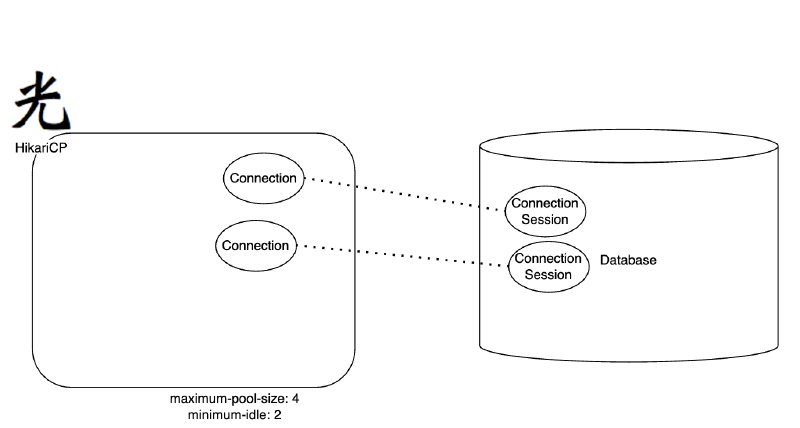
アプリケーションが実行され、HikariCPが初期化されると、minimum-idle設定値と同じ接続を事前に作成します。
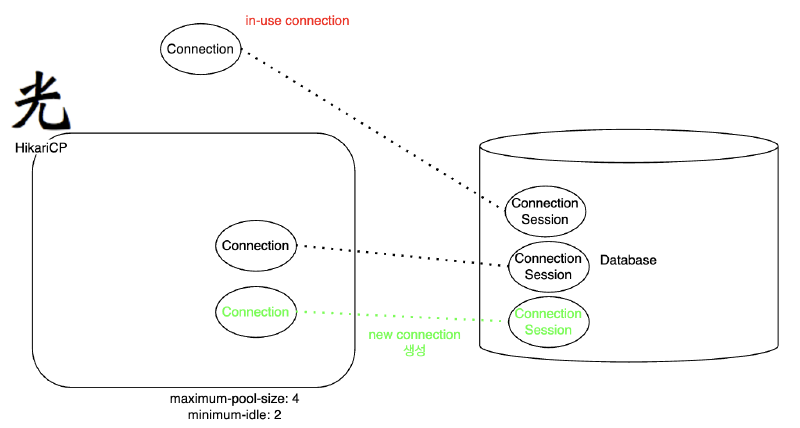
アプリケーションがDBジョブ(クエリ実行など)のために接続を要求すると、HikariCPはプール内に事前に準備されたアイドル接続を1つ取り出して返します。
このコネクションはin-use(使用中)状態となり、DBクエリを実行したりトランザクション処理をするようになる。
トラフィックが発生して接続が1つ使用されている場合、1つのアイドル接続が残ります。
このとき、HikariCPは内部的にidle-connectionをminimum-idle以上維持するため
maximum-pool-sizeの範囲内で新しい接続を作成します。
idle-timeout
プール内の接続がアイドル接続状態に維持できる最大時間を制御します。
minimum-idleよりも多くのアイドル接続がある場合、HikariCPはidle-timeoutより古いアイドル接続を接続プールから削除し、接続プール内の接続数をminimum-idleに合わせます。
connection-timeout
クライアント(つまり、ユーザー)がプール内の接続を待機する最大ミリ秒数を制御します。接続が利用できない状態でこのタイムアウトが発生すると、例外が発生します。
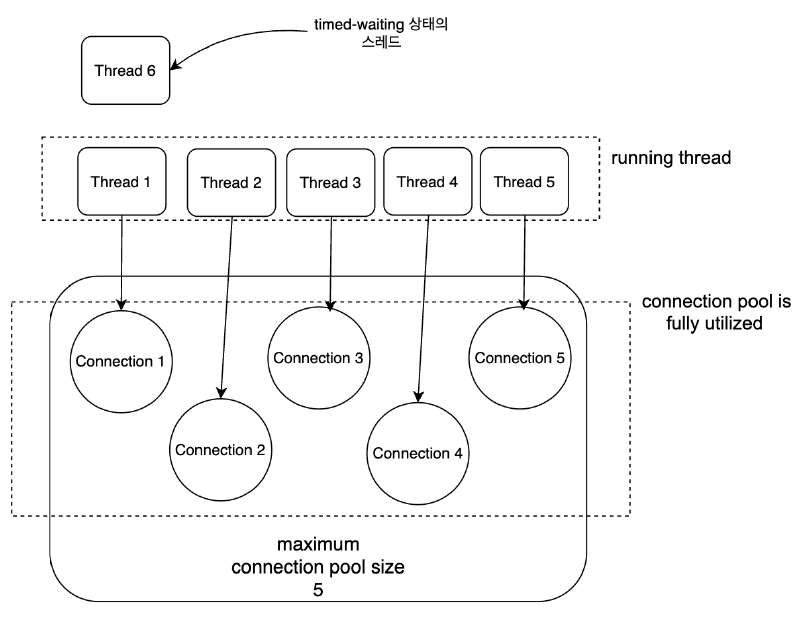
上記の場合、Thread6がconnection-timeoutに設定された時間の間に接続を取得できない場合、例外が発生します。
application.yml
spring:
  datasource:
    url: jdbc:h2:tcp://localhost/~/spring6
    username: sa
    password: 1234
    driver-class-name: org.h2.Driver

    # Hikari設定を追加する。
    hikari:
      maximum-pool-size: 5
      connection-timeout: 10000
PostRepository
@Slf4j
@Repository
public class PostRepository {
    private final DataSource dataSource;

    public PostRepository(DataSource dataSource) {
        this.dataSource = dataSource;
    }

    public void save(Post post) throws SQLException {
        Connection con = null;
        PreparedStatement pstmt = null;

        try {
            con = dataSource.getConnection();
            pstmt = con.prepareStatement("insert into post(post_id, title, content, likes) values(?, ?, ?, ?)");
            pstmt.setLong(1, post.getPostId());
            pstmt.setString(2, post.getTitle());
            pstmt.setString(3, post.getContent());
            pstmt.setInt(4, post.getLikes());
            pstmt.executeUpdate();
            Thread.sleep(20000); // 20秒待機を追加
        } catch (SQLException e) {
            log.error("db error", e);
            throw e;
        } catch (InterruptedException e) {
            throw new RuntimeException(e);
        } finally {
            if (pstmt != null) {
                try {
                    pstmt.close();
                } catch (SQLException e) {
                    log.error("prepareStatement close error", e);
                    throw e;
                }
            }
            if (con != null) {
                try {
                    con.close();
                } catch (SQLException e) {
                    log.error("connection close error", e);
                    throw e;
                }
            }
        }
    }

    public Post findById(Long id) throws SQLException {
        Connection con = null;
        PreparedStatement pstmt = null;
        ResultSet rs = null;

        try {
            con = dataSource.getConnection();
            pstmt = con.prepareStatement("select * from post where post_id = ?");
            pstmt.setLong(1, id);
            rs = pstmt.executeQuery();
            rs.next();
            return Post.of(rs.getLong("post_id"),
                    rs.getString("title"),
                    rs.getString("content"),
                    rs.getInt("likes"));
        } catch (SQLException e) {
            log.error("db error", e);
            throw e;
        } finally {
            if (rs != null) {
                try {
                    rs.close();
                } catch (SQLException e) {
                    log.error("resultSet close error", e);
                    throw e;
                }
            }
            if (pstmt != null) {
                try {
                    pstmt.close();
                } catch (SQLException e) {
                    log.error("prepareStatement close error", e);
                    throw e;
                }
            }
            if (con != null) {
                try {
                    con.close();
                } catch (SQLException e) {
                    log.error("connection close error", e);
                    throw e;
                }
            }
        }
    }

    public void deleteAll() {
        Connection con = null;
        PreparedStatement pstmt = null;

        try {
            con = dataSource.getConnection();
            pstmt = con.prepareStatement("delete from post");
            pstmt.executeUpdate();
        } catch (SQLException e) {
            log.error("db error", e);
            throw new RuntimeException(e);
        } finally {
            if (pstmt != null) {
                try {
                    pstmt.close();
                } catch (SQLException e) {
                    log.error("prepareStatement close error", e);
                    throw new RuntimeException(e);
                }
            }
            if (con != null) {
                try {
                    con.close();
                } catch (SQLException e) {
                    log.error("connection close error", e);
                    throw new RuntimeException(e);
                }
            }
        }
    }
}
HikariTest
@SpringBootTest
public class HikariTest {

    @Autowired
    private PostRepository postRepository;

    @BeforeEach
    void init() {
        postRepository.deleteAll();
    }

    @AfterEach
    void clear() {
        postRepository.deleteAll();
    }

    @Test
    void testConnectionTimeout() throws InterruptedException {
        final int THREAD_COUNT = 6;
        // 最大プールサイズが5なので、6個以上のスレッドを同時に回してタイムアウトを誘導

        ExecutorService executorService = Executors.newFixedThreadPool(THREAD_COUNT);
        CountDownLatch latch = new CountDownLatch(THREAD_COUNT);

        for (int i = 0; i < THREAD_COUNT; i++) {
            int index = i;
            executorService.submit(() -> {
                try {
                    // 単にpostIdをインデックスとしてPostオブジェクトを作成する
                    Post post = Post.create((long) index, "title " + index, "content " + index);
                    System.out.println("Thread " + index + " starts saving post...");

                    // saveメソッド内で20秒(20000ms)待機する
                    postRepository.save(post);

                    System.out.println("Thread " + index + " finished saving post.");
                } catch (Exception e) {
                    // ここで connection-timeout 発生時にログ確認可能
                    System.out.println("Thread " + index + " error: " + e.getMessage());
                } finally {
                    latch.countDown();
                }
            });
        }

        latch.await(); // すべてのスレッド処理が終わるまで待機
        executorService.shutdown();
        System.out.println("All threads finished.");
    }
}
max-lifetime
接続プール内の接続の最大寿命を制御します。 idle-connectionがmax-lifetimeを超えると、接続プールから直接削除され、active-connectionがmax-lifetimeを超えた場合は接続プールに返され、削除されます。
ただし、接続プールに返されないと、max-lifetimeは動作しません。 → max-lifetimeを引き継ぎ続け、コネクションが生きている可能性がある。
- DB の wait-timeout
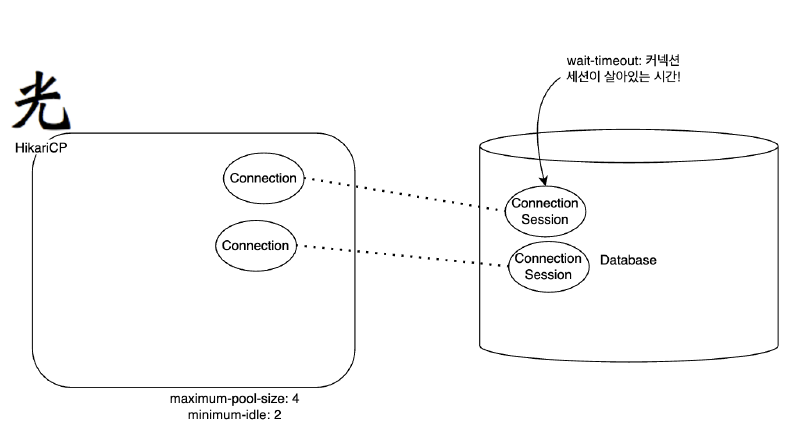
DBにはwait-timeoutという属性があります。この属性は、DBで接続が非アクティブな状況の場合、再び要求が来るまでどのくらいの時間を待ってから接続(セッション)を閉じるかを制御します。もしアプリケーションで異常なコネクション終了やリターンができない問題が発生すると、TCP接続を維持したまま下炎なしで待つコネクションがたまることになる。この問題を防ぐためにwait-timeoutが使用されます。
この時、MySQLのwait-timeoutが60秒に設定されていれば? DBではコネクションを切ってしまう。
そして、それから接続がプールに返されたら?そしてそのコネクションが再び再利用され、DBにリクエストを送ると例外が飛び出す。
したがって、書き込んだコネクションはプールで返すことが重要で、HikariCPのmax-lifetimeはDBのwait-timeoutより(2〜3秒または5秒程度)に短く設定する必要があります。
2. Spring JDBC#
2.1 JdbcTemplateの使い方#
JdbcTemplateの構造と動作原理#
既存のPostRepositoryには深刻な問題があります。まさに例外状況に対する処理だ。
try/catch/finally ブロックが二重に入れ子になって出てくるうえ、すべてのメソッドごとに繰り返される。
このようなコードを効果的に扱う方法はないだろうか?問題の核心は変わらないが、多くの場所で重複するコードとロジックによって、しばしば拡張され、頻繁に変化するコードをよく分離する作業だ。
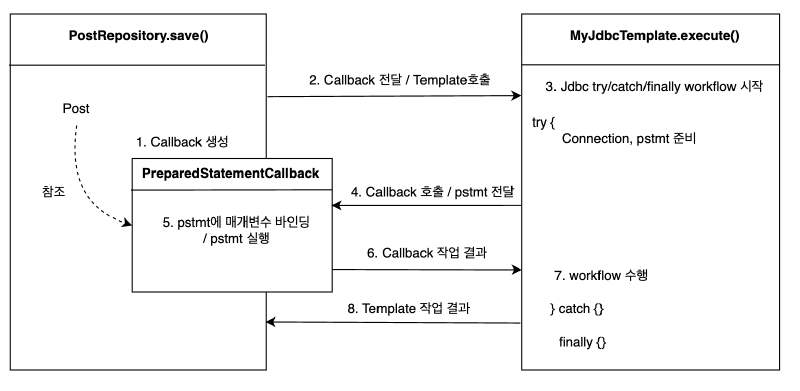
分離と再利用のためのテンプレートコールバックパターンの適用
不変部分:try/catch/finallyブロック
変化する部分: PrepareStatement を実行する部分
MyJdbcTemplate
@Slf4j
public class MyJdbcTemplate {
    private final DataSource dataSource;

    public MyJdbcTemplate(DataSource dataSource) {
        this.dataSource = dataSource;
    }

    public <T> T execute(String sql, MyPreparedStatementCallback<T> callback) throws SQLException {
        Connection con = null;
        PreparedStatement ps = null;
        try {
            con = dataSource.getConnection();
            ps = con.prepareStatement(sql);
            return callback.doInPreparedStatement(ps);
        } catch (SQLException e) {
            log.error("db error", e);
            throw e;
        } finally {
            if (ps != null) {
                try {
                    ps.close();
                } catch (SQLException e) {
                    log.info("prepareStatement close error", e);
                    throw e;
                }
            }
            if (con != null) {
                try {
                    con.close();
                } catch (SQLException e) {
                    log.info("connection close error", e);
                    throw e;
                }
            }
        }
    }
}
PreparedStatementCallback
public interface MyPreparedStatementCallback<T> {
    T doInPreparedStatement(PreparedStatement ps) throws SQLException;
}
PostRepository
@Repository
public class PostRepository {
    private final MyJdbcTemplate myJdbcTemplate;

    public PostRepository(DataSource dataSource) {
        this.myJdbcTemplate = new MyJdbcTemplate(dataSource);
    }

    public void save(Post post) throws SQLException {
        String sql = "insert into post(post_id, title, content, likes) values(?, ?, ?, ?)";
        myJdbcTemplate.execute(sql, ps -> {
            ps.setLong(1, post.getPostId());
            ps.setString(2, post.getTitle());
            ps.setString(3, post.getContent());
            ps.setInt(4, post.getLikes());
            return ps.executeUpdate();
        });
    }

    public Post findById(Long id) throws SQLException {
        String sql = "select * from post where post_id = ?";
        return myJdbcTemplate.execute(sql, ps -> {
            ps.setLong(1, id);
            try (ResultSet rs = ps.executeQuery()) {
                rs.next();
                return Post.of(rs.getLong("post_id"),
                        rs.getString("title"),
                        rs.getString("content"),
                        rs.getInt("likes"));
            }
        });
    }

    public void deleteAll() throws SQLException {
        String sql = "delete from post";
        myJdbcTemplate.execute(sql, ps -> ps.executeUpdate());
    }
}
Springが提供するJdbcTemplate
JdbcTemplateはスプリングが提供する機能で、JDBCをラップしてJDBCを直接使用するときに必要な整形化され、重複した処理に代わるものです。
→Java標準であるJDBCをより簡単に使用できる方法を提供します。
JdbcTemplateはテンプレートコールバックパターンを使用して、JDBCを直接使用するときに発生するほとんどの繰り返し操作を代わりに処理します。
開発者はSQLを作成し、渡すパラメータを定義し、応答値をマッピングするだけです。
私たちが考えることができるほとんどの繰り返し作業:
Connectionを獲得statementの準備と実行- 結果を繰り返すループを実行する
connection,statement,resultSet終了- トランザクションを処理するためのコネクション同期
- 例外発生時にスプリング例外コンバータを実行する
PostRepository
@Repository
public class PostRepository {
    private final JdbcTemplate jdbcTemplate;

    public PostRepository(DataSource dataSource) {
        this.jdbcTemplate = new JdbcTemplate(dataSource);
    }

    public void save(Post post) {
        String sql = "insert into post(post_id, title, content, likes) values(?, ?, ?, ?)";
        jdbcTemplate.update(sql, post.getPostId(), post.getTitle(), post.getContent(), post.getLikes());
    }

    public Post findById(Long id) {
        String sql = "select * from post where post_id = ?";
        return jdbcTemplate.query(sql, ps -> ps.setLong(1, id), rs -> {
            rs.next();
            return Post.of(rs.getLong("post_id"),
                    rs.getString("title"),
                    rs.getString("content"),
                    rs.getInt("likes"));
        });
    }

    public void deleteAll() {
        String sql = "delete from post";
        jdbcTemplate.update(sql);
    }
}検索系の処理#
検索系列処理を次の3つに分けて見てみましょう。
- 1つの列を取得する場合
- レコードをMapオブジェクトに変換して取得する場合
- レコードをEntityオブジェクトに変換して取得する場合
@SpringBootTest
public class JdbcTemplateTest {

    @Autowired
    private PostRepository postRepository;

    @Autowired
    private JdbcTemplate jdbcTemplate;

    @AfterEach
    void clear() {
        postRepository.deleteAll();
    }

    @DisplayName("1レコードの1カラムを取得")
    @Test
    void queryForObject() throws Exception {
        // given
        Post post = Post.create(1L, "タイトル1", "内容1");
        postRepository.save(post);

        /**
         * 2番目の引数には、戻り値として返すオブジェクトのタイプを指定します。
         * 3番目の引数は?記号にバインドする値です。
         */
        String title = jdbcTemplate.queryForObject("select title from post where post_id = ?", String.class, 1l);

        // then
        Assertions.assertThat(title).isEqualTo("タイトル1");
    }

    @DisplayName("1レコードをMapオブジェクトに変換して取得")
    @Test
    void queryForMap() throws Exception {
        // given
        Post post = Post.create(1L, "タイトル1", "内容1");
        postRepository.save(post);

        // when
        Map<String, Object> map = jdbcTemplate.queryForMap("select * from post where post_id = ?", 1l);

        // then
        System.out.println(map);
    }

    @DisplayName("レコードをEntityオブジェクトに変換して取得")
    @Test
    void queryFonEntity() throws Exception {
        // given
        Post post = Post.create(1L, "タイトル1", "内容1");
        postRepository.save(post);

        // when
        Post savedPost = jdbcTemplate.queryForObject("select * from post where post_id = ?"
                , new DataClassRowMapper<>(Post.class), 1l);

        // then
        assertEquals(savedPost, post);
    }
}
BeanPropertyRowMapper vs DataClassRowMapper
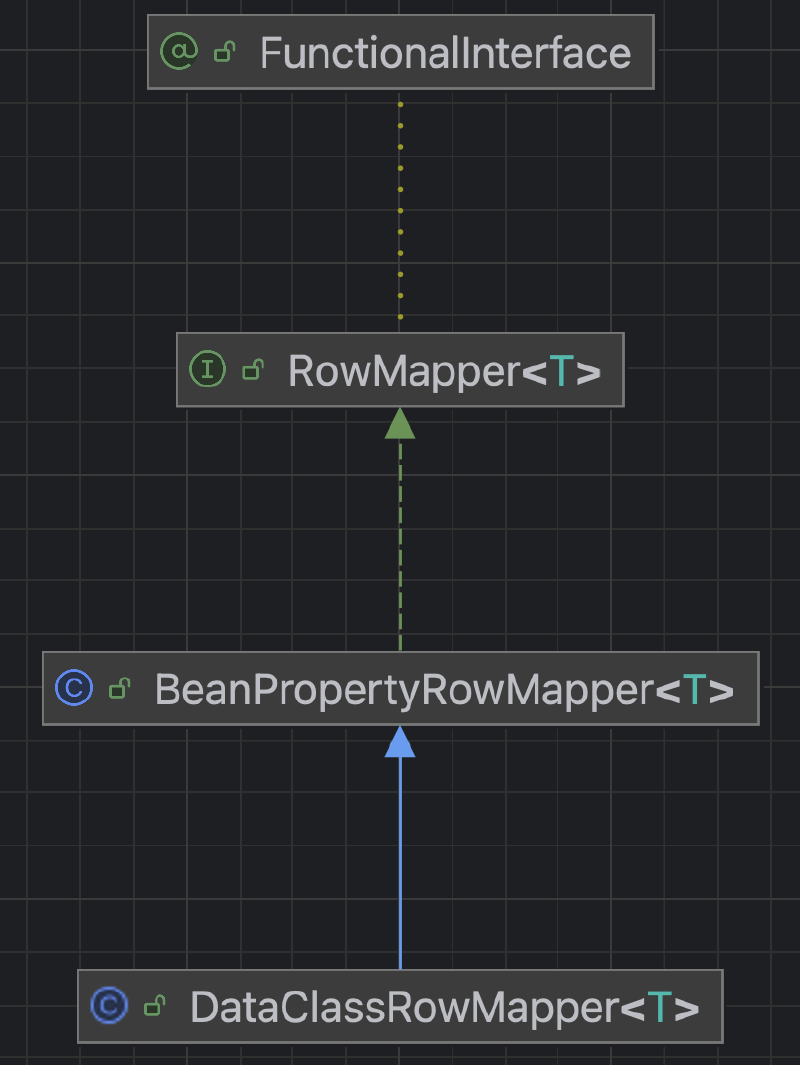
BeanPropertyRowMapperを使用する場合は、セッターとデフォルトコンストラクターが必要です。
DataClassRowMapperはコンストラクタ注入に基づいて動作するため、setterやNoArgsConstructorなしで不変オブジェクトを簡単にマッピングできます。
全体的に、不変オブジェクトを好むか、コードの簡潔さを重視する場合は、DataClassRowMapperが魅力的な選択になる可能性があります。
更新系処理#
次に、更新系(追加、変更、削除)処理について、次の3つに分けて説明する。
- INSERT文を実行する
- UPDATE文を実行する
- DELETE文を実行する
/**
 * INSERT文を実行するときは、updateメソッドを使用してください。 SQL文はINSERTですが、メソッド名はupdateなので注意。
 * その後、UPDATE、DELETEステートメントを実行するときにもupdateメソッドを使用します。
 */
@DisplayName("insertクエリ実行")
@Test
void insert() throws Exception {
    // given
    Post post = Post.create(1L, "タイトル1", "内容1");
    jdbcTemplate.update("insert into post(post_id, title, content, likes) values(?, ?, ?, ?)",
            post.getPostId(), post.getTitle(), post.getContent(), post.getLikes());

    // when
    Post savedPost = jdbcTemplate.queryForObject("select * from post", new DataClassRowMapper<>(Post.class));

    // then
    assertEquals(savedPost, post);
}

@DisplayName("updateクエリ実行")
@Test
void update() throws Exception {
    // given
    Post post = Post.create(1L, "タイトル1", "内容1");
    postRepository.save(post);

    // when
    jdbcTemplate.update("update post set title = ?, content = ? where post_id = ?", "タイトル2", "内容2", 1L);

    // then
    Post updatedPost = jdbcTemplate.queryForObject("select * from post where post_id = ?", new DataClassRowMapper<>(Post.class), 1L);
    assertEquals(updatedPost.getTitle(), "タイトル2");
    assertEquals(updatedPost.getContent(), "内容2");
}

@DisplayName("deleteクエリ実行")
@Test
void delete() throws Exception {
    // given
    Post post = Post.create(1L, "タイトル1", "内容1");
    postRepository.save(post);

    // when
    jdbcTemplate.update("delete from post where post_id = ?", 1L);

    // then
    List<Post> posts = jdbcTemplate.query("select * from post", new DataClassRowMapper<>(Post.class));
    assertEquals(posts.size(), 0);
}
2.2 NamedParameterJdbcTemplateの活用#
NamedParameterJdbcTemplateを使う理由#
NamedParameterJdbcTemplateはSpringが提供するクラスで、SQLクエリで「?」記号を使用したバインディングの代わりに名前付きパラメータを使用できるようにします。このクラスは内部的にJdbcTemplateを活用して、実行時に名前付きパラメータをJDBCスタイルの「?」に置き換えます。
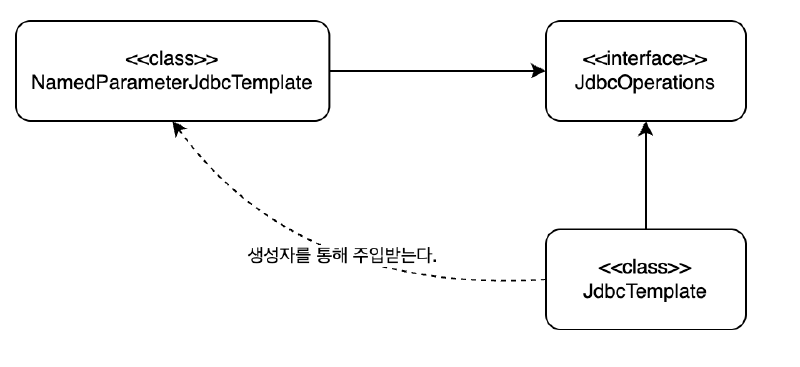
パラメータバインディング方式#
NamedParameterJdbcTemplateを使用するときにパラメータをバインドする方法は、代表的には3つあります。
MapSqlParameterSourceBeanPropertySqlParameterSourceCollections.singletonMap
MapSqlParameterSource
利点
- パラメータを
Mapと同様にkey-value形式に入れます。 - 値に追加のメタデータ(typeなど)を指定できます。
欠点
- すべてのパラメータを手動で設定する必要があるため、パラメータが多くなるとコードが長くなるという欠点が存在します。
MapSqlParameterSource params = new MapSqlParameterSource()
    .addValue("id", 1L)
    .addValue("title", "タイトル");

MapSqlParameterSource params = new MapSqlParameterSource()
    .addValue("id", 1L, Types.BIGINT)
    .addValue("title", "タイトル1", Types.VARCHAR)
    .addValue("created_at", LocalDate.now(), Types.DATE);
BeanPropertySqlParameterSource
利点
- オブジェクトプロパティ名とSQLのパラメータ名が一致すれば、非常に簡潔でメンテナンスに便利です。
- コードを減らし、オブジェクトとデータベース間のマッピングを直感的に処理することができ、生産性が良い。
短所
- プロパティ名が変更されると、SQLクエリまで変更が必要になり、密接に結合されます。
- プロパティとSQLパラメータ名が正確に一致しないと、エラーが発生し、メンテナンスが困難になる可能性があります。
Post post = Post.create(1L, "タイトル", "内容");
BeanPropertySqlParameterSource params = new BeanPropertySqlParameterSource(post);
Map.of() または Collections.singletonMap
利点
- コードを最小限に簡潔に保ちます。
- パラメータが少ないと直感的に見えます。
短所
- タイプの追加のメタ情報を指定することはできません。
- パラメータが多くなると可読性が低下する可能性があります。
Map<String, Object> params = Collections.singletonMap("id", 1L);
Map<String, Object> params = Map.of("id", 1L, "title", "タイトル");実践例#
@SpringBootTest
public class NamedParameterJdbcTemplateTest {

    @Autowired
    private PostRepository postRepository;

    @Autowired
    private NamedParameterJdbcTemplate namedParameterJdbcTemplate;

    @AfterEach
    void clear() {
        postRepository.deleteAll();
    }

    @DisplayName("1レコードの1カラムを取得")
    @Test
    void queryForObject() throws Exception {
        // given
        Post post = Post.create(1L, "タイトル1", "内容1");
        postRepository.save(post);

        // パラメータ設定
        MapSqlParameterSource params = new MapSqlParameterSource("postId", 1L);

        // SQLの実行
        String title = namedParameterJdbcTemplate.queryForObject(
                "SELECT title FROM post WHERE post_id = :postId",
                params,
                String.class
        );

        // then
        Assertions.assertThat(title).isEqualTo("タイトル1");
    }

    @DisplayName("1レコードをMapオブジェクトに変換して取得")
    @Test
    void queryForMap() throws Exception {
        // given
        Post post = Post.create(1L, "タイトル1", "内容1");
        postRepository.save(post);

        // パラメータ設定
        Map<String, Object> params = Collections.singletonMap("postId", 1L);

        // SQLの実行
        Map<String, Object> map = namedParameterJdbcTemplate.queryForMap(
                "SELECT * FROM post WHERE post_id = :postId",
                params
        );

        // then
        System.out.println(map);
    }

    @DisplayName("レコードをEntityオブジェクトに変換して取得")
    @Test
    void queryForEntity() throws Exception {
        // given
        Post post = Post.create(1L, "タイトル1", "内容1");
        postRepository.save(post);

        // パラメータ設定
        Map<String, Object> params = Collections.singletonMap("postId", 1L);

        // SQLの実行
        Post savedPost = namedParameterJdbcTemplate.queryForObject(
                "SELECT * FROM post WHERE post_id = :postId",
                params,
                new DataClassRowMapper<>(Post.class)
        );

        // then
        assertEquals(savedPost, post);
    }

    @DisplayName("複数レコードをEntityオブジェクトに変換して取得")
    @Test
    void queryForEntityList() throws Exception {
        // given
        Post post1 = Post.create(1L, "タイトル1", "内容1");
        Post post2 = Post.create(2L, "タイトル2", "内容2");
        Post post3 = Post.create(3L, "タイトル3", "内容3");
        postRepository.save(post1);
        postRepository.save(post2);
        postRepository.save(post3);

        // SQLの実行
        List<Post> posts = namedParameterJdbcTemplate.query(
                "SELECT * FROM post",
                new DataClassRowMapper<>(Post.class)
        );

        // then
        assertEquals(posts.size(), 3);
        assertEquals(posts, List.of(post1, post2, post3));
    }

    @DisplayName("insertクエリ実行")
    @Test
    void insert() throws Exception {
        // given
        Post post = Post.create(1L, "タイトル1", "内容1");

        // パラメータ設定
        SqlParameterSource params = new BeanPropertySqlParameterSource(post);

        // SQLの実行
        namedParameterJdbcTemplate.update(
                "INSERT INTO post(post_id, title, content, likes) VALUES(:postId, :title, :content, :likes)",
                params
        );

        // when
        Post savedPost = namedParameterJdbcTemplate.queryForObject(
                "SELECT * FROM post WHERE post_id = :postId",
                Collections.singletonMap("postId", post.getPostId()),
                new DataClassRowMapper<>(Post.class)
        );

        // then
        assertEquals(savedPost, post);
    }

    @DisplayName("updateクエリ実行")
    @Test
    void update() throws Exception {
        // given
        Post post = Post.create(1L, "タイトル1", "内容1");
        postRepository.save(post);

        // パラメータ設定
        Map<String, Object> params = new HashMap<>();
        params.put("title", "タイトル2");
        params.put("content", "内容2");
        params.put("postId", 1L);

        // SQLの実行
        namedParameterJdbcTemplate.update(
                "UPDATE post SET title = :title, content = :content WHERE post_id = :postId",
                params
        );

        // then
        Post updatedPost = namedParameterJdbcTemplate.queryForObject(
                "SELECT * FROM post WHERE post_id = :postId",
                Collections.singletonMap("postId", 1L),
                new DataClassRowMapper<>(Post.class)
        );
        assertEquals(updatedPost.getTitle(), "タイトル2");
        assertEquals(updatedPost.getContent(), "内容2");
    }

    @DisplayName("deleteクエリ実行")
    @Test
    void delete() throws Exception {
        // given
        Post post = Post.create(1L, "タイトル1", "内容1");
        postRepository.save(post);

        // パラメータ設定
        Map<String, Object> params = Collections.singletonMap("postId", 1L);

        // SQLの実行
        namedParameterJdbcTemplate.update(
                "DELETE FROM post WHERE post_id = :postId",
                params
        );

        // then
        List<Post> posts = namedParameterJdbcTemplate.query(
                "SELECT * FROM post",
                new DataClassRowMapper<>(Post.class)
        );
        assertEquals(posts.size(), 0);
    }
}
3. トランザクション管理#
3.1 @Transactionalアノテーションの使用#
トランザクションとは?#
もはや分けられない単位作業。
単一のSQL命令を処理する場合は、DBがトランザクションを保証していると信じることができます。
しかし、複数のSQLが使用されるジョブを1つのトランザクションとして扱わなければならない場合もある。これにより、データの不整合状態を防止することができる。
トランザクションの開始時に複数のSQLを実行し、すべてのSQLが成功した場合は最後にコミットします。コミットすると、データベースにデータが保存されます。
トランザクションの開始と終了は、デフォルトでConnectionオブジェクトを介して行われます。
(JPA / HibernateはConnectionを直接使用せずにEntityManager / Sessionを使用し、独自のトランザクション管理APIを使用します。)
JDBCでトランザクションを開始するには、自動コミットオプションをfalseにするだけです。 JDBCのデフォルト設定は、DB操作を実行した直後に自動的にコミットされるようになっています。
トランザクションが一度開始されると、commit()またはrollback()メソッドが呼び出されるまでの操作は1つのトランザクションにまとめられます。
トランザクション操作中に例外が発生した場合は、トランザクションをロールバックします。
データベースにpost_likeスキーマを作成
drop table post_like if exists cascade;

CREATE TABLE post_like (
    post_id BIGINT,
    user_id BIGINT,
    liked_at TIMESTAMP DEFAULT CURRENT_TIMESTAMP,
    PRIMARY KEY (post_id, user_id)
);
Post
@Getter
@EqualsAndHashCode
public class Post {
    private final Long postId;
    private final String title;
    private final String content;
    private int likes;

    private Post(Long postId, String title, String content, int likes) {
        this.postId = postId;
        this.title = title;
        this.content = content;
        this.likes = likes;
    }

    public static Post create(Long postId, String title, String content) {
        return new Post(postId, title, content, 0);
    }

    public static Post of(Long postId, String title, String content, int likes) {
        return new Post(postId, title, content, likes);
    }

		// 追加
    public void increaseLikes() {
        this.likes++;
    }
}
PostLike
@Getter
@EqualsAndHashCode
@AllArgsConstructor
public class PostLike {
    private Long postId;
    private Long userId;
    private LocalDateTime likedAt;
}
PostLikeRepository
@Repository
public class PostLikeRepository {
    private final JdbcTemplate jdbcTemplate;

    public PostLikeRepository(JdbcTemplate jdbcTemplate) {
        this.jdbcTemplate = jdbcTemplate;
    }

    public void save(PostLike postLike) {
        String sql = "insert into post_like(post_id, user_id, liked_at) values (?, ?, ?)";
        jdbcTemplate.update(sql, postLike.getPostId(), postLike.getUserId(), Timestamp.valueOf(postLike.getLikedAt()));
    }

    public boolean existsByPostIdAndUserId(Long postId, Long userId) {
        String sql = "select count(*) from post_like where post_id = ? and user_id = ?";
        Integer count = jdbcTemplate.queryForObject(sql, Integer.class, postId, userId);
        return count != null && count > 0;
    }

    public void deleteAll() {
        jdbcTemplate.update("delete from post_like");
    }
}
PostRepository
@Repository
public class PostRepository {
    private final JdbcTemplate jdbcTemplate;

    public PostRepository(DataSource dataSource) {
        this.jdbcTemplate = new JdbcTemplate(dataSource);
    }

    public void save(Post post) {
        String sql = "insert into post(post_id, title, content, likes) values(?, ?, ?, ?)";
        jdbcTemplate.update(sql, post.getPostId(), post.getTitle(), post.getContent(), post.getLikes());
    }

    public void incrementLikes(Long postId) {
        String sql = "update post set likes = likes + 1 where post_id = ?";
        jdbcTemplate.update(sql, postId);
    }

    public Post findById(Long id) {
        String sql = "select * from post where post_id = ?";
        return jdbcTemplate.queryForObject(sql, new DataClassRowMapper<>(Post.class), id);
    }

    public void deleteAll() {
        String sql = "delete from post";
        jdbcTemplate.update(sql);
    }
}
PostLikeService
@Service
@RequiredArgsConstructor
public class PostLikeService {

    private final PostRepository postRepository;
    private final PostLikeRepository postLikeRepository;
    private final DataSource dataSource;

    public void likePost(Long postId, Long userId) throws SQLException {
        Connection connection = dataSource.getConnection();
        connection.setAutoCommit(false);

        try {
            // まず良い数を増やして
            postRepository.incrementLikes(postId);

            // その後、重複チェックで例外が発生すると、
            // 例外後のロールバックによってlikesの数が戻ったかどうかを検証できます。
            if (postLikeRepository.existsByPostIdAndUserId(postId, userId)) {
                throw new IllegalStateException("すでにいいねを押した投稿です。");
            }

            postLikeRepository.save(new PostLike(postId, userId, LocalDateTime.now()));
            connection.commit();
        } catch (Exception e) {
            connection.rollback();
            throw e;
        } finally {
            connection.setAutoCommit(true);
            connection.close();
        }
    }
}
PostLikeServiceTest
import static org.junit.jupiter.api.Assertions.*;

@SpringBootTest
class PostLikeServiceTest {

    @Autowired
    PostRepository postRepository;

    @Autowired
    PostLikeRepository postLikeRepository;

    @Autowired
    PostLikeService postLikeService;

    @BeforeEach
    void init() throws SQLException {
        postRepository.save(Post.create(1L, "トランザクションテスト", "いいね機能テスト"));
    }

    @AfterEach
    void clear() {
        postLikeRepository.deleteAll();
        postRepository.deleteAll();
    }

    @DisplayName("投稿いいねテスト")
    @Test
    void postLikeSave() throws SQLException {
        // given
        Long postId = 1L;
        Long userId = 100L;

        // when
        postLikeService.likePost(postId, userId);

        // then
        Post post = postRepository.findById(postId);
        assertEquals(1, post.getLikes());
        assertTrue(postLikeRepository.existsByPostIdAndUserId(postId, userId));
    }

    @DisplayName("投稿に重複していいねできない")
    @Test
    void duplicatePostLikeSave() throws SQLException {
        // given
        Long postId = 1L;
        Long userId = 100L;

        postLikeService.likePost(postId, userId); // 1回目のいいね成功

        // when, then
        assertThrows(IllegalStateException.class, () -> {
            postLikeService.likePost(postId, userId); // 重複いいねを試行
        });

        // ロールバックを確認する:いいね!
        Post post = postRepository.findById(postId);
        assertEquals(1, post.getLikes());
    }
}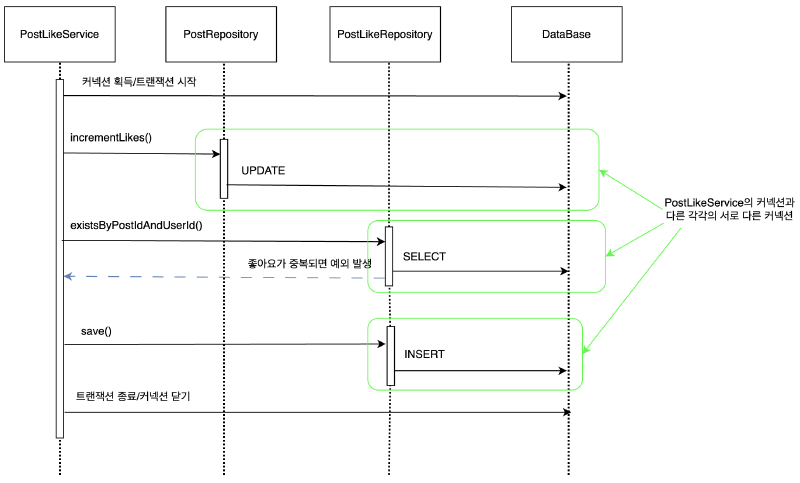
上記のコードを実行すると、2番目のテストは失敗します。
その理由は、PostLikeServiceで使用されているConnectionがPostRepository、PostLikeRepositoryで使用されているConnectionとは異なる接続であるためです。
テストを成功させるには、PostLikeServiceと各Repositoryで同じConnectionを使用する必要があります。
トランザクションを維持するには、トランザクションの開始から終了まで同じデータベース接続を維持する必要があります。
結局、同じ接続を同期させるために、最も簡単にはパラメータで接続を渡すことができます。
しかし、パラメータでコネクションを渡す方法はコードが汚れてしまうことはもちろん、コネクションをめくるメソッドとめくりないメソッドを重複して作らなければならないなど様々な欠点が多い。また、DBコネクションを含むリソースのきちんとした処理を可能にしたJdbcTemplateもこれ以上活用できない。
この問題を解決するためにSpringが提案する方法は、独立したトランザクション同期方式です。
Springが提供するトランザクション#
トランザクション同期とは
PostLikeServiceでトランザクションを開始するために作成したConnectionオブジェクトを特別なリポジトリ(ThreadLocal)に保存し、
後で呼び出されるRepositoryのメソッドでは(正確にはJdbcTemplate)、保存されたConnectionを取得して使用させます。
Springでは、これにPlatformTransactionManagerを使用したトランザクション抽象化機能を提供します。
トランザクション同期化されたまま JdbcTemplate を使用すると、JdbcTemplate のジョブで同期させた DB コネクションを使用することになる。
PostLikeService
@Service
@RequiredArgsConstructor
public class PostLikeService {

    private final PostRepository postRepository;
    private final PostLikeRepository postLikeRepository;
    private final PlatformTransactionManager transactionManager;

    public void likePost(Long postId, Long userId) throws SQLException {
        TransactionStatus status = transactionManager.getTransaction(new DefaultTransactionDefinition());

        try {
            // まず良い数を増やして
            postRepository.incrementLikes(postId);

            // その後、重複チェックで例外が発生すると、
            // 例外後のロールバックによってlikesの数が戻ったかどうかを検証できます。
            if (postLikeRepository.existsByPostIdAndUserId(postId, userId)) {
                throw new IllegalStateException("すでにいいねを押した投稿です。");
            }

            postLikeRepository.save(new PostLike(postId, userId, LocalDateTime.now()));
            transactionManager.commit(status);
        } catch (Exception e) {
            transactionManager.rollback(status);
            throw e;
        }
    }
}
トランザクションを使用するロジックを見ると、次のパターンが繰り返されることがわかります。
他のサービスでトランザクションを開始するには、try、catch、finallyを含む成功時にコミット、失敗時にロールバックコードが繰り返されます。
Springは、繰り返し問題を解決するためにテンプレートコールバックパターンを適用したTransactionTemplateを提供します。
PostLikeService
@Service
public class PostLikeService {

    private final PostRepository postRepository;
    private final PostLikeRepository postLikeRepository;
    private final TransactionTemplate transactionTemplate;

    public PostLikeService(PostRepository postRepository, PostLikeRepository postLikeRepository, PlatformTransactionManager txManager) {
        this.postRepository = postRepository;
        this.postLikeRepository = postLikeRepository;
        this.transactionTemplate = new TransactionTemplate(txManager);
    }

    public void likePost(Long postId, Long userId) {
        transactionTemplate.executeWithoutResult(status -> {
            postRepository.incrementLikes(postId);

            if (postLikeRepository.existsByPostIdAndUserId(postId, userId)) {
                throw new IllegalStateException("すでにいいねを押した投稿です。");
            }

            postLikeRepository.save(new PostLike(postId, userId, LocalDateTime.now()));
        });
    }
}
サービスロジックは、可能な限り重要なビジネスロジックのみでなければなりません。しかし、トランザクション技術を使用するには、やむを得ずトランザクションコードを出さなければなりません。どうすればこの問題を解決できますか?
@Transactionalを使用すると、SpringはAOPを適用してこの問題を解決します。
PostLikeService
@Service
public class PostLikeService {

    private final PostRepository postRepository;
    private final PostLikeRepository postLikeRepository;

    public PostLikeService(PostRepository postRepository, PostLikeRepository postLikeRepository) {
        this.postRepository = postRepository;
        this.postLikeRepository = postLikeRepository;
    }

    @Transactional
    public void likePost(Long postId, Long userId) {
        postRepository.incrementLikes(postId);

        if (postLikeRepository.existsByPostIdAndUserId(postId, userId)) {
            throw new IllegalStateException("すでにいいねを押した投稿です。");
        }

        postLikeRepository.save(new PostLike(postId, userId, LocalDateTime.now()));
    }
}
@Transactionalを有効にする設定
@Transactionalが付いたクラスを検出してProxyオブジェクトを自動的に生成するには、@EnableTransactionManagementを有効にする必要があります。
もしこの設定を忘れてしまえば、メソッドやクラスに @Transactional を付けてもProxyが生成されず、トランザクション制御にならないので注意しなければならない。
ただし、Spring Bootを使用すると、自動構成(Auto-Configuration)メカニズムによってトランザクション管理が有効になります。
Spring Bootは@SpringBootApplicationに含まれている@EnableAutoConfigurationを介して複数のAuto-Configurationクラスを読み込み、そのうちの1つであるTransactionAutoConfigurationクラスでトランザクション管理を自動的に設定します。
したがって、@EnableTransactionManagementを直接指定する必要はありません。
3.2 宣言型トランザクション対プログラミング型トランザクション#
宣言的トランザクションとプログラム的トランザクション#
宣言的トランザクションとは
Springフレームワークの宣言的トランザクション管理はSpring AOPを通じて可能です。
過去にはxmlを利用して作成したりもした。
動作方式
Springはプロキシオブジェクトを作成し、@Transactionalの付いたメソッドが呼び出されるとトランザクションを開始し、メソッドが終了するとトランザクションをコミットまたはロールバックします。
例外の発生、メソッドの終了時点などに基づいてトランザクションを自動管理します。
@Service
public class PostLikeService {

    private final PostRepository postRepository;
    private final PostLikeRepository postLikeRepository;

    public PostLikeService(PostRepository postRepository, PostLikeRepository postLikeRepository) {
        this.postRepository = postRepository;
        this.postLikeRepository = postLikeRepository;
    }

    @Transactional
    public void likePost(Long postId, Long userId) {
        postRepository.incrementLikes(postId);

        if (postLikeRepository.existsByPostIdAndUserId(postId, userId)) {
            throw new IllegalStateException("すでにいいねを押した投稿です。");
        }

        postLikeRepository.save(new PostLike(postId, userId, LocalDateTime.now()));
    }
}
利点
- 簡潔さ:トランザクション制御コードを直接書く必要なしに、注釈を付けるだけです。
- 興味の分離:ビジネスロジックとトランザクションロジックが分離されました。コードの読みやすさと保守性の向上。
- 一貫性:フレームワークは一貫した方法でトランザクションを処理するため、ミスによる欠落や重複が少なくなります。
短所
- きめ細かい制御が難しい:基本的な動作に加えて、特別なトランザクション境界(部分コミット、非常に複雑なフロー)を制御するのは難しいです。
- プロキシ制限:内部メソッド呼び出しには
@Transactionalが適用されないなど、AOPプロキシ制限があります。 - 技術的理解の必要性:動的プロキシ、AOP、例外ロールバック規則などの理解が不足すると、予期しない動作が発生する可能性があります。
プログラミング的トランザクションとは
コードレベルで明示的にトランザクションを開始、コミット、ロールバックする方法
トランザクション関連コードを直接書くことで、Spring Frameworkはプログラム的なトランザクション管理のための2つの手段を提供します。
TransactionTemplateorTransactionalOperatorTransactionManagerを使用
Springチームは通常、プログラムによるトランザクション管理のためにTransactionTemplateを、リアクティブコードにはTransactionalOperatorをお勧めします。
TransactionTemplateの例
@Service
public class PostLikeService {

    private final PostRepository postRepository;
    private final PostLikeRepository postLikeRepository;
    private final TransactionTemplate transactionTemplate;

    public PostLikeService(PostRepository postRepository, PostLikeRepository postLikeRepository, PlatformTransactionManager txManager) {
        this.postRepository = postRepository;
        this.postLikeRepository = postLikeRepository;
        this.transactionTemplate = new TransactionTemplate(txManager);
    }

    public void likePost(Long postId, Long userId) {
        transactionTemplate.executeWithoutResult(status -> {
            postRepository.incrementLikes(postId);

            if (postLikeRepository.existsByPostIdAndUserId(postId, userId)) {
                throw new IllegalStateException("すでにいいねを押した投稿です。");
            }

            postLikeRepository.save(new PostLike(postId, userId, LocalDateTime.now()));
        });
    }
}transactionTemplate.execute()ブロック内のコードをトランザクション範囲に設定し、終了時にコミットまたはロールバックを実行します。
TransactionManager の例
@Service
@RequiredArgsConstructor
public class PostLikeService {

    private final PostRepository postRepository;
    private final PostLikeRepository postLikeRepository;
    private final PlatformTransactionManager transactionManager;

    public void likePost(Long postId, Long userId) throws SQLException {
        TransactionStatus status = transactionManager.getTransaction(new DefaultTransactionDefinition());

        try {
            // まず良い数を増やして
            postRepository.incrementLikes(postId);

            // その後、重複チェックで例外が発生すると、
            // 例外後のロールバックによってlikesの数が戻ったかどうかを検証できます。
            if (postLikeRepository.existsByPostIdAndUserId(postId, userId)) {
                throw new IllegalStateException("すでにいいねを押した投稿です。");
            }

            postLikeRepository.save(new PostLike(postId, userId, LocalDateTime.now()));
            transactionManager.commit(status);
        } catch (Exception e) {
            transactionManager.rollback(status);
            throw e;
        }
    }
}
利点
- 細かい制御:トランザクションの途中でコミット、ロールバックを決定したり、特定の条件に基づいてトランザクション範囲を動的に調整したりできます。
- 明示的なフロー:ロジックでトランザクション境界がどこにあるかを直感的に知ることができ、デバッグが簡単になります。
短所
- コードの重複:トランザクションの開始、コミット、ロールバックなどのコードを複数の場所で繰り返すことができます。
- ビジネスロジックとの結合:トランザクションロジックがビジネスコードと混在し、可読性が低下する可能性があります。
- 追加の学習曲線:
PlatformTransactionManager、TransactionDefinition、TransactionStatusなど、Spring Transaction APIの学習が必要です。
宣言的トランザクションとプログラミング的トランザクション
プログラミングトランザクション管理は通常、トランザクションジョブ数が少ない場合にのみ使用することをお勧めします。
たとえば、特定の更新タスクに対してのみトランザクションを必要とするWebアプリケーションがある場合、Spring AOPや他の技術を使用してプロキシを設定したくない場合があります。
この場合、TransactionTemplateを使用するのが良い方法かもしれません。
一方、アプリケーションに多数のトランザクション操作がある場合、宣言的トランザクション管理は一般的に価値があります。トランザクション管理をビジネスロジックから分離して構成できます。
Springフレームワークを使用すると、宣言的トランザクション管理の構成コストが大幅に削減されます。
- 一般的なWeb/サービス開発
ほとんどの場合、単に@Transactionalを使用する宣言的トランザクションがより効率的です。
コードがきれいでメンテナンスしやすく、スプリングが一貫して管理してくれるから。
- 特殊なトランザクションフロー
たとえば、あるメソッドで複数回部分コミットしたり、特定の条件でのみロールバックする必要があるなどの複雑なシナリオでは、プログラミングトランザクションが柔軟になる可能性があります。
- 混合を使用
ほとんどの場合、宣言的トランザクションを使用しますが、非常にきめ細かなトランザクション境界を必要とするいくつかのセクションでプログラミングトランザクションを使用する方法も可能です。
きめ細かいトランザクション制御の例#
PostLikeProgrammaticService
@Slf4j
@Service
@RequiredArgsConstructor
public class PostLikeProgrammaticService {

    private final PostRepository postRepository;
    private final PostLikeRepository postLikeRepository;
    private final PlatformTransactionManager transactionManager;

    /**
     * 複数の投稿で「いいね」をクリックするメソッド
     * @param partialAllowed trueの場合、一部の投稿が失敗したときにロールバックせずに残りの成功を許可する
     */
    public void likeMultiplePosts(List<Long> postIds, Long userId, boolean partialAllowed) {
        TransactionTemplate txTemplate = new TransactionTemplate(transactionManager);

        if (!partialAllowed) {
            txTemplate.executeWithoutResult(status -> {
                for (Long postId : postIds) {
                    // いいねロジックで例外が発生した場合はトランザクション全体をロールバック
                    likeSinglePostOrThrow(postId, userId);
                }
            });
            return;
        }

        // partialAllowed == trueの場合 - >部分的な成功を許可する
        // 「各投稿ごとに別々のトランザクション」として処理(ネストされたトランザクションまたは繰り返しトランザクション)
        for (Long postId : postIds) {
            try {
                txTemplate.executeWithoutResult(status -> {
                    likeSinglePostOrThrow(postId, userId);
                });
            } catch (Exception e) {
                // 特定の投稿が失敗してもログだけ残して次へ進む
                log.info("投稿{}のいいね失敗: {}", postId, e.getMessage());
            }
        }
    }

    /**
     * 単一の投稿にいいねを行い、重複いいねの場合は例外を発生させる
     * (重複いいねの試行などで例外が発生してもそのままthrowしてロールバックを誘導)
     */
    private void likeSinglePostOrThrow(Long postId, Long userId) {
        if (postLikeRepository.existsByPostIdAndUserId(postId, userId)) {
            throw new IllegalStateException("すでにいいねを押した投稿です。 (postId=" + postId + ")");
        }
        postRepository.incrementLikes(postId);
        postLikeRepository.save(new PostLike(postId, userId, LocalDateTime.now()));
    }
}
PostLikeProgrammaticServiceTest
@SpringBootTest
class PostLikeProgrammaticServiceTest {

    @Autowired
    PostLikeProgrammaticService postLikeProgrammaticService;

    @Autowired
    PostRepository postRepository;

    @Autowired
    PostLikeRepository postLikeRepository;

    @BeforeEach
    void init() throws SQLException {
        // 3つの投稿を事前に作成
        postRepository.save(Post.create(1L, "Title1", "Content1"));
        postRepository.save(Post.create(2L, "Title2", "Content2"));
        postRepository.save(Post.create(3L, "Title3", "Content3"));
    }

    @AfterEach
    void clear() {
        postLikeRepository.deleteAll();
        postRepository.deleteAll();
    }

    @DisplayName("All-or-Nothingモードで1つでも失敗したら全体をロールバック")
    @Test
    void likeMultiplePostsAllOrNothingFail() throws SQLException {
        // given
        List<Long> postIds = Arrays.asList(1L, 2L, 3L);
        Long userId = 100L;

        // 2番の投稿にいいねを入れて重複状況を作る
        postLikeRepository.save(new PostLike(2L, userId, LocalDateTime.now()));

        // when - then
        // 2番の投稿で例外 -> 全体をロールバック
        assertThrows(IllegalStateException.class, () ->
                postLikeProgrammaticService.likeMultiplePosts(postIds, userId, false) // partialAllowed = false
        );

        // then: 1, 3回 投稿 いいねも失敗しなければならない -> likes=0, post_like テーブルも変化なし
        assertEquals(0, postRepository.findById(1L).getLikes());
        assertEquals(0, postRepository.findById(2L).getLikes()); // 既存のlikesだけ反映(ここでは0)
        assertEquals(0, postRepository.findById(3L).getLikes());

        // 2番の投稿にはすでにいいねがある
        assertTrue(postLikeRepository.existsByPostIdAndUserId(2L, userId));

        // 残りの投稿いいね!
        assertFalse(postLikeRepository.existsByPostIdAndUserId(1L, userId));
        assertFalse(postLikeRepository.existsByPostIdAndUserId(3L, userId));
    }

    @Test
    @DisplayName("PartialAllowed=true -> 失敗した投稿だけロールバックし、残りは成功")
    void likeMultiplePostsPartialSuccess() throws SQLException {
        // given
        List<Long> postIds = Arrays.asList(1L, 2L, 3L);
        Long userId = 100L;

        // すでに1番の投稿にいいねがある -> 1番の投稿で例外が予想される
        postLikeRepository.save(new PostLike(1L, userId, LocalDateTime.now()));

        // when
        postLikeProgrammaticService.likeMultiplePosts(postIds, userId, true); // partialAllowed = true

        // then
        // 1) 1番の投稿 -> 失敗(重複)、ロールバック済み(likes変更なし)
        assertEquals(0, postRepository.findById(1L).getLikes());

        // 2) 2番, 3番 投稿 -> 成功 (likes=1)
        assertEquals(1, postRepository.findById(2L).getLikes());
        assertEquals(1, postRepository.findById(3L).getLikes());

        // post_like -> 1番は既存の1レコードのみ、2番と3番追加
        assertTrue(postLikeRepository.existsByPostIdAndUserId(1L, userId));
        assertTrue(postLikeRepository.existsByPostIdAndUserId(2L, userId));
        assertTrue(postLikeRepository.existsByPostIdAndUserId(3L, userId));
    }
}
All-or-Nothing vs PartialSuccess
1つのメソッドはすべての投稿のいいねを処理しますが、失敗した場合はすべてロールバックするか失敗した投稿のみをロールバックするかを動的に制御します。
部分的な成功を許可する場合、投稿ごとに新しいトランザクションを開いていいねを試すことで、個別のロールバックが可能になります。
内部で重複例外( IllegalStateException )が発生したらトランザクションをロールバックし、その例外を受け取って必要に応じてログだけ残して処理を続けることができます。
もし、宣言的トランザクション( @Transactional )で単一のメソッドにまとめるだけで「All-or-Nothing」になってしまい、部分成功などのトランザクション範囲を柔軟に調整することが難しい。
3.3 トランザクションの内部構造#
トランザクションマネージャとトランザクション同期マネージャ#
PlatformTransactionManager(トランザクションマネージャ)
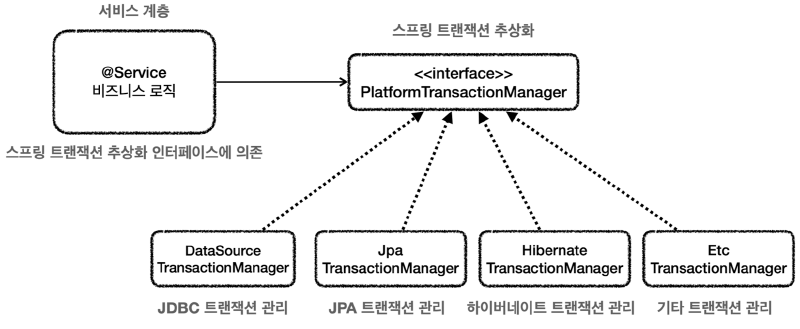
出典:キム・ヨンハンの春DB1
実装技術によるトランザクションの使用法
トランザクションは、実装技術ごとに使用する方法が異なる。
JDBC:
connection.setAutoCommit(false), connection.commit(), connection.rollback()
JPA:
tx = entityManager.getTransaction()
tx.begin(), tx.commit(), tx.rollback()
Hibernate:
tx = session.beginTransaction()
tx.commit(), tx.rollback()
データベースアクセス技術をJDBCからJPAに変更する場合は、サービス層のトランザクション開始コードを変更する必要があります。
これらの問題を解決するために、PlatformTransactionManagerを使用したトランザクション抽象化技術をSpringが提供し、主に使用するデータアクセス技術のトランザクションマネージャの実装も提供します。
さらに、Spring Bootはどのデータアクセス技術を使用しているかを自動的に認識し、適切なトランザクションマネージャを選択してSpring Beanに登録するため、トランザクションマネージャを選択して登録するプロセスも省略できます。
たとえば、JdbcTemplate、MyBatisを使用するとDataSourceTransactionManager(JdbcTransactionManager)をスプリングビンとして登録し、JPAを使用するとJpaTransactionManagerをスプリングビンとして登録します。
TransactionSynchronizationManager(トランザクション同期マネージャ)とDataSourceUtils
Springは、マルチスレッド環境でも安全なトランザクション同期方法を実装するためにTransactionSynchronizationManagerを提供します。これはスレッドローカル(ThreadLocal)を使用して接続を同期します。
**「トランザクションマネージャ」**は内部でこの「**トランザクション同期マネージャ」**を使用します。
トランザクション同期マネージャはスレッドローカルを使用するため、マルチスレッドの状況に安全に接続を同期できます。
接続が必要な場合は、DataSourceUtilsが提供するgetConnection()メソッドを介してDB接続を取得できます。
DataSourceからコネクションを直接取得せず、Springが提供するユーティリティメソッドを使う理由は、このDataSourceUtilsのgetConnection()メソッドがConnectionオブジェクトをDataSourceから取得するだけでなく、トランザクション同期に使うための保存先(ThreadLocal)へバインドしてくれるためです。
トランザクション例の内部構造#
TransactionTemplateを使用した場合の内部構造
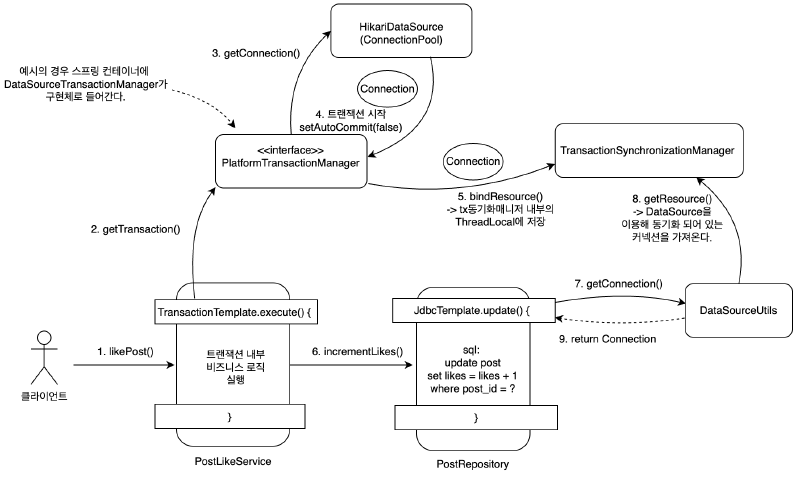
JdbcTemplateは内部的にDataSourceUtilsを使用します。
@Transactionalを使用した場合の内部構造
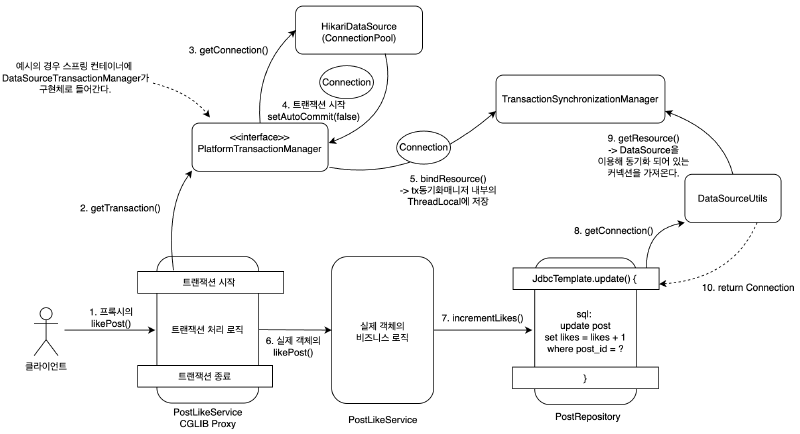
トランザクションの適用範囲(メソッド、クラス単位)#
スプリングでは、優先順位は常により具体的で詳細なものが高い優先順位を持っています。
たとえば、メソッドとクラスにアノテーションを付けることができる場合、より具体的なメソッドはより高い優先順位を持ちます。
インタフェースとそのインタフェースを実装したクラスにアノテーションを付けることができれば、より具体的なクラスがより高い優先順位を持つ。
// test lombok
testCompileOnly('org.projectlombok:lombok')
testAnnotationProcessor('org.projectlombok:lombok')
@SpringBootTest
public class TxLevelTest {
@Autowired
LevelService service;
@Test
void orderTest() {
service.write();
service.read();
}
@TestConfiguration
static class TxApplyLevelConfig {
@Bean
LevelService levelService() {
return new LevelService();
}
}
@Slf4j
@Transactional(readOnly = true)
static class LevelService {
@Transactional(readOnly = false)
public void write() {
log.info("call write");
printTxInfo();
}
public void read() {
log.info("call read");
printTxInfo();
}
private void printTxInfo() {
boolean txActive = TransactionSynchronizationManager.isActualTransactionActive();
log.info("tx active={}", txActive);
boolean readOnly = TransactionSynchronizationManager.isCurrentTransactionReadOnly();
log.info("tx readOnly={}", readOnly);
}
}
}クラスレベル:@Transactional(readOnly = true)
基本的に、このクラス内のすべてのメソッドが「読み取り専用」トランザクションで動作するようになる。
メソッドレベル:@Transactional(readOnly = false)
クラスレベルで読み取り専用を設定しても、メソッドレベルで別の設定(ここではreadOnly = false)を宣言すると、このメソッドが優先されます。
その結果、write()メソッドは読み取り専用ではなくトランザクションとして動作します。
トランザクションAOPの注意事項1#
PostLikeService
@Service
public class PostLikeService {

    private final PostRepository postRepository;
    private final PostLikeRepository postLikeRepository;

    public PostLikeService(PostRepository postRepository, PostLikeRepository postLikeRepository) {
        this.postRepository = postRepository;
        this.postLikeRepository = postLikeRepository;
    }

    @Transactional
    public void likePost(Long postId, Long userId) {
        // postRepository.incrementLikes(postId);
        Post post = postRepository.findById(postId);
        post.increaseLikes();
        postRepository.update(post);

        if (postLikeRepository.existsByPostIdAndUserId(postId, userId)) {
            throw new IllegalStateException("すでにいいねを押した投稿です。");
        }

        postLikeRepository.save(new PostLike(postId, userId, LocalDateTime.now()));
    }
}
PostRepository
@Repository
public class PostRepository {
    private final JdbcTemplate jdbcTemplate;

    public PostRepository(DataSource dataSource) {
        this.jdbcTemplate = new JdbcTemplate(dataSource);
    }

    public void save(Post post) {
        String sql = "insert into post(post_id, title, content, likes) values(?, ?, ?, ?)";
        jdbcTemplate.update(sql, post.getPostId(), post.getTitle(), post.getContent(), post.getLikes());
    }

    public void incrementLikes(Long postId) {
        String sql = "update post set likes = likes + 1 where post_id = ?";
        jdbcTemplate.update(sql, postId);
    }

		// 追加
    public void update(Post post) {
        String sql = "update post set title = ?, content = ?, likes = ? where post_id = ?";
        jdbcTemplate.update(sql, post.getTitle(), post.getContent(), post.getLikes(), post.getPostId());
    }

    public Post findById(Long id) {
        String sql = "select * from post where post_id = ?";
        return jdbcTemplate.queryForObject(sql, new DataClassRowMapper<>(Post.class), id);
    }

    public void deleteAll() {
        String sql = "delete from post";
        jdbcTemplate.update(sql);
    }
}
PostLikeSyncTest
@SpringBootTest
public class PostLikeSyncTest {

    @Autowired
    private PostRepository postRepository;

    @Autowired
    private PostLikeService postLikeService;

    @Autowired
    private PostLikeRepository postLikeRepository;

    @BeforeEach
    void init() {
        postRepository.deleteAll();
        postLikeRepository.deleteAll();
        // 初期投稿の生成
        postRepository.save(Post.create(10L, "title", "content"));
    }

    @AfterEach
    void clear() {
        postRepository.deleteAll();
        postLikeRepository.deleteAll();
    }

    @DisplayName("投稿いいね同時実行テスト")
    @Test
    void unLikeSync() throws Exception {
        // given
        int threadCount = 400;

        ExecutorService executorService = Executors.newFixedThreadPool(threadCount);
        CountDownLatch latch = new CountDownLatch(threadCount);

        // when
        for (int i = 0; i < threadCount; i++) {
            Long userId = (long) i;
            executorService.submit(() -> {
                try {
                    postLikeService.likePost(10L, userId);
                } finally {
                    latch.countDown();
                }
            });
        }

        latch.await();
        executorService.shutdown();

        // then
        Post post = postRepository.findById(10L);
        assertThat(post.getLikes()).isEqualTo(400);
    }
}
上記のコードは、likes列で競合条件が発生する並行性の例であり、テストは失敗します。
その理由は、同時に複数のスレッドが同じ投稿に対して「いいね」を押す過程で、DBから読み込んだ「likes」をそれぞれメモリに上げて1ずつ増えた後、再度更新するからだ。
すなわち、次のような典型的なレースコンディション問題が発生する。
- スレッドAとスレッドBはそれぞれほぼ同時に
postRepository.findById(10L)を介して投稿を読み込みます。
たとえば、両方のスレッドが likes = 0 の状態の Post オブジェクトを取得するとします。
- 各スレッドは、取得したPostオブジェクトの
likesを1増やした後(post.increaseLikes())、postRepository.update(post)を呼び出します。
AスレッドはDBにlikes = 1に更新
BスレッドはDBにlikes = 1に更新
- その結果、BがAの後にDB更新を実行すると、最終結果は1だけになり、2回分(スレッド数分)の増加が失われます。
コメントに変更した既存のincrementLikes()メソッドは、DBレベルで「likes」列を直接アトミックに増加させるクエリを使用しました。
したがって、「読み込み→メモリから+1→DBに書き換える」過程で発生するレース条件を避けることができた。
しかし、別の方法でsynchronizedキーワードを使用する方法を考えることができます。
同じJVM内で同時に入ってくる複数のスレッドはこのメソッドへ同時に進入できないため(一つのスレッドが終了するまで別のスレッドは待機する)、レースコンディションを避けることができる。
PostLikeService
@Service
public class PostLikeServiceProxy {

    private final PostRepository postRepository;
    private final PostLikeRepository postLikeRepository;

    public PostLikeServiceProxy(PostRepository postRepository, PostLikeRepository postLikeRepository) {
        this.postRepository = postRepository;
        this.postLikeRepository = postLikeRepository;
    }

    public void likePost(Long postId, Long userId) {
		    // トランザクションの開始
		    // 複数のスレッドが待機
		    // PostLikeService.likePost() 呼び出し
        // トランザクション終了
    }
}
@Service
public class PostLikeService {
private final PostRepository postRepository;
private final PostLikeRepository postLikeRepository;
public PostLikeService(PostRepository postRepository, PostLikeRepository postLikeRepository) {
this.postRepository = postRepository;
this.postLikeRepository = postLikeRepository;
}
@Transactional
public synchronized void likePost(Long postId, Long userId) {
// 事業開始
// postRepository.incrementLikes(postId);
Post post = postRepository.findById(postId);
post.increaseLikes();
postRepository.update(post);
if (postLikeRepository.existsByPostIdAndUserId(postId, userId)) {
throw new IllegalStateException("すでにいいねを押した投稿です。");
}
postLikeRepository.save(new PostLike(postId, userId, LocalDateTime.now()));
}
}しかし、それでもテストケースが失敗することがわかります。
これは、Springの@Transactionalアナテーションの動作方法によるものです。
プロキシ方式を使用するため、プロキシクラスのlikePost()メソッドにはsynchronizedが適用されていません。
したがって、プロキシクラスのlikePost()メソッド内でトランザクションのコミットまたはロールバックが終了する前に、他のスレッドがpostLikeService.likePost()メソッドにアクセスして、前のスレッドがコミットする前の状態のリソースを見ることができます。
参考までに@Transactionalアナテーションを削除すると、テストは合格します。
トランザクションAOPの注意事項2#
@Transactionalを適用すると、プロキシオブジェクトは最初に要求を受け取り、トランザクションを処理し、実際のオブジェクトを呼び出します。
したがって、トランザクションを適用するには、常にプロキシを介してターゲットオブジェクト(Target)を呼び出す必要があります。
これにより、プロキシで最初にトランザクションを適用し、その後ターゲットオブジェクトを呼び出します。
もし、プロキシを経ずに対象オブジェクトを直接呼び出すと、AOPは適用されず、トランザクションも適用されない。
トランザクション制御ログの確認
logging:
  level:
    org:
      springframework:
        transaction:
          interceptor: TRACE
        jdbc:
          support:
            JdbcTransactionManager: TRACE
TxInternalCallTest
@Slf4j
@SpringBootTest
public class TxInternalCallTest {

    @Autowired
    private TxInternalCallService txInternalCallService;

    @DisplayName("プロキシ確認")
    @Test
    void printProxy() {
        log.info("callService class={}", txInternalCallService.getClass());
    }

    @DisplayName("externalMethodによるinternalMethod呼び出しテスト")
    @Test
    void external() throws Exception {
        txInternalCallService.externalMethod();
    }

    @DisplayName("internalMethod単独呼び出しテスト")
    @Test
    void internal() throws Exception {
        txInternalCallService.internalMethod();
    }

    @TestConfiguration
    static class TxInternalCallTestConfig {
        @Bean
        public TxInternalCallService txInternalCallService() {
            return new TxInternalCallService();
        }
    }

    @Service
    static class TxInternalCallService {

        public void externalMethod() {
            log.info("call externalMethod()");
            printTx();
            internalMethod();
        }

        @Transactional
        public void internalMethod() {
            log.info("call internalMethod()");
            printTx();
        }

        private void printTx() {
            boolean txActive = TransactionSynchronizationManager.isActualTransactionActive();
            log.info("txActive: {}", txActive);
        }
    }
}予想どおり、internalMethod()ではトランザクションがまったく適用されませんでした。
なぜこのような問題が発生するのか?
@Transactionalが1つでもあれば、トランザクションプロキシオブジェクトが作成されます。
そして、TxInternalCallService Beanを注入すると、トランザクションプロキシオブジェクトは代わりに注入されます。
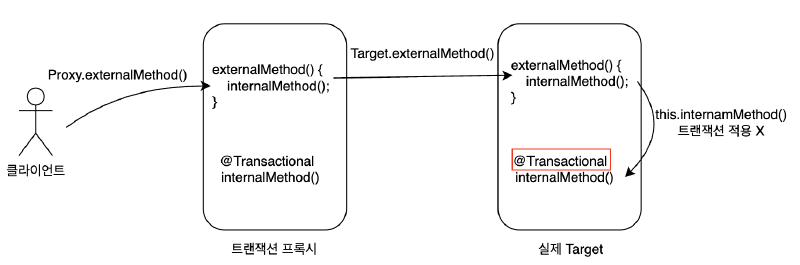
それではどうすれば解決できますか?
最も簡単な方法はinternalMethod()を別のクラスに分割することです。
@Slf4j
@SpringBootTest
public class TxInternalCallTest {

    @Autowired
    private ExternalCallService externalCallService;

    @DisplayName("プロキシ確認")
    @Test
    void printProxy() {
        log.info("callService class={}", externalCallService.getClass());
    }

    @DisplayName("externalMethodによるinternalMethod呼び出しテスト")
    @Test
    void external() throws Exception {
        externalCallService.externalMethod();
    }

    @TestConfiguration
    static class TxInternalCallTestConfig {
        @Bean
        public ExternalCallService txInternalCallService() {
            return new ExternalCallService(internalCall());
        }

        @Bean
        public TxInternalCall internalCall() {
            return new TxInternalCall();
        }
    }

    static class ExternalCallService {
        private final TxInternalCall txInternalCall;

        public ExternalCallService(TxInternalCall txInternalCall) {
            this.txInternalCall = txInternalCall;
        }

        public void externalMethod() {
            log.info("call externalMethod()");
            printTx();
            txInternalCall.internalMethod();
        }

        private void printTx() {
            boolean txActive = TransactionSynchronizationManager.isActualTransactionActive();
            log.info("txActive: {}", txActive);
        }
    }

    static class TxInternalCall {

        @Transactional
        public void internalMethod() {
            log.info("call internalMethod()");
            printTx();
        }

        private void printTx() {
            boolean txActive = TransactionSynchronizationManager.isActualTransactionActive();
            log.info("txActive: {}", txActive);
        }
    }
}
この方法に加えて、SpringAOPをプロキシベースではなくコンパイル時やクラスロード時にJavaコードを操作する方法もある。
3.4 トランザクションの伝播属性#
トランザクションの伝播と属性#
トランザクション伝播は、あるトランザクション内で別のトランザクションメソッドを呼び出すときにそれらの関係をどのように管理するかを決定するためのメカニズムです。
複数のレイヤ(コントローラ、サービス、リポジトリなど)や複数のモジュールにわたってトランザクションがかけられている可能性があるため、「現在トランザクションが既に存在する場合には合流するのか、新しいトランザクションを開くのか、エラーで処理するのか」などを明示的に設定する必要がある。
Springはさまざまなトランザクション伝播オプションを提供します。伝播オプションに別の設定がない場合は、REQUIREDがデフォルトとして使用されます。
- REQUIRED
最もよく使うデフォルト設定だ。既存のトランザクションがなければ作成し、あれば参加する。トランザクションが必須という意味で理解すればよい。
- REQUIRES_NEW
常に独立した新しいトランザクションを作成します。既存のトランザクションがある場合はしばらく中断し、内部タスクを別々にコミットまたはロールバックします。
- SUPPORTS
トランザクションをサポートするという意味だ。既存のトランザクションがなければ、ないまま進行して、あれば参加する。
- NOT_SUPPORTED
トランザクションをサポートしていないという意味だ。
- MANDATORY
義務事項だ。トランザクションが必要です。既存のトランザクションがないと例外が発生します。
- NEVER
トランザクションを使わないという意味だ。既存のトランザクションがあると例外が発生します。既存のトランザクションも許可しません。
- NESTED
既存のトランザクションなし:新しいトランザクションを作成します。 既存のトランザクションあり:入れ子になったトランザクションを作成します。
伝播属性の使用例#
Log スキーマの生成
drop table log if exists cascade;

create table log (
    log_id bigint primary key auto_increment,
    msg varchar(255),
    created_at timestamp
);
Log
@ToString
@NoArgsConstructor
@Getter
public class Log {
    private Long logId;
    private String msg;
    private LocalDateTime createdAt;

    private Log(String msg, LocalDateTime createdAt) {
        this.msg = msg;
        this.createdAt = createdAt;
    }

    private Log(Long logId, String msg, LocalDateTime createdAt) {
        this.logId = logId;
        this.msg = msg;
        this.createdAt = createdAt;
    }

    public static Log create(String msg) {
        return new Log(msg, LocalDateTime.now());
    }
}
LogRepository
@Slf4j
@RequiredArgsConstructor
@Repository
public class LogRepository {
    private final JdbcTemplate jdbcTemplate;

    @Transactional(propagation = Propagation.REQUIRES_NEW)
    public void save(Log lg) {
        log.info("save log: {}", lg);
        String sql = "insert into log(msg, created_at) values(?, ?)";
        jdbcTemplate.update(sql, lg.getMsg(), Timestamp.valueOf(lg.getCreatedAt()));
    }

    public List<Log> findAll() {
        log.info("find all logs");
        String sql = "select * from log";
        return jdbcTemplate.query(sql, new DataClassRowMapper<>(Log.class));
    }

    public void deleteAll() {
        log.info("delete all logs");
        String sql = "delete from log";
        jdbcTemplate.update(sql);
    }
}
PostLikeLogService
@Service
public class PostLikeLogService {
    private final PostLikeService postLikeService;
    private final LogRepository logRepository;

    public PostLikeLogService(PostLikeService postLikeService, LogRepository logRepository) {
        this.postLikeService = postLikeService;
        this.logRepository = logRepository;
    }

    @Transactional
    public void likePost(Long postId, Long userId) {
        postLikeService.likePost(postId, userId);
        logRepository.save(Log.create("Post liked. postId=" + postId + ", userId=" + userId));

        throw new RuntimeException("強制例外発生!");
    }
}
PostLikeLogServiceTest
@SpringBootTest
class PostLikeLogServiceTest {
    @Autowired
    private PostLikeLogService postLikeLogService;

    @Autowired
    private PostRepository postRepository;

    @Autowired
    private PostLikeRepository postLikeRepository;

    @Autowired
    private LogRepository logRepository;

    @BeforeEach
    void before() {
        postRepository.deleteAll();
        postLikeRepository.deleteAll();
        logRepository.deleteAll();
        postRepository.save(Post.create(10L, "title", "content"));
    }

    @AfterEach
    void clear() {
        postRepository.deleteAll();
        postLikeRepository.deleteAll();
        logRepository.deleteAll();

    }

    @DisplayName("Postいいねログテスト")
    @Test
    void postLikeLog() throws Exception {
        assertThrows(RuntimeException.class, () -> postLikeLogService.likePost(10L, 1L));
        assertEquals(1, logRepository.findAll().size());
    }
}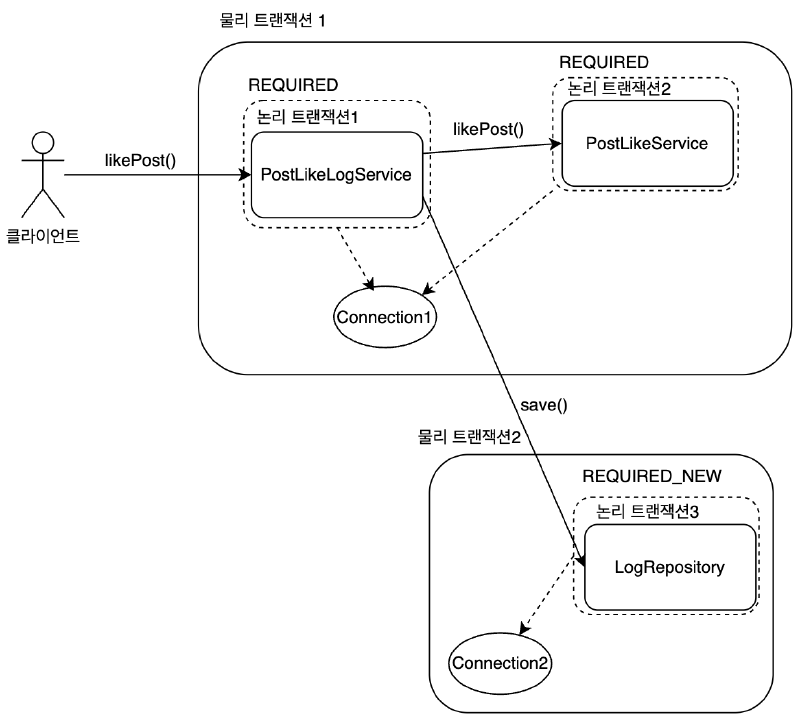
重要なのは、同じトランザクション内で発生した例外によって全体がロールバックされても、REQUIRES_NEWを使用したトランザクション操作はコミットされてデータベースに残ることです。
そして、この記事のようにJdbcTemplateとDataSourceTransactionManagerを使用する環境では、外側のトランザクションがすでに接続(Connection1)を占有している間、REQUIRES_NEWが内部トランザクション用の接続(Connection2)をさらに取得します。
つまり、1つのHTTPリクエスト内でも、この区間ではコネクションが最大2つまで同時に占有できる。
全体の流れ
- クライアントは
PostLikeLogService.likePost()を呼び出します。
このメソッドは@Transactional(デフォルト:REQUIRED)なので、論理トランザクション1(→物理トランザクション1)で囲みます。
PostLikeService.likePost()を呼び出して投稿のいいねを処理します。
PostLikeService.likePost()も@Transactional(デフォルト:REQUIRED)で同じトランザクションに参加します。
クエリは同じConnection(Connection1)を介してDBに反映されます。
LogRepository.save()を呼び出します。
このメソッドは@Transactional(propagation = Propagation.REQUIRES_NEW)なので、新しい論理トランザクション2(→物理トランザクション2)を作成し、別のConnection(Connection2)を取得します。
このとき、外部トランザクションのConnection1は終了するのではなく、しばらく中断されたままになり、内部トランザクションはConnection2で実行されます。
ログを挿入した後、このREQUIRES_NEWトランザクションはすぐにコミットされます。
PostLikeLogService.likePost()内でRuntimeExceptionを強制します。
この例外のため、物理トランザクション1はロールバックされます。
しかし、すでにREQUIRES_NEWで処理されたログ保存は、別々の物理トランザクションでコミットされたため、ロールバックされずに残ります。
なぜログは残り、いいねはロールバックされるのか?
基本 ( REQUIRED ) トランザクションに属する良いジョブは、例外が発生したときにロールバックされます。
ただし、REQUIRES_NEWは「親トランザクションをしばらく中断し、完全に独立した新しいトランザクションとして動作する」ため、ログ保存はすでに他の物理トランザクションでコミットされます。
その結果、親トランザクションがロールバックされても、ログデータはロールバックされずにDBに残ります。
したがって、REQUIRES_NEWを頻繁に使用すると、同時に必要なコネクションの数が増加するため、コネクションプールのサイズとトランザクション設計を一緒に考慮する必要があります。
逆に、外側のトランザクションがない状態でREQUIRES_NEWメソッドのみが単独で呼び出される場合、最終的にはトランザクション1個、コネクション1個だけを使用する。
REQUIRES_NEWを使用していない場合は
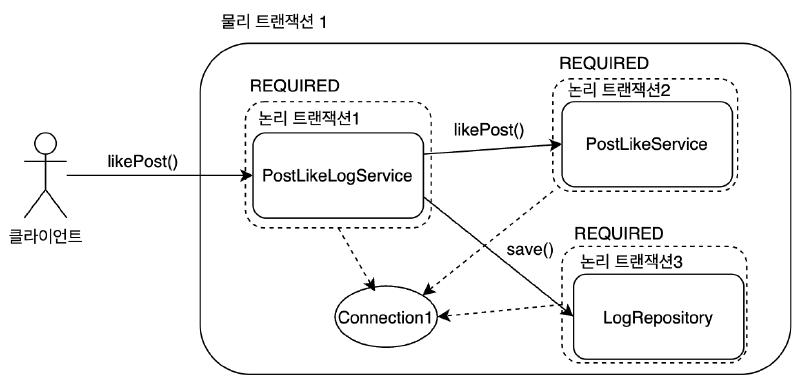
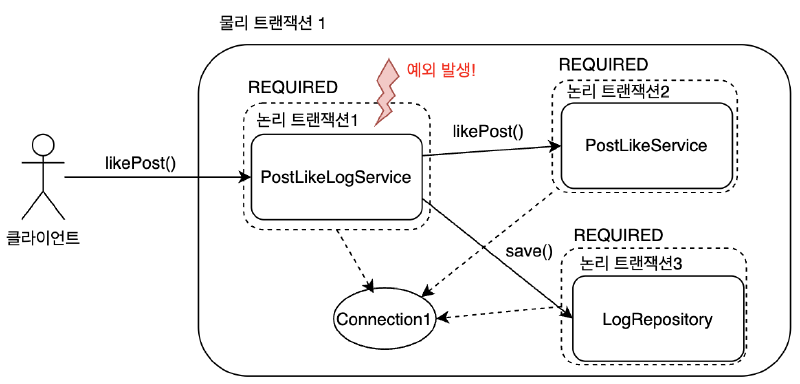
LogRepository.save() に @Transactional(propagation = Propagation.REQUIRED) のように別途伝播設定なしで親トランザクションと同じように動作する場合、次のような結果が出る。
PostLikeLogService.likePost()→postLikeService.likePost()→logRepository.save()が同じトランザクションで囲まれます。RuntimeExceptionのため、すべてのジョブが1つのトランザクション内でロールバックされます。- したがって、いいねもロールバックされ、ログもDBに残らない。
4. 練習:Spring JDBCを使用したCRUDの実装#
4.1 プロジェクトの構成#
MySQLデータベースのインストール
MACユーザー:
brew update
brew install mysql
mysql.server start
WINDOWユーザー:
https://dev.mysql.com/downloads/mysql/
IntelliJ Database接続
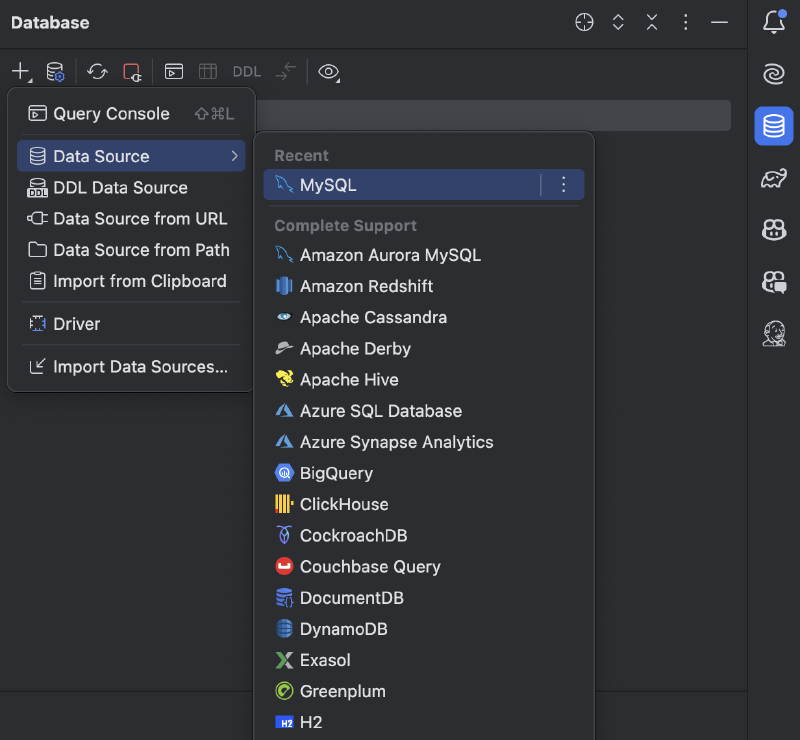
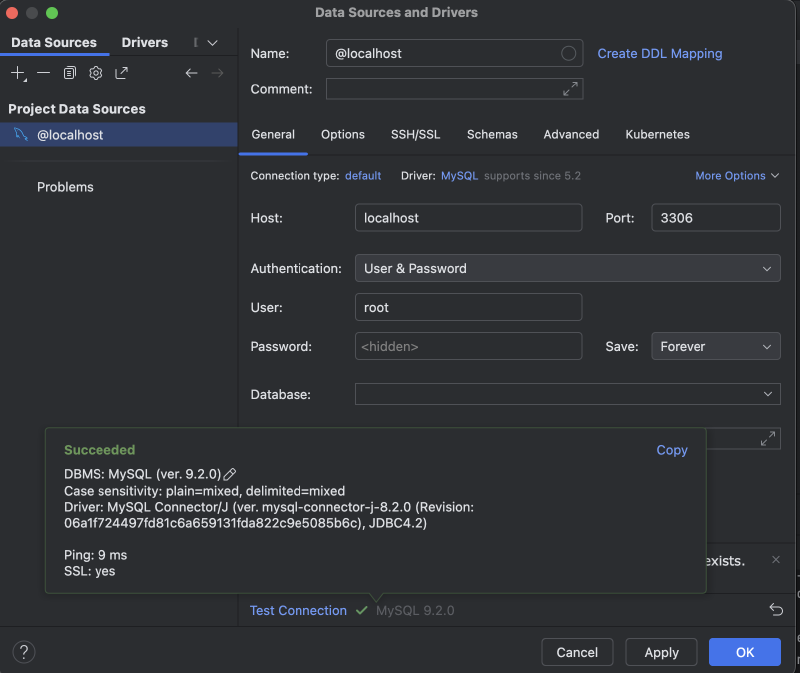
mirco-blog スキーマの生成
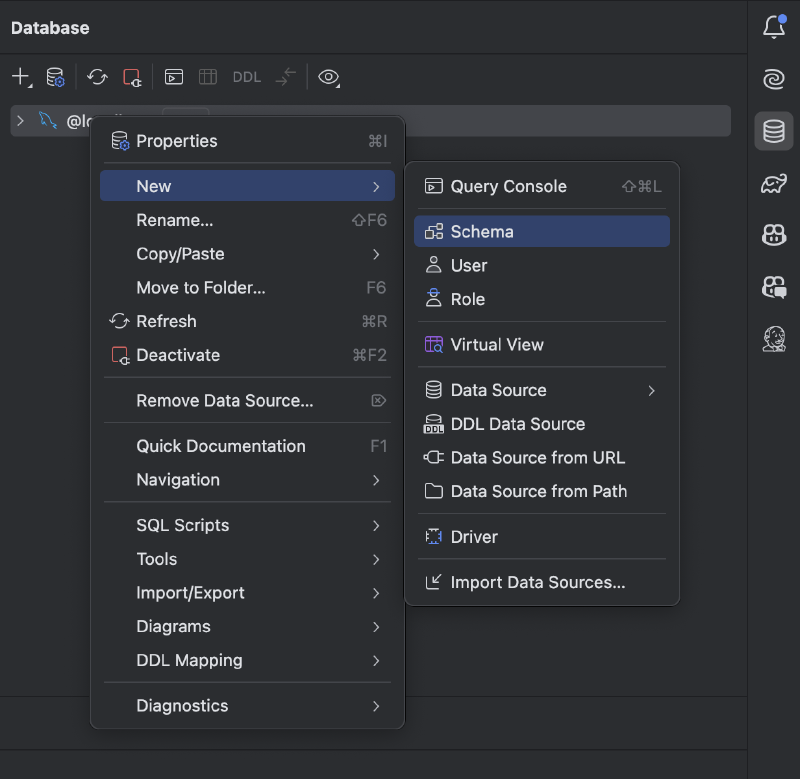
プロジェクトの作成
application.yml
spring:
  datasource:
    url: jdbc:mysql://localhost:3306/micro-blog
    username: root
    password:
    driver-class-name: com.mysql.cj.jdbc.Driver
    hikari:
      maximum-pool-size: 10
4.2 CRUDとJoinを利用したマイクロブログの例の作成#
DBスキーマの作成
DROP TABLE IF EXISTS comment;
DROP TABLE IF EXISTS post;

CREATE TABLE post (
    id BIGINT PRIMARY KEY AUTO_INCREMENT,
    title VARCHAR(255) NOT NULL,
    content TEXT NOT NULL,
    created_at TIMESTAMP DEFAULT CURRENT_TIMESTAMP
);

CREATE TABLE comment (
    id BIGINT PRIMARY KEY AUTO_INCREMENT,
    post_id BIGINT NOT NULL,
    content TEXT NOT NULL,
    created_at TIMESTAMP DEFAULT CURRENT_TIMESTAMP,
    CONSTRAINT fk_comment_post
        FOREIGN KEY (post_id) REFERENCES post (id)
        ON DELETE CASCADE
);

-- サンプルデータ
INSERT INTO post (title, content) VALUES
('最初の投稿', 'ブログ例を開始!'),
('2番目の投稿', 'thymeleafとjdbcを使った例');

INSERT INTO comment (post_id, content) VALUES
(1, '最初のコメント!'),
(1, '2番目のコメント'),
(2, '2番目の投稿の最初のコメント');
Post
@ToString
@Getter @Setter
@NoArgsConstructor
@EqualsAndHashCode
public class Post {
    private Long id;
    private String title;
    private String content;
    private LocalDateTime createdAt;

    private Post(Long id, String title, String content, LocalDateTime createdAt) {
        this.id = id;
        this.title = title;
        this.content = content;
        this.createdAt = createdAt;
    }

    public static Post create(String title, String content) {
        return new Post(null, title, content, LocalDateTime.now());
    }

    public static Post of(Long id, String title, String content, LocalDateTime createdAt) {
        return new Post(id, title, content, createdAt);
    }
}
Comment
@ToString
@Getter @Setter
@NoArgsConstructor
@EqualsAndHashCode
public class Comment {
    private Long id;
    private Long postId;
    private String content;
    private LocalDateTime createdAt;

    private Comment(Long id, Long postId, String content, LocalDateTime createdAt) {
        this.id = id;
        this.postId = postId;
        this.content = content;
        this.createdAt = createdAt;
    }

    public static Comment create(Long postId, String content) {
        return new Comment(null, postId, content, LocalDateTime.now());
    }
}
PostRepository
@Repository
@RequiredArgsConstructor
public class PostRepository {
    private final JdbcTemplate jdbcTemplate;

    // 投稿を保存
    public void save(Post post) {
        String sql = "insert into post (title, content, created_at) values (?, ?, ?)";
        jdbcTemplate.update(sql, post.getTitle(), post.getContent(), post.getCreatedAt());
    }

    // 投稿を編集
    public void update(Post post) {
        String sql = "update post set title = ?, content = ? where id = ?";
        jdbcTemplate.update(sql, post.getTitle(), post.getContent(), post.getId());
    }

    // 記事の短い検索
    public Post findById(Long id) {
        String sql = "select * from post where id = ?";
        return jdbcTemplate.queryForObject(sql, new BeanPropertyRowMapper<>(Post.class), id);
    }

    // すべての投稿を見る(コメント数Join)
    public List<PostWithCommentCount> findAllWithCommentCount() {
        String sql = """
            select p.*, count(c.id) as comment_count
              from post p
              left join comment c on p.id = c.post_id
              group by p.id
              order by p.id desc
            """;
        return jdbcTemplate.query(sql, new BeanPropertyRowMapper<>(PostWithCommentCount.class));
    }

    // 投稿を削除
    public void deleteById(Long id) {
        String sql = "delete from post where id = ?";
        jdbcTemplate.update(sql, id);
    }
}
CommentRepository
@Repository
@RequiredArgsConstructor
public class CommentRepository {
    private final JdbcTemplate jdbcTemplate;

    // コメントを保存
    public void save(Comment comment) {
        String sql = "insert into comment (post_id, content, created_at) values (?, ?, ?)";
        jdbcTemplate.update(sql,
                comment.getPostId(),
                comment.getContent(),
                comment.getCreatedAt());
    }

    // 特定の投稿のすべてのコメントを表示
    public List<Comment> findByPostId(Long postId) {
        String sql = "select * from comment where post_id = ? order by id desc";
        return jdbcTemplate.query(sql, new BeanPropertyRowMapper<>(Comment.class), postId);
    }

    // コメントを削除
    public void deleteById(Long id) {
        String sql = "delete from comment where id = ?";
        jdbcTemplate.update(sql, id);
    }
}
PostService
@Transactional
@RequiredArgsConstructor
@Service
public class PostService {
    private final PostRepository postRepository;
    private final CommentRepository commentRepository;

    public List<PostWithCommentCount> getPostsWithCommentCount() {
        return postRepository.findAllWithCommentCount();
    }

    public PostDetailDto getPostDetail(Long id) {
        Post post = postRepository.findById(id);
        List<Comment> comments = commentRepository.findByPostId(id);
        return PostDetailDto.of(post, comments);
    }

    public void createPost(Post post) {
        postRepository.save(post);
    }

    public void updatePost(Post post) {
        postRepository.update(post);
    }

    public void deletePost(Long id) {
        postRepository.deleteById(id);
    }
}
CommentService
@Transactional
@RequiredArgsConstructor
@Service
public class CommentService {
    private final CommentRepository commentRepository;

    public void createComment(Comment comment) {
        commentRepository.save(comment);
    }

    public void deleteComment(Long id) {
        commentRepository.deleteById(id);
    }
}
PostController
@Controller
@RequiredArgsConstructor
@RequestMapping("/posts")
public class PostController {

    private final PostService postService;

    @GetMapping
    public String list(Model model) {
        List<PostWithCommentCount> posts = postService.getPostsWithCommentCount();
        model.addAttribute("posts", posts);
        return "post_list";
    }

    @GetMapping("/{id}")
    public String detail(@PathVariable(name = "id") Long id, Model model) {
        PostDetailDto postDetailDto = postService.getPostDetail(id);
        model.addAttribute("postDetail", postDetailDto);
        return "post_detail";
    }

    @GetMapping("/new")
    public String newForm(Model model) {
        model.addAttribute("post", new Post()); // フォームバインディング用
        return "post_form";
    }

    @PostMapping
    public String create(@RequestParam String title,
                         @RequestParam String content) {
        Post post = Post.create(title, content);
        postService.createPost(post);
        return "redirect:/posts";
    }

    @GetMapping("/{id}/edit")
    public String editForm(@PathVariable(name = "id") Long id, Model model) {
        Post post = postService.getPostDetail(id).toPost();
        model.addAttribute("post", post);
        return "post_form";
    }

    @PostMapping("/{id}/edit")
    public String update(@PathVariable(name = "id") Long id,
                         @RequestParam String title,
                         @RequestParam String content) {
        Post post = Post.of(id, title, content, null);
        postService.updatePost(post);
        return "redirect:/posts/" + id;
    }

    @PostMapping("/{id}/delete")
    public String delete(@PathVariable(name = "id") Long id) {
        postService.deletePost(id);
        return "redirect:/posts";
    }
}
CommentController
@Controller
@RequiredArgsConstructor
@RequestMapping("/posts/{postId}/comments")
public class CommentController {

    private final CommentService commentService;

    @PostMapping
    public String createComment(@PathVariable(name = "postId") Long postId,
                                @RequestParam String content) {
        Comment comment = Comment.create(postId, content);
        commentService.createComment(comment);
        return "redirect:/posts/" + postId;
    }

    @PostMapping("/{commentId}/delete")
    public String deleteComment(@PathVariable(name = "postId") Long postId,
                                @PathVariable(name = "commentId") Long commentId) {
        commentService.deleteComment(commentId);
        return "redirect:/posts/" + postId;
    }
}
PostDetailDto
@ToString
@Getter
@EqualsAndHashCode
public class PostDetailDto {
    private final Long id;
    private final String title;
    private final String content;
    private final LocalDateTime createdAt;
    private final List<Comment> comments;

    private PostDetailDto(Long id, String title, String content, LocalDateTime createdAt, List<Comment> comments) {
        this.id = id;
        this.title = title;
        this.content = content;
        this.createdAt = createdAt;
        this.comments = comments;
    }

    public static PostDetailDto of(Post post, List<Comment> comments) {
        return new PostDetailDto(
                post.getId(),
                post.getTitle(),
                post.getContent(),
                post.getCreatedAt(),
                comments
        );
    }

    public Post toPost() {
        return Post.of(id, title, content, createdAt);
    }
}
PostWithCommentCount
@ToString
@Getter @Setter
@NoArgsConstructor
@EqualsAndHashCode
public class PostWithCommentCount {
    private Long id;
    private String title;
    private String content;
    private LocalDateTime createdAt;
    private int commentCount;

    private PostWithCommentCount(Long id, String title, String content, int commentCount) {
        this.id = id;
        this.title = title;
        this.content = content;
        this.commentCount = commentCount;
    }
}
post_list.html
<!DOCTYPE html>
<html xmlns:th="http://www.thymeleaf.org">
<head>
    <title>投稿一覧</title>
</head>
<body>
<h1>投稿一覧</h1>
<a th:href="@{/posts/new}">新規投稿作成</a>

<table border="1">
    <tr>
        <th>ID</th>
        <th>タイトル</th>
        <th>コメント数</th>
    </tr>
    <tr th:each="post : ${posts}">
        <td th:text="${post.id}"></td>
        <td>
            <a th:href="@{/posts/{id}(id=${post.id})}"
               th:text="${post.title}">タイトル</a>
        </td>
        <td th:text="${post.commentCount}"></td>
    </tr>
</table>
</body>
</html>
post_detail.html
<!DOCTYPE html>
<html xmlns:th="http://www.thymeleaf.org">
<head>
    <title>投稿詳細</title>
</head>
<body>
<h1 th:text="${postDetail.title}">タイトル</h1>
<p th:text="${postDetail.content}">内容</p>
<p>作成日:
    <span th:text="${#temporals.format(postDetail.createdAt, 'yyyy-MM-dd HH:mm')}"></span>
</p>

<hr/>
<h2>コメント</h2>
<div th:each="comment : ${postDetail.comments}">
    <p th:text="${comment.content}">コメント内容</p>
    <small th:text="${#temporals.format(comment.createdAt, 'yyyy-MM-dd HH:mm')}"></small>
    <form th:action="@{/posts/{postId}/comments/{commentId}/delete(postId=${postDetail.id}, commentId=${comment.id})}"
          method="post">
        <button type="submit">削除</button>
    </form>
    <hr/>
</div>

<!-- コメント作成 -->
<form th:action="@{/posts/{id}/comments(id=${postDetail.id})}" method="post">
    <textarea name="content" rows="3" cols="40"></textarea>
    <button type="submit">コメント作成</button>
</form>

<hr/>
<!-- 投稿の編集、削除 -->
<form th:action="@{/posts/{id}/edit(id=${postDetail.id})}" method="get">
    <button type="submit">編集する</button>
</form>
<form th:action="@{/posts/{id}/delete(id=${postDetail.id})}" method="post">
    <button type="submit">削除する</button>
</form>
<a th:href="@{/posts}">一覧に戻る</a>
</body>
</html>
post_form.html
<!DOCTYPE html>
<html xmlns:th="http://www.thymeleaf.org">
<head>
    <title>投稿の作成/編集</title>
</head>
<body>
<h1>投稿の作成/編集</h1>

<form th:if="${post.id == null}"
      th:action="@{/posts}"
      method="post">
    <p>タイトル: <input type="text" name="title"/></p>
    <p>内容: <textarea name="content" rows="5" cols="40"></textarea></p>
    <button type="submit">作成</button>
</form>

<form th:if="${post.id != null}"
      th:action="@{/posts/{id}/edit(id=${post.id})}"
      method="post">
    <p>タイトル: <input type="text" name="title" th:value="${post.title}"/></p>
    <p>内容: <textarea name="content" rows="5" cols="40"
                     th:text="${post.content}"></textarea></p>
    <button type="submit">編集</button>
</form>

<a th:href="@{/posts}">一覧に戻る</a>
</body>
</html>ソース:
トビーの春
絵で学ぶスプリング6入門
キム・ヨンハンの春DB 1、2
https://docs.spring.io/spring-framework/reference/data-access.html
https://github.com/brettwooldridge/HikariCP?tab=readme-ov-file