
이 글은 Spring 6 스터디를 진행하며 작성한 코드 위주의 실습 기록입니다.
1. JDBC 기초#
1.1 JDBC API 개요#
JDBC가 등장한 배경과 필요성#
애플리케이션을 개발할 때 중요한 데이터는 대부분 데이터베이스에 보관한다.
클라이언트가 애플리케이션 서버를 통해 데이터를 저장하거나 조회하면, 애플리케이션은 데이터베이스와 아래의 통신 과정을 통해 데이터를 주고받는다.
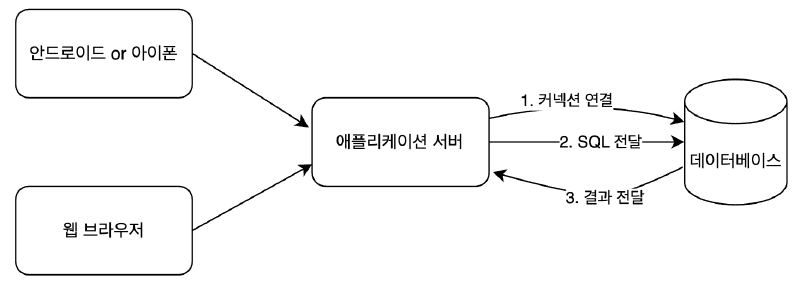
문제는? 각각의 데이터베이스마다 커넥션을 연결하는 방법, SQL을 전달하는 방법, 그리고 결과를 전달 받는 방법 모두 다르다는 것.
따라서 데이터베이스를 다른 종류의 데이터베이스로 변경하면 애플리케이션 서버에 개발된 데이터베이스 사용 코드도 함께 변경해야 한다.
이러한 문제를 해결하기 위해 1997년 JDBC라는 자바 표준이 등장했다.
JDBC 핵심 클래스와 인터페이스#
JDBC(Java Database Connectivity)는 자바에서 데이터베이스에 접속할 수 있도록 하는 Java API.
대표적으로 Connection, Statement, ResultSet을 인터페이스로 정의해서 제공한다.
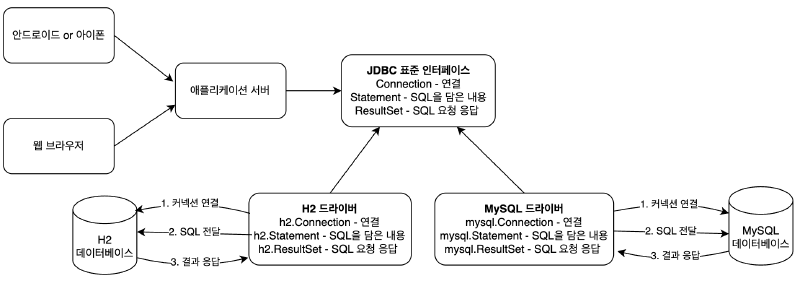
그런데 인터페이스 만으로는 동작하지 않는다. 각각의 데이터베이스 회사는 자신의 DB에 맞도록 JDBC의 인터페이스를 구현해서 제공하는데, 이것을 JDBC 드라이버라 한다.
JDBC를 이용하는 작업의 일반적인 순서는 다음과 같다.
- DB 연결을 위한
Connection을 가져온다. - SQL을 담은
Statement(또는PreparedStatement)를 만든다. - 만들어진
Statement을 실행한다. - 조회의 경우 SQL 쿼리의 실행 결과를
ResultSet으로 받아서 정보를 저장할 오브젝트(User, Post, …) 에 옮겨준다. - 작업 중에 생성된
Connection,Statement,ResultSet같은 리소스는 작업을 마친 후 반드시 닫아준다. - JDBC API가 만들어내는 예외(
Exception)를 잡아서 직접 처리하거나, 메소드에throws를 선언해서 예외가 발생하면 메소드 밖으로 던지게 한다.
DB 커넥션이라는 제한적인 리소스를 공유해 사용하는 서버에서 동작하는 JDBC 코드에는 반드시 지켜야 할 원칙이 있다. 바로 예외처리다.
정상적인 JDBC 코드의 흐름을 따르지 않고 중간에 어떤 이유로든 예외가 발생했을 경우에도 사용한 리소스를 반드시 반환하도록 만들어야 하기 때문이다. 그렇지 않으면 시스템에 심각한 문제를 일으킬 수 있다.
Statement vs PreparedStatement
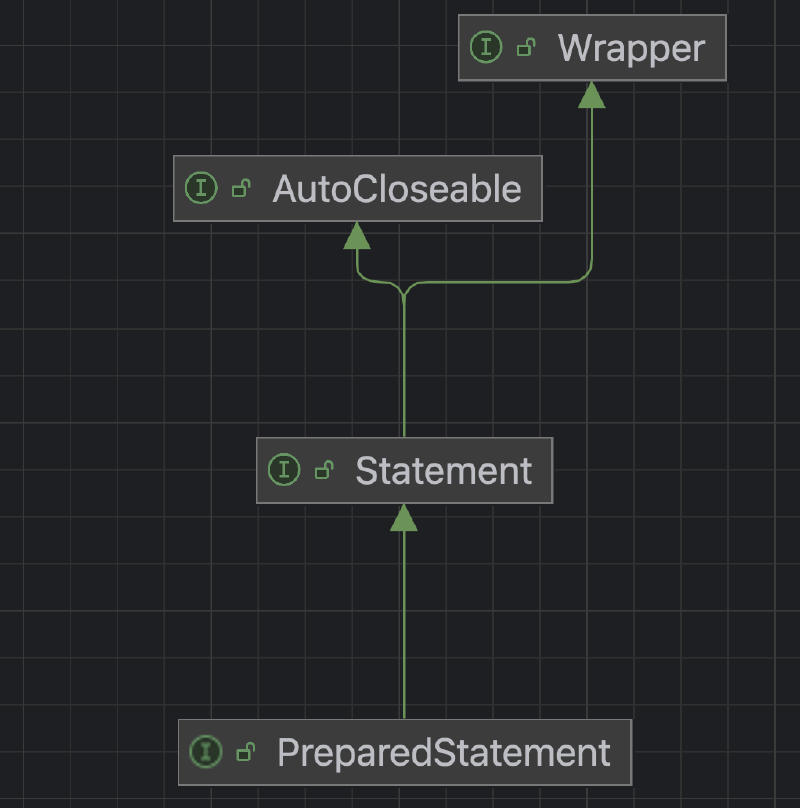
PreparedStatement는 Statement의 자식 타입인데, 물음표(?)를 통한 파라미터 바인딩을 가능하게 해준다.
SQL Injection 공격을 예방하려면 PreparedStatement를 통한 파라미터 바인딩 방식을 사용해야한다.
DriverManager는 사용할 애플리케이션에 대해 라이브러리에 등록된 JDBC(Java Database Connectivity) 드라이버 세트를 관리하고 커넥션을 획득하는 기능을 제공한다.
JDBC가 제공하는 DriverManager 클래스
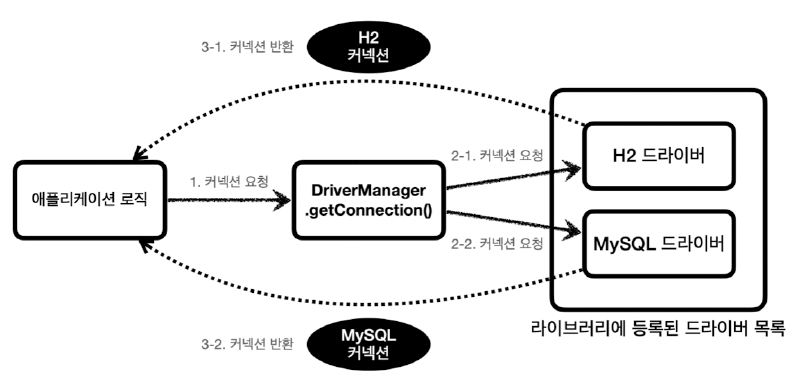
출처: 김영한의 Spring DB 1편
정리
JDBC의 등장으로 애플리케이션 로직은 이제 JDBC 표준 인터페이스에만 의존한다.
따라서 데이터베이스를 다른 종류의 데이터베이스로 변경하고 싶으면 JDBC 구현 라이브러리만 변경하면 된다.
JDBC를 이용한 H2 DB 접근#
H2 데이터 베이스 다운로드
https://www.h2database.com/html/download-archive.html
MAC 사용자
디렉토리 이동: cd bin
권한 설정: chmod 755 h2.sh
실행: ./h2.sh
WINDOW 사용자
실행: h2.bat
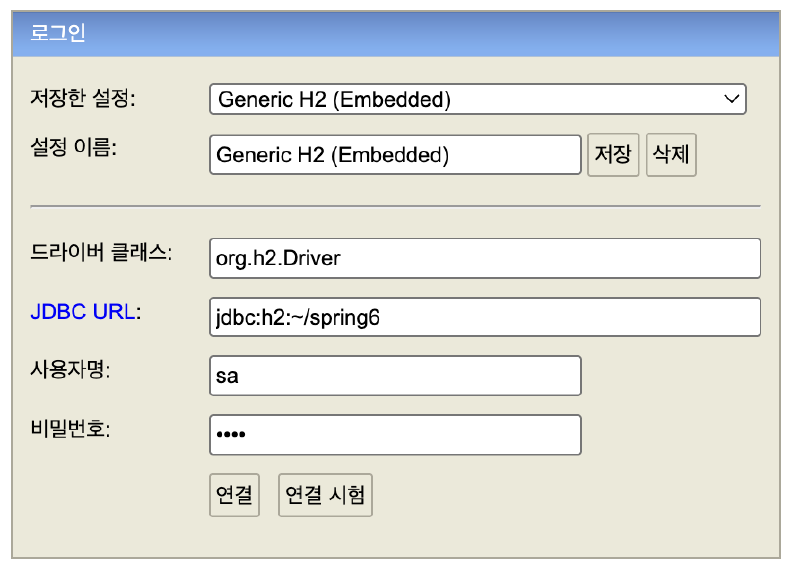
데이터베이스 파일 생성 방법
JDBC URL: jdbc:h2:~/spring6
사용자명: sa
비밀번호: 1234
데이터베이스 파일 생성 후 접속 방법
JDBC URL: jdbc:h2:tcp://localhost/~/spring6
테이블 생성과 데이터 삽입
drop table post if exists cascade;

create table post (
		post_id bigint primary key,
		title varchar(255) not null,
		content varchar(255) not null,
		likes int not null
);
Post 클래스 생성
@Getter
@EqualsAndHashCode
public class Post {
    private final Long postId;
    private final String title;
    private final String content;
    private int likes;

    private Post(Long postId, String title, String content, int likes) {
        this.postId = postId;
        this.title = title;
        this.content = content;
        this.likes = likes;
    }

    // 신규 생성 시 사용 (좋아요 기본값 0 강제)
    public static Post create(Long postId, String title, String content) {
        return new Post(postId, title, content, 0);
    }

    // DB 등에서 로딩할 때 사용
    public static Post of(Long postId, String title, String content, int likes) {
        return new Post(postId, title, content, likes);
    }
}
PostRepository 클래스 생성
@Slf4j
public class PostRepository {

    public void save(Post post) throws SQLException {
        Connection con = null;
        PreparedStatement pstmt = null;

        try {
            con = DriverManager.getConnection("jdbc:h2:tcp://localhost/~/spring6", "sa", "1234");
            pstmt = con.prepareStatement("insert into post(post_id, title, content, likes) values(?, ?, ?, ?)");
            pstmt.setLong(1, post.getPostId());
            pstmt.setString(2, post.getTitle());
            pstmt.setString(3, post.getContent());
            pstmt.setInt(4, post.getLikes());
            pstmt.executeUpdate();
        } catch (SQLException e) {
            log.error("db error", e);
            throw e;
        } finally {
            if (pstmt != null) {
                try {
                    pstmt.close();
                } catch (SQLException e) {
                    log.error("prepareStatement close error", e);
                    throw e;
                }
            }
            if (con != null) {
                try {
                    con.close();
                } catch (SQLException e) {
                    log.error("connection close error", e);
                    throw e;
                }
            }
        }
    }

    public Post findById(Long id) throws SQLException {
        Connection con = null;
        PreparedStatement pstmt = null;
        ResultSet rs = null;

        try {
            con = DriverManager.getConnection("jdbc:h2:tcp://localhost/~/spring6", "sa", "1234");
            pstmt = con.prepareStatement("select * from post where post_id = ?");
            pstmt.setLong(1, id);
            rs = pstmt.executeQuery();
            rs.next();
            return Post.of(rs.getLong("post_id"),
                    rs.getString("title"),
                    rs.getString("content"),
                    rs.getInt("likes"));
        } catch (SQLException e) {
            log.error("db error", e);
            throw e;
        } finally {
            if (rs != null) {
                try {
                    rs.close();
                } catch (SQLException e) {
                    log.error("resultSet close error", e);
                    throw e;
                }
            }
            if (pstmt != null) {
                try {
                    pstmt.close();
                } catch (SQLException e) {
                    log.error("prepareStatement close error", e);
                    throw e;
                }
            }
            if (con != null) {
                try {
                    con.close();
                } catch (SQLException e) {
                    log.error("connection close error", e);
                    throw e;
                }
            }
        }
    }

    public void deleteAll() {
        Connection con = null;
        PreparedStatement pstmt = null;

        try {
            con = DriverManager.getConnection("jdbc:h2:tcp://localhost/~/spring6", "sa", "1234");
            pstmt = con.prepareStatement("delete from post");
            pstmt.executeUpdate();
        } catch (SQLException e) {
            log.error("db error", e);
            throw new RuntimeException(e);
        } finally {
            if (pstmt != null) {
                try {
                    pstmt.close();
                } catch (SQLException e) {
                    log.error("prepareStatement close error", e);
                    throw new RuntimeException(e);
                }
            }
            if (con != null) {
                try {
                    con.close();
                } catch (SQLException e) {
                    log.error("connection close error", e);
                    throw new RuntimeException(e);
                }
            }
        }
    }
}
PostRepositoryTest 생성
import static org.junit.jupiter.api.Assertions.assertEquals;
import static org.junit.jupiter.api.Assertions.assertThrows;

@SpringBootTest
class PostRepositoryTest {

    @AfterEach
    void clear() throws SQLException {
        PostRepository postRepository = new PostRepository();
        postRepository.deleteAll();
    }

    @DisplayName("PostRepository save 테스트")
    @Test
    void save() throws Exception {
        PostRepository postRepository = new PostRepository();

        Post post = Post.create(1L, "title", "content");

        postRepository.save(post);
    }

    @DisplayName("PostRepository get 테스트")
    @Test
    void get() throws Exception {
        // given
        PostRepository postRepository = new PostRepository();
        Long postId = 1L;

        Post post = Post.create(postId, "title", "content");
        postRepository.save(post);

        // when
        Post savedPost = postRepository.findById(postId);

        // then
        assertEquals(post, savedPost);
    }

    @DisplayName("PostRepository deleteAll 테스트")
    @Test
    void deleteAll() throws Exception {
        // given
        PostRepository postRepository = new PostRepository();

        Post post = Post.create(1L, "title", "content");
        postRepository.save(post);

        // when
        postRepository.deleteAll();

        // then
        assertThrows(Exception.class, () -> postRepository.findById(1L));
    }
}
1.2 DataSource 설정#
DataSource 개념과 필요성#
기존에는 PostRepository가 H2를 직접 사용하기 위해 DB URL, USERNAME, PASSWORD 등의 구체적인 정보에 의존하고 있다.
따라서 H2가 아닌 MySQL로 데이터베이스를 변경한다면 PostRepository의 코드를 변경해 줘야한다.
또한 커넥션을 얻는 방법은 커넥션 풀을 사용할 수도 있다. 이 경우에도 PostRepository을 직접 변경해야한다.
이러한 문제를 해결하기 위해, DB 커넥션을 가져오는 기능을 ConnectionMaker 인터페이스를 도입하여 추상화를 진행해보자.
ConnectionMaker 인터페이스 도입으로 PostRepository는 구체적인 DB 또는 커넥션 획득 방법에 대해 알 필요 없이 해당 인터페이스에만 의존하면 된다.
ConnectionMaker
public interface ConnectionMaker {
    Connection makeConnection() throws SQLException;
}
DBConnectionMaker
public class DBConnectionMaker implements ConnectionMaker {

    @Override
    public Connection makeConnection() throws SQLException {
        return DriverManager.getConnection("jdbc:h2:tcp://localhost/~/spring6", "sa", "1234");
    }
}
PostRepository
@Slf4j
public class PostRepository {
    private final ConnectionMaker connectionMaker;

    public PostRepository(ConnectionMaker connectionMaker) {
        this.connectionMaker = connectionMaker;
    }

    public void save(Post post) throws SQLException {
        Connection con = null;
        PreparedStatement pstmt = null;

        try {
            con = connectionMaker.makeConnection();
            pstmt = con.prepareStatement("insert into post(post_id, title, content, likes) values(?, ?, ?, ?)");
            pstmt.setLong(1, post.getPostId());
            pstmt.setString(2, post.getTitle());
            pstmt.setString(3, post.getContent());
            pstmt.setInt(4, post.getLikes());
            pstmt.executeUpdate();
        } catch (SQLException e) {
            log.error("db error", e);
            throw e;
        } finally {
            if (pstmt != null) {
                try {
                    pstmt.close();
                } catch (SQLException e) {
                    log.error("prepareStatement close error", e);
                    throw e;
                }
            }
            if (con != null) {
                try {
                    con.close();
                } catch (SQLException e) {
                    log.error("connection close error", e);
                    throw e;
                }
            }
        }
    }

    public Post findById(Long id) throws SQLException {
        Connection con = null;
        PreparedStatement pstmt = null;
        ResultSet rs = null;

        try {
            con = connectionMaker.makeConnection();
            pstmt = con.prepareStatement("select * from post where post_id = ?");
            pstmt.setLong(1, id);
            rs = pstmt.executeQuery();
            rs.next();
            return Post.of(rs.getLong("post_id"),
                    rs.getString("title"),
                    rs.getString("content"),
                    rs.getInt("likes"));
        } catch (SQLException e) {
            log.error("db error", e);
            throw e;
        } finally {
            if (rs != null) {
                try {
                    rs.close();
                } catch (SQLException e) {
                    log.error("resultSet close error", e);
                    throw e;
                }
            }
            if (pstmt != null) {
                try {
                    pstmt.close();
                } catch (SQLException e) {
                    log.error("prepareStatement close error", e);
                    throw e;
                }
            }
            if (con != null) {
                try {
                    con.close();
                } catch (SQLException e) {
                    log.error("connection close error", e);
                    throw e;
                }
            }
        }
    }

    public void deleteAll() {
        Connection con = null;
        PreparedStatement pstmt = null;

        try {
            con = connectionMaker.makeConnection();
            pstmt = con.prepareStatement("delete from post");
            pstmt.executeUpdate();
        } catch (SQLException e) {
            log.error("db error", e);
            throw new RuntimeException(e);
        } finally {
            if (pstmt != null) {
                try {
                    pstmt.close();
                } catch (SQLException e) {
                    log.error("prepareStatement close error", e);
                    throw new RuntimeException(e);
                }
            }
            if (con != null) {
                try {
                    con.close();
                } catch (SQLException e) {
                    log.error("connection close error", e);
                    throw new RuntimeException(e);
                }
            }
        }
    }
}
BeanFactory
@Configuration
public class BeanFactory {

    @Bean
    public PostRepository postRepository() {
        return new PostRepository(connectionMaker());
    }

    @Bean
    public ConnectionMaker connectionMaker() {
        return new DBConnectionMaker();
    }
}
PostRepositoryTest
import static org.junit.jupiter.api.Assertions.assertEquals;
import static org.junit.jupiter.api.Assertions.assertThrows;

@SpringBootTest
class PostRepositoryTest {
    @Autowired
    private PostRepository postRepository;

    @AfterEach
    void clear() throws SQLException {
        postRepository.deleteAll();
    }

    @DisplayName("PostRepository save 테스트")
    @Test
    void save() throws Exception {
        Post post = Post.create(1L, "title", "content");

        postRepository.save(post);
    }

    @DisplayName("PostRepository get 테스트")
    @Test
    void get() throws Exception {
        // given
        Long postId = 1L;

        Post post = Post.create(postId, "title", "content");
        postRepository.save(post);

        // when
        Post savedPost = postRepository.findById(postId);

        // then
        assertEquals(post, savedPost);
    }

    @DisplayName("PostRepository deleteAll 테스트")
    @Test
    void deleteAll() throws Exception {
        // given
        Post post = Post.create(1L, "title", "content");
        postRepository.save(post);

        // when
        postRepository.deleteAll();

        // then
        assertThrows(Exception.class, () -> postRepository.findById(1L));
    }
}
사실 자바에서는 DB 커넥션을 가져오는 오브젝트의 기능을 추상화해서 비슷한 용도로 사용할 수 있게 만들어진 DataSource라는 인터페이스가 이미 존재한다.
따라서 실전에서 ConnectionMaker와 같은 인터페이스를 만들어서 사용할 일은 없을 것이다.
DriverManager 와 DataSource
JDBC를 사용할 때 DriverManager와 DataSource는 “DB 커넥션을 어떻게 관리할 것인가?”라는 같은 문제를 다루지만, 역할과 추상화 레벨이 서로 다르다.
DriverManager은 커넥션 풀이나 고급 관리 로직을 포함하지 않는, **“**JDBC 드라이버를 어떻게 호출하느냐” 정도를 추상화한 셈. 그리고 클래스다.
DataSource 인터페이스는 “엔터프라이즈 환경에서 커넥션을 안정적으로 획득하는 방법”에 대한 추상화로서, 구현체에 따라 커넥션 풀까지 포함할 수 있다.
Spring은 DriverManager도 DataSource를 통해서 사용할 수 있도록 DriverManagerDataSource라는 DataSource를 구현한 클래스를 제공한다.
이제 애플리케이션 로직은 DataSource인터페이스에만 의존하면 된다. 덕분에 DriverManagerDataSource를 통해서 DriverManager를 사용하다가 커넥션 풀을 사용하도록 코드를 변경해도 애플리케이션 로직은 변경하지 않아도 된다.
ConnectionConst
public class ConnectionConst {
    public static final String URL = "jdbc:h2:tcp://localhost/~/spring6";
    public static final String USERNAME = "sa";
    public static final String PASSWORD = "1234";
}
BeanFactory
@Configuration
public class BeanFactory {

    @Bean
    public PostRepository postRepository() {
        return new PostRepository(dataSource());
    }

    @Bean
    public DataSource dataSource() {
        return new DriverManagerDataSource(URL, USERNAME, PASSWORD);
    }
}
PostRepository
@Slf4j
public class PostRepository {
    private final DataSource dataSource;

    public PostRepository(DataSource dataSource) {
        this.dataSource = dataSource;
    }

    public void save(Post post) throws SQLException {
        Connection con = null;
        PreparedStatement pstmt = null;

        try {
            con = dataSource.getConnection();
            pstmt = con.prepareStatement("insert into post(post_id, title, content, likes) values(?, ?, ?, ?)");
            pstmt.setLong(1, post.getPostId());
            pstmt.setString(2, post.getTitle());
            pstmt.setString(3, post.getContent());
            pstmt.setInt(4, post.getLikes());
            pstmt.executeUpdate();
        } catch (SQLException e) {
            log.error("db error", e);
            throw e;
        } finally {
            if (pstmt != null) {
                try {
                    pstmt.close();
                } catch (SQLException e) {
                    log.error("prepareStatement close error", e);
                    throw e;
                }
            }
            if (con != null) {
                try {
                    con.close();
                } catch (SQLException e) {
                    log.error("connection close error", e);
                    throw e;
                }
            }
        }
    }

    public Post findById(Long id) throws SQLException {
        Connection con = null;
        PreparedStatement pstmt = null;
        ResultSet rs = null;

        try {
            con = dataSource.getConnection();
            pstmt = con.prepareStatement("select * from post where post_id = ?");
            pstmt.setLong(1, id);
            rs = pstmt.executeQuery();
            rs.next();
            return Post.of(rs.getLong("post_id"),
                    rs.getString("title"),
                    rs.getString("content"),
                    rs.getInt("likes"));
        } catch (SQLException e) {
            log.error("db error", e);
            throw e;
        } finally {
            if (rs != null) {
                try {
                    rs.close();
                } catch (SQLException e) {
                    log.error("resultSet close error", e);
                    throw e;
                }
            }
            if (pstmt != null) {
                try {
                    pstmt.close();
                } catch (SQLException e) {
                    log.error("prepareStatement close error", e);
                    throw e;
                }
            }
            if (con != null) {
                try {
                    con.close();
                } catch (SQLException e) {
                    log.error("connection close error", e);
                    throw e;
                }
            }
        }
    }

    public void deleteAll() {
        Connection con = null;
        PreparedStatement pstmt = null;

        try {
            con = dataSource.getConnection();
            pstmt = con.prepareStatement("delete from post");
            pstmt.executeUpdate();
        } catch (SQLException e) {
            log.error("db error", e);
            throw new RuntimeException(e);
        } finally {
            if (pstmt != null) {
                try {
                    pstmt.close();
                } catch (SQLException e) {
                    log.error("prepareStatement close error", e);
                    throw new RuntimeException(e);
                }
            }
            if (con != null) {
                try {
                    con.close();
                } catch (SQLException e) {
                    log.error("connection close error", e);
                    throw new RuntimeException(e);
                }
            }
        }
    }
}
Spring Boot에서 Connection Pool과 DataSource 설정하기#
DriverManager는 예전부터 존재하던 JDBC 초창기 클래스이다. 따라서 커넥션 풀(Connection Pooling)과 같은 고급 기능은 포함되어 있지 않다.
DriverManagerDataSource 는 Spring이 제공하는 DataSource 인터페이스 구현체 중 하나로, 내부적으로 DriverManager를 호출하여 매번 새로운 커넥션을 생성한다.
데이터베이스 커넥션을 획득할 때는 다음과 같은 복잡한 과정을 거친다.
- 애플리케이션 로직은 DB 드라이버를 통해 커넥선을 조회한다.
- DB 드라이버는 DB와 TCP/IP 커넥션을 연결한다. 물론 이 과정에서 3way handshake 같은 네트워크 동작이 발생한다.
- DB 드라이버는 TCP/IP 커넥션이 연결되면 ID, PW와 같은 기타 부가정보를 DB에 전달한다.
- DB는 ID, PW를 통해 내부 인증을 완료하고, 내부에 DB 세션을 생성한다.
- DB 커넥션은 생성이 완료되었다는 응답을 보낸다.
- DB 드라이버는 커넥션 객체를 생성해서 클라이언트에 반환한다.
이렇게 커넥션을 새로 만드는 것은 시간도 많이 소모되며 TCP/IP 연결을 위해 네트워크 리소스가 매번 사용된다.
→ 사용자에게 좋지 않은 경험을 줄 수 있다.
이러한 문제를 해결하기 위해 커넥션을 미리 생성해두고 사용하는 커넥션 풀이라는 아이디어가 나타났다.
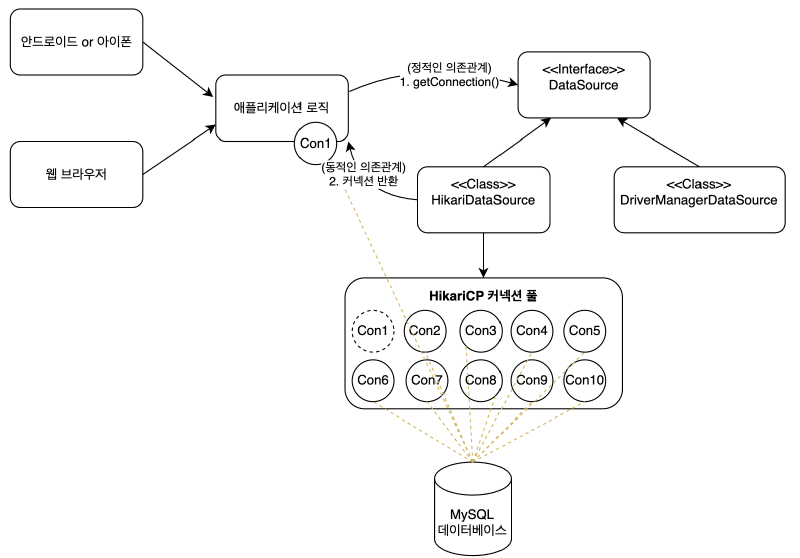
Spring Boot 2.0 부터 기본 DataSource로 설정되는 HikariCP는 직접 DriverManager.getConnection()을 호출하지 않고, 내부적으로 JDBC Driver의 connect() 메서드를 통해 물리 커넥션을 획득하고 관리한다.
커넥션 풀에 들어 있는 커넥션은 TCP/IP로 DB와 커넥션이 연결되어 있는 상태이기 때문에 언제든지 즉시 SQL을 DB에 전달할 수 있다.
HikariCP 커넥션 획득 테스트
@SpringBootTest
public class DataSourceConnectionPoolTest {
    private static final String URL = "jdbc:h2:tcp://localhost/~/spring6";
    private static final String USERNAME = "sa";
    private static final String PASSWORD = "1234";

    @DisplayName("커넥션 풀 획득 테스트")
    @Test
    void dataSourceConnectionPool() throws InterruptedException {
        HikariDataSource dataSource = new HikariDataSource();
        dataSource.setJdbcUrl(URL);
        dataSource.setUsername(USERNAME);
        dataSource.setPassword(PASSWORD);
        dataSource.setMaximumPoolSize(10); // 커넥션 풀 최대 사이즈 10개로 설정
        dataSource.setPoolName("MyPool");
        Thread.sleep(1000); //커넥션 풀에서 커넥션 생성 시간 대기

        // 멀티스레드 구성 (20개 쓰레드)
        int taskCount = 20;
        CountDownLatch latch = new CountDownLatch(taskCount);
        ExecutorService executorService = Executors.newFixedThreadPool(taskCount);

        // 20개 쓰레드를 실행하여 커넥션 빌리고, 로그 출력
        for (int i = 0; i < taskCount; i++) {
            executorService.submit(() -> {
                // try-with-resources 구문을 사용하여 커넥션 풀에서 커넥션을 빌림 (try 블록 종료 시 자동으로 반납)
                try (Connection connection = dataSource.getConnection()) {
                    // 커넥션 정보 확인
                    System.out.println("Thread: " + Thread.currentThread().getName() + ", Connection: " + connection);
                    Thread.sleep(500);
                } catch (SQLException e) {
                    throw new RuntimeException(e);
                } catch (InterruptedException e) {
                    throw new RuntimeException(e);
                } finally {
                    latch.countDown();
                }
            });
        }

        // 모든 쓰레드 종료 대기
        latch.await();
        executorService.shutdown();

        // DataSource 종료
        dataSource.close();
    }
}
application.yml 에서 DataSource 설정
spring:
  datasource:
    url: jdbc:h2:tcp://localhost/~/spring6
    username: sa
    password: 1234
    driver-class-name: org.h2.Driver
    hikari:
      maximum-pool-size: 10
스프링 부트가 애플리케이션을 시작할 때, DataSourceAutoConfiguration 내부에서 클래스패스에 있는 HikariCP 라이브러리를 감지하여 spring.datasource.*, spring.datasource.hikari.* 등으로 시작하는 설정은 DataSourceProperties 및 HikariDataSource에 바인딩한다.
// BeanFactory, ConnectionConst 등은 삭제한다.

@Slf4j
@Repository // 컴포넌트 스캔으로 빈을 등록하고 자동으로 DataSource를 주입받음
public class PostRepository {
    private final DataSource dataSource;

    public PostRepository(DataSource dataSource) {
        this.dataSource = dataSource;
    }

    ...
}
HikariCP Connection Pool Configuration#
HikariCP의 대표 설정값으로는 maximumPoolSize, minimumIdle, idleTimeout, connectionTimeout, maxLifetime 등이 있다.
maximum-pool-size(default = 10)
idle(inActive)-connection과 사용 중인 in-use(active)-connection 을 모두 포함하여 풀이 도달할 수 있는 최대 크기를 제어한다.
기본적으로 이 값에 따라 데이터베이스와 서버의 커넥션에 대한 실제 최대 연결 수가 결정된다.
커넥션풀이 이 크기에 도달하고 사용 가능한 idle-connection이 없는 경우, getConnection() 호출은 최대 connection-timeout 밀리초 동안 차단된다.
적절한 커넥션 풀의 사이즈
커넥션풀의 사이즈는 작게 잡되, 필요 시 충분히 확보는 것이 핵심이다.
HikariCP의 권장 공식
connections = (core_count * 2) + effective_spindle_count
core_count**:** 실제 물리적 CPU 코어 수 (하이퍼스레딩 코어는 포함하지 않음)
effective_spindle_count**:** 캐시가 활성화되어 있다면 0, 그렇지 않으면 실제 디스크 스핀들의 수에 근접한 값
예를 들어, 하드 디스크가 하나 있는 작은 4코어 i7 서버
→ 9 = ((4 * 2) + 1)
Pool-Locking 문제를 피하기 위한 공식
pool-locking이란? 하나의 스레드가 여러 커넥션을 동시에 필요로 하는 경우, 풀의 크기가 너무 작으면 데드락(deadlock) 상태에 빠질 위험이 있다
pool-size = T * (C - 1) + 1
T: 최대 동시 실행가능한 스레드 수
C: 단일 스레드가 동시에 보유할 필요가 있는 커넥션 수
예를 들어, 3개의 스레드가 각각 4개의 커넥션을 필요로 한다면
→ 10 = 3 * (4 − 1) + 1
하지만 실제로 배포 환경에서 적절한 커넥션 수
모니터링 환경을 구축하고(서버 리소스, 서버 스레드, DBCP 등등) 백엔드 시스템에 부하테스트를 가하여 적절한 수를 찾는다.
minimum-idle(default = maximum-pool-size)
pool에서 유지하는 최소한의 idle-connection수를 제어한다. idle-connection 수가 minimum-idle 설정 값보다 작고, 전체 connection 수도 maximum-pool-size 설정값 보다 작다면 신속하게 추가로 connection을 만든다.
maximum-pool-size와 minimum-idle을 같게 유지할려면 maximum-pool-size만 설정하면 된다.
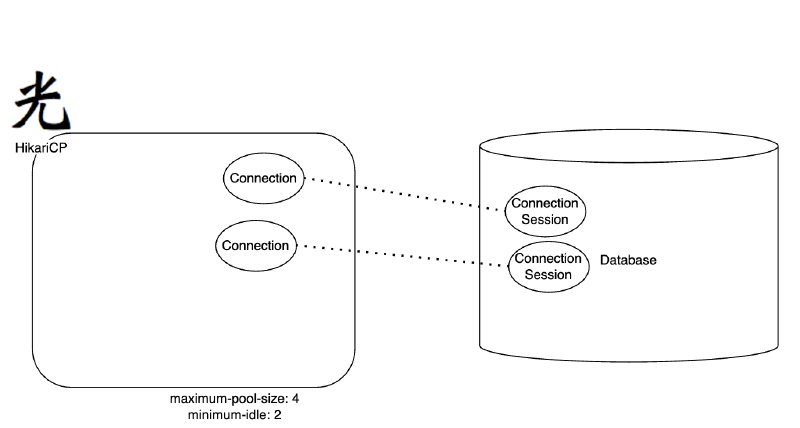
애플리케이션이 실행되고 HikariCP가 초기화될 때, minimum-idle 설정값만큼 커넥션을 미리 만들어 둔다.
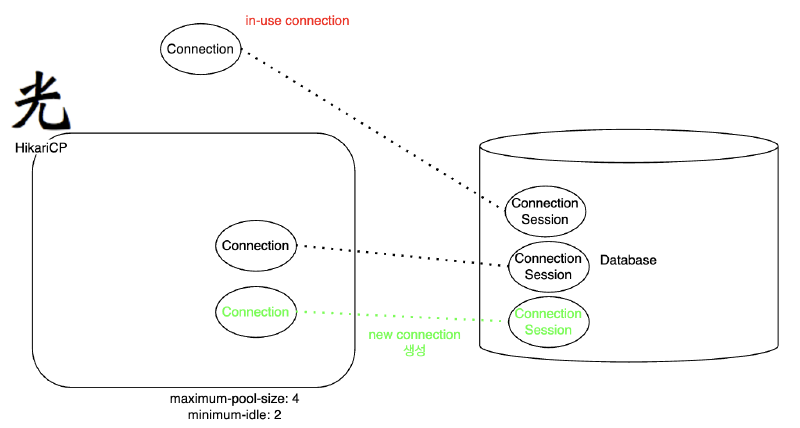
애플리케이션이 DB 작업(쿼리 실행 등)을 위해 커넥션을 요청하면, HikariCP는 풀 안에 미리 준비된 idle-connection을 하나 꺼내서 반환한다.
이 커넥션은 in-use(사용 중) 상태가 되고, DB 쿼리를 수행하거나 트랜잭션 처리를 하게 된다.
만약 트래픽이 발생하여 커넥션 하나가 in-use(사용중) 상태가 된다면 idle-connection은 1개가 남게 된다.
이때 HikariCP는 내부적으로 idle-connection을 minimum-idle 이상 유지하기위해
maximum-pool-size 범위 내에서 새로운 커넥션을 만든다.
idle-timeout
풀에서 connection이 idle-connection상태로 유지될 수 있는 최대 시간을 제어한다.
만약, minimum-idle 보다 더 많은 idle-connection이 있다면 HikariCP는 idle-timeout보다 더 오래된 idle-connection을 커넥션 풀에서 제거하여 커넥션 풀안에 있는 커넥션 수를 minimum-idle 로 맞춘다.
connection-timeout
클라이언트(즉, 사용자)가 풀에서 연결을 대기하는 최대 밀리초 수를 제어한다. 연결을 사용할 수 없는 상태에서 이 시간이 초과되면 예외가 발생한다.
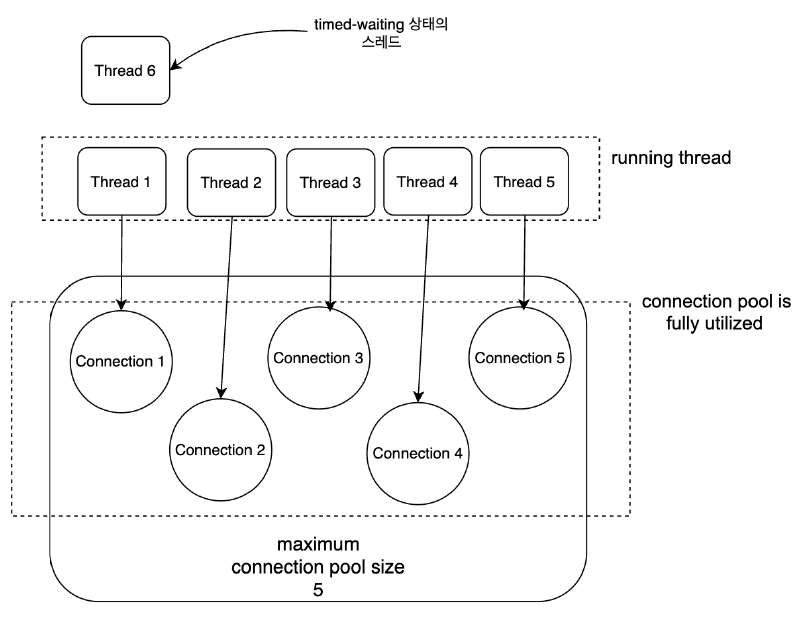
위와 같은 경우 Thread6가 connection-timeout으로 설정된 시간동안 커넥션을 얻지 못하면 예외가 발생한다.
application.yml
spring:
  datasource:
    url: jdbc:h2:tcp://localhost/~/spring6
    username: sa
    password: 1234
    driver-class-name: org.h2.Driver

    # Hikari설정을 추가한다.
    hikari:
      maximum-pool-size: 5
      connection-timeout: 10000
PostRepository
@Slf4j
@Repository
public class PostRepository {
    private final DataSource dataSource;

    public PostRepository(DataSource dataSource) {
        this.dataSource = dataSource;
    }

    public void save(Post post) throws SQLException {
        Connection con = null;
        PreparedStatement pstmt = null;

        try {
            con = dataSource.getConnection();
            pstmt = con.prepareStatement("insert into post(post_id, title, content, likes) values(?, ?, ?, ?)");
            pstmt.setLong(1, post.getPostId());
            pstmt.setString(2, post.getTitle());
            pstmt.setString(3, post.getContent());
            pstmt.setInt(4, post.getLikes());
            pstmt.executeUpdate();
            Thread.sleep(20000); // 20초 대기 추가
        } catch (SQLException e) {
            log.error("db error", e);
            throw e;
        } catch (InterruptedException e) {
            throw new RuntimeException(e);
        } finally {
            if (pstmt != null) {
                try {
                    pstmt.close();
                } catch (SQLException e) {
                    log.error("prepareStatement close error", e);
                    throw e;
                }
            }
            if (con != null) {
                try {
                    con.close();
                } catch (SQLException e) {
                    log.error("connection close error", e);
                    throw e;
                }
            }
        }
    }

    public Post findById(Long id) throws SQLException {
        Connection con = null;
        PreparedStatement pstmt = null;
        ResultSet rs = null;

        try {
            con = dataSource.getConnection();
            pstmt = con.prepareStatement("select * from post where post_id = ?");
            pstmt.setLong(1, id);
            rs = pstmt.executeQuery();
            rs.next();
            return Post.of(rs.getLong("post_id"),
                    rs.getString("title"),
                    rs.getString("content"),
                    rs.getInt("likes"));
        } catch (SQLException e) {
            log.error("db error", e);
            throw e;
        } finally {
            if (rs != null) {
                try {
                    rs.close();
                } catch (SQLException e) {
                    log.error("resultSet close error", e);
                    throw e;
                }
            }
            if (pstmt != null) {
                try {
                    pstmt.close();
                } catch (SQLException e) {
                    log.error("prepareStatement close error", e);
                    throw e;
                }
            }
            if (con != null) {
                try {
                    con.close();
                } catch (SQLException e) {
                    log.error("connection close error", e);
                    throw e;
                }
            }
        }
    }

    public void deleteAll() {
        Connection con = null;
        PreparedStatement pstmt = null;

        try {
            con = dataSource.getConnection();
            pstmt = con.prepareStatement("delete from post");
            pstmt.executeUpdate();
        } catch (SQLException e) {
            log.error("db error", e);
            throw new RuntimeException(e);
        } finally {
            if (pstmt != null) {
                try {
                    pstmt.close();
                } catch (SQLException e) {
                    log.error("prepareStatement close error", e);
                    throw new RuntimeException(e);
                }
            }
            if (con != null) {
                try {
                    con.close();
                } catch (SQLException e) {
                    log.error("connection close error", e);
                    throw new RuntimeException(e);
                }
            }
        }
    }
}
HikariTest
@SpringBootTest
public class HikariTest {

    @Autowired
    private PostRepository postRepository;

    @BeforeEach
    void init() {
        postRepository.deleteAll();
    }

    @AfterEach
    void clear() {
        postRepository.deleteAll();
    }

    @Test
    void testConnectionTimeout() throws InterruptedException {
        final int THREAD_COUNT = 6;
        // 최대 풀 크기가 5이므로 6개 이상의 스레드를 동시에 돌려 타임아웃을 유도

        ExecutorService executorService = Executors.newFixedThreadPool(THREAD_COUNT);
        CountDownLatch latch = new CountDownLatch(THREAD_COUNT);

        for (int i = 0; i < THREAD_COUNT; i++) {
            int index = i;
            executorService.submit(() -> {
                try {
                    // 단순히 postId를 인덱스로 해서 Post 객체 생성
                    Post post = Post.create((long) index, "title " + index, "content " + index);
                    System.out.println("Thread " + index + " starts saving post...");

                    // save 메서드 내에서 20초(20000ms) 대기 발생
                    postRepository.save(post);

                    System.out.println("Thread " + index + " finished saving post.");
                } catch (Exception e) {
                    // 여기서 connection-timeout 발생 시 로그 확인 가능
                    System.out.println("Thread " + index + " error: " + e.getMessage());
                } finally {
                    latch.countDown();
                }
            });
        }

        latch.await(); // 모든 스레드 작업이 끝날 때까지 대기
        executorService.shutdown();
        System.out.println("All threads finished.");
    }
}
max-lifetime
커넥션풀에서 커넥션의 최대 수명을 제어한다. idle-connection이 max-lifetime을 넘기면 커넥션 풀에서 바로 제거하고, active-connection이 max-lifetime을 넘긴 경우 경우 커넥션 풀로 반환된 후 제거된다.
단, 커넥션 풀로 반환되지 않으면 max-lifetime이 동작하지 않는다. → max-lifetime을 넘겨서 계속 커넥션이 살아있을 수 있다.
DB의 wait-timeout
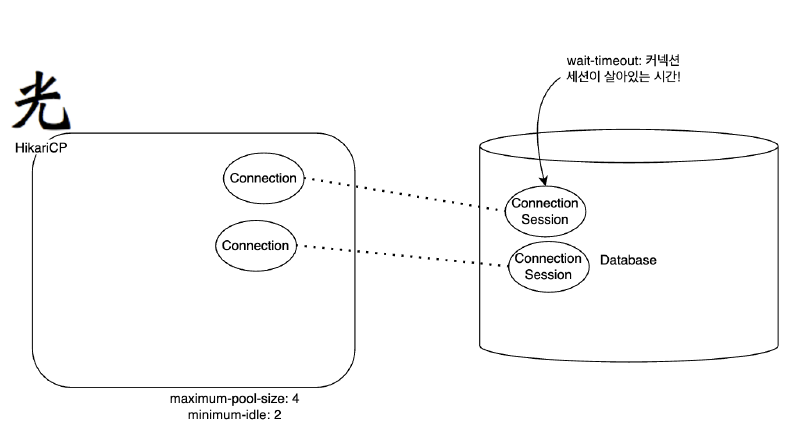
DB에는
wait-timeout이라는 속성이 있다. 해당 속성은 DB에서 커넥션이 inactive한 상황일 때, 다시 요청이 오기까지 얼마의 시간을 기다린 뒤 커넥션(세션)을 닫을 것인지를 제어한다. 만약 애플리케이션에서 비정상적인 커넥션 종료나 반환이 안되는 문제가 발생하면 TCP 연결을 유지한 채 하염없이 기다리는 커넥션이 쌓이게 된다. 이러한 문제를 방지하기 위해wait-timeout이 사용된다.
이때, MySQL의 wait-timeout이 60초로 설정되어 있다면? DB에서는 커넥션을 끊어버리게 된다.
그리고 그때 커넥션이 pool로 반환된다면? 그리고 그 커넥션이 다시 재사용되어 DB로 요청을 보낸다면 예외가 터지게 된다.
따라서 다 쓴 커넥션은 pool로 반환하는 것이 중요하며 HikariCP의 max-lifetime은 DB의 wait-timeout보다 (2~3초 혹은 5초정도)로 짧게 설정해야 한다.
2. Spring JDBC#
2.1 JdbcTemplate 사용법#
JdbcTemplate 구조와 동작 원리#
기존의 PostRepository에는 심각한 문제점이 있다. 바로 예외 상황에 대한 처리다.
try/catch/finally 블록이 2중으로 중첩까지 되어 나오는데다, 모든 메소드마다 반복된다.
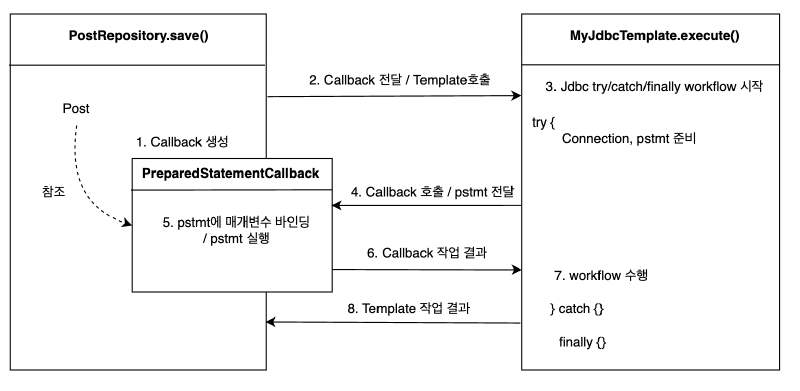
이런 코드를 효과적으로 다룰 수 있는 방법은 없을까? 문제의 핵심은 변하지 않는, 그러나 많은 곳에서 중복되는 코드와 로직에 따라 자꾸 확장되고 자주 변하는 코드를 잘 분리해내는 작업이다.
분리와 재사용을 위해 템플릿 콜백 패턴 적용
변하지 않는 부분: try/catch/finally 블록
변하는 부분: PrepareStatement을 실행하는 부분
MyJdbcTemplate
@Slf4j
public class MyJdbcTemplate {
    private final DataSource dataSource;

    public MyJdbcTemplate(DataSource dataSource) {
        this.dataSource = dataSource;
    }

    public <T> T execute(String sql, MyPreparedStatementCallback<T> callback) throws SQLException {
        Connection con = null;
        PreparedStatement ps = null;
        try {
            con = dataSource.getConnection();
            ps = con.prepareStatement(sql);
            return callback.doInPreparedStatement(ps);
        } catch (SQLException e) {
            log.error("db error", e);
            throw e;
        } finally {
            if (ps != null) {
                try {
                    ps.close();
                } catch (SQLException e) {
                    log.info("prepareStatement close error", e);
                    throw e;
                }
            }
            if (con != null) {
                try {
                    con.close();
                } catch (SQLException e) {
                    log.info("connection close error", e);
                    throw e;
                }
            }
        }
    }
}
PreparedStatementCallback
public interface MyPreparedStatementCallback<T> {
    T doInPreparedStatement(PreparedStatement ps) throws SQLException;
}
PostRepository
@Repository
public class PostRepository {
    private final MyJdbcTemplate myJdbcTemplate;

    public PostRepository(DataSource dataSource) {
        this.myJdbcTemplate = new MyJdbcTemplate(dataSource);
    }

    public void save(Post post) throws SQLException {
        String sql = "insert into post(post_id, title, content, likes) values(?, ?, ?, ?)";
        myJdbcTemplate.execute(sql, ps -> {
            ps.setLong(1, post.getPostId());
            ps.setString(2, post.getTitle());
            ps.setString(3, post.getContent());
            ps.setInt(4, post.getLikes());
            return ps.executeUpdate();
        });
    }

    public Post findById(Long id) throws SQLException {
        String sql = "select * from post where post_id = ?";
        return myJdbcTemplate.execute(sql, ps -> {
            ps.setLong(1, id);
            try (ResultSet rs = ps.executeQuery()) {
                rs.next();
                return Post.of(rs.getLong("post_id"),
                        rs.getString("title"),
                        rs.getString("content"),
                        rs.getInt("likes"));
            }
        });
    }

    public void deleteAll() throws SQLException {
        String sql = "delete from post";
        myJdbcTemplate.execute(sql, ps -> ps.executeUpdate());
    }
}
Spring이 제공하는 JdbcTemplate
JdbcTemplate은 스프링이 제공하는 기능으로, JDBC를 래핑(wrapping)하여 JDBC를 직접 사용할 때 필요한 정형화되고 중복된 처리를 대신해준다.
→ 자바 표준인 JDBC를 좀 더 쉽게 사용할 수 있는 방법을 제공한다.
JdbcTemplate은 템플릿 콜백 패턴을 사용해서, JDBC를 직접 사용할 때 발생하는 대부분의 반복 작업을 대신 처리해준다.
개발자는 SQL을 작성하고, 전달할 파라미터를 정의하고, 응답 값을 매핑하기만 하면 된다.
우리가 생각할 수 있는 대부분의 반복 작업:
Connection획득statement를 준비하고 실행- 결과를 반복하도록 루프를 실행
connection,statement,resultSet종료- 트랜잭션 다루기 위한 커넥션 동기화
- 예외 발생시 스프링 예외 변환기 실행
PostRepository
@Repository
public class PostRepository {
    private final JdbcTemplate jdbcTemplate;

    public PostRepository(DataSource dataSource) {
        this.jdbcTemplate = new JdbcTemplate(dataSource);
    }

    public void save(Post post) {
        String sql = "insert into post(post_id, title, content, likes) values(?, ?, ?, ?)";
        jdbcTemplate.update(sql, post.getPostId(), post.getTitle(), post.getContent(), post.getLikes());
    }

    public Post findById(Long id) {
        String sql = "select * from post where post_id = ?";
        return jdbcTemplate.query(sql, ps -> ps.setLong(1, id), rs -> {
            rs.next();
            return Post.of(rs.getLong("post_id"),
                    rs.getString("title"),
                    rs.getString("content"),
                    rs.getInt("likes"));
        });
    }

    public void deleteAll() {
        String sql = "delete from post";
        jdbcTemplate.update(sql);
    }
}
검색 계열 처리#
검색 계열 처리를 다음 3가지로 나누어 살펴보자.
- 하나의 컬럼을 가져오는 경우
- 레코드를 Map 객체로 변환하여 가져오는 경우
- 레코드를 Entity 객체로 변환하여 가져오는 경우
@SpringBootTest
public class JdbcTemplateTest {

    @Autowired
    private PostRepository postRepository;

    @Autowired
    private JdbcTemplate jdbcTemplate;

    @AfterEach
    void clear() {
        postRepository.deleteAll();
    }

    @DisplayName("한 레코드의 한 컬럼 가져오기")
    @Test
    void queryForObject() throws Exception {
        // given
        Post post = Post.create(1L, "제목1", "내용1");
        postRepository.save(post);

        /**
         * 두 번째 인수에는 반환 값으로 반환할 객체의 타입을 지정한다.
         * 세 번째 인수는 ?기호에 바인딩할 값이다.
         */
        String title = jdbcTemplate.queryForObject("select title from post where post_id = ?", String.class, 1l);

        // then
        Assertions.assertThat(title).isEqualTo("제목1");
    }

    @DisplayName("한 레코드를 Map 객체로 변환해서 가져오기")
    @Test
    void queryForMap() throws Exception {
        // given
        Post post = Post.create(1L, "제목1", "내용1");
        postRepository.save(post);

        // when
        Map<String, Object> map = jdbcTemplate.queryForMap("select * from post where post_id = ?", 1l);

        // then
        System.out.println(map);
    }

    @DisplayName("레코드를 Entity 객체로 변환해서 가져오기")
    @Test
    void queryFonEntity() throws Exception {
        // given
        Post post = Post.create(1L, "제목1", "내용1");
        postRepository.save(post);

        // when
        Post savedPost = jdbcTemplate.queryForObject("select * from post where post_id = ?"
                , new DataClassRowMapper<>(Post.class), 1l);

        // then
        assertEquals(savedPost, post);
    }
}
BeanPropertyRowMapper vs DataClassRowMapper
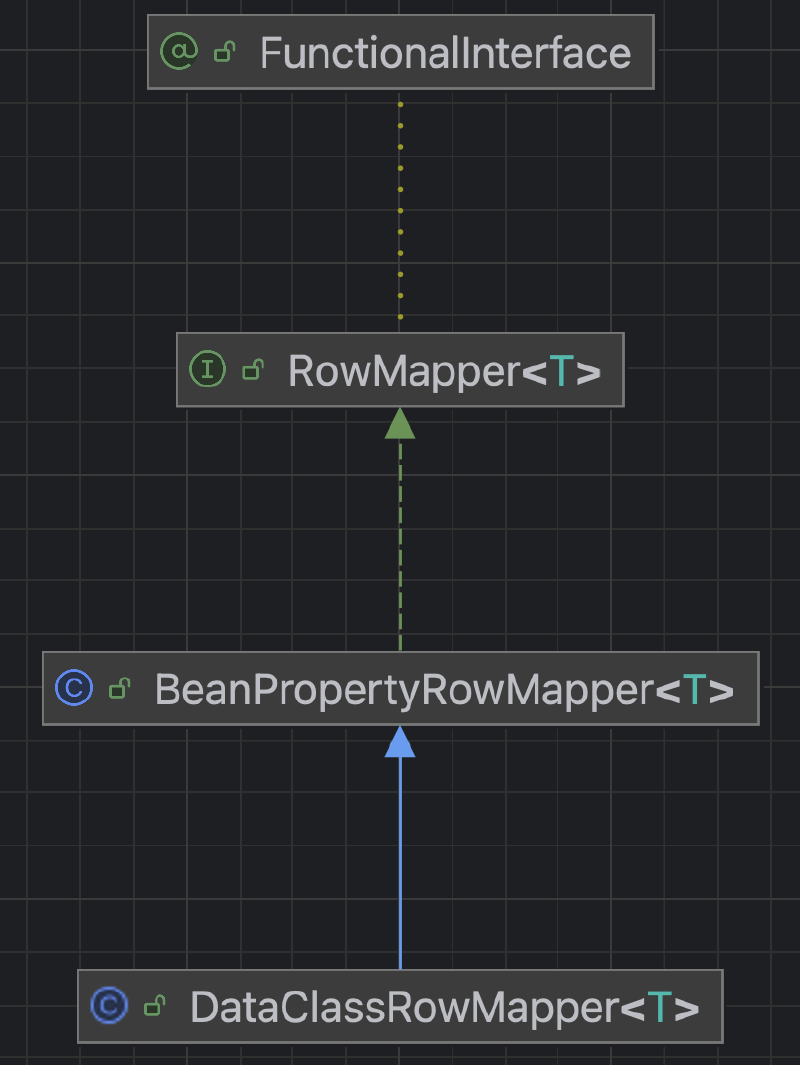
BeanPropertyRowMapper을 사용하는 경우 setter와 기본 생성자가 필요함.
DataClassRowMapper은 생성자 주입 기반으로 동작하기 때문에, setter나 NoArgsConstructor 없이도 불변 객체(immutable object)를 쉽게 매핑할 수 있다.
전반적으로, 불변 객체를 선호하거나 코드의 간결성을 중시한다면 DataClassRowMapper가 매력적인 선택이 될 수 있다.
갱신 계열 처리#
이제부터는 갱신 계열(추가, 변경, 삭제) 처리에 대해 다음 3가지로 나누어 설명한다.
- INSERT 문 실행하기
- UPDATE 문 실행하기
- DELETE 문 실행하기
/**
 * INSERT 문을 실행할 때는 update 메서드를 사용한다. SQL 문은 INSERT 지만 메서드 이름은 update이므로 주의.
 * 이어서 UPDATE, DELETE 문을 실행할 때도 update 메서드를 사용한다.
 */
@DisplayName("insert 쿼리 실행")
@Test
void insert() throws Exception {
    // given
    Post post = Post.create(1L, "제목1", "내용1");
    jdbcTemplate.update("insert into post(post_id, title, content, likes) values(?, ?, ?, ?)",
            post.getPostId(), post.getTitle(), post.getContent(), post.getLikes());

    // when
    Post savedPost = jdbcTemplate.queryForObject("select * from post", new DataClassRowMapper<>(Post.class));

    // then
    assertEquals(savedPost, post);
}

@DisplayName("update 쿼리 실행")
@Test
void update() throws Exception {
    // given
    Post post = Post.create(1L, "제목1", "내용1");
    postRepository.save(post);

    // when
    jdbcTemplate.update("update post set title = ?, content = ? where post_id = ?", "제목2", "내용2", 1L);

    // then
    Post updatedPost = jdbcTemplate.queryForObject("select * from post where post_id = ?", new DataClassRowMapper<>(Post.class), 1L);
    assertEquals(updatedPost.getTitle(), "제목2");
    assertEquals(updatedPost.getContent(), "내용2");
}

@DisplayName("delete 쿼리 실행")
@Test
void delete() throws Exception {
    // given
    Post post = Post.create(1L, "제목1", "내용1");
    postRepository.save(post);

    // when
    jdbcTemplate.update("delete from post where post_id = ?", 1L);

    // then
    List<Post> posts = jdbcTemplate.query("select * from post", new DataClassRowMapper<>(Post.class));
    assertEquals(posts.size(), 0);
}
2.2 NamedParameterJdbcTemplate 활용#
NamedParameterJdbcTemplate를 쓰는 이유#
NamedParameterJdbcTemplate은 Spring에서 제공하는 클래스로, SQL 쿼리에서 ‘?‘기호를 활용한 바인딩 대신 이름이 지정된 파라미터를 사용할 수 있도록 지원한다. 이 클래스는 내부적으로 JdbcTemplate을 활용하여, 실행 시점에 이름이 지정된 파라미터를 JDBC 스타일의 ‘?‘로 대체한다.
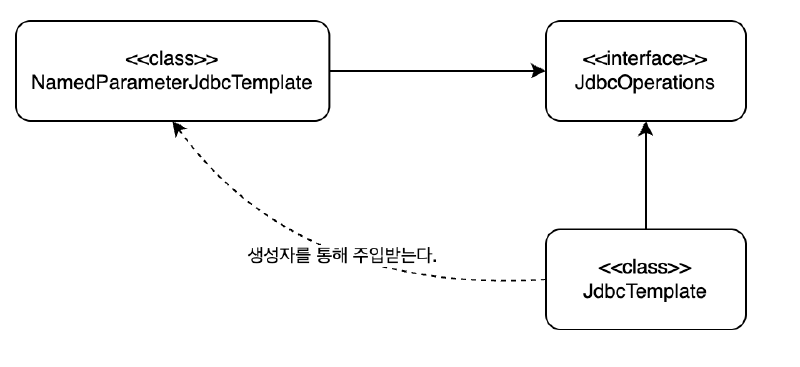
파라미터 바인딩 방식#
NamedParameterJdbcTemplate을 사용할 때 파라미터를 바인딩하는 방법은 대표적으로 다음 세 가지가 있다.
MapSqlParameterSourceBeanPropertySqlParameterSourceCollections.singletonMap
MapSqlParameterSource
장점
- 파라미터를
Map과 유사하게 key-value 형식으로 넣는다. - 값에 추가적인 메타데이터(type 등)를 명시할 수 있다.
단점
- 모든 파라미터를 수동으로 설정해야 하므로 파라미터가 많아지면 코드가 길어질 수 있는 단점이 존재.
MapSqlParameterSource params = new MapSqlParameterSource()
    .addValue("id", 1L)
    .addValue("title", "제목");

MapSqlParameterSource params = new MapSqlParameterSource()
    .addValue("id", 1L, Types.BIGINT)
    .addValue("title", "제목1", Types.VARCHAR)
    .addValue("created_at", LocalDate.now(), Types.DATE);
BeanPropertySqlParameterSource
장점
- 객체 프로퍼티 이름과 SQL의 파라미터 이름이 일치하면 매우 간결하고 유지보수하기 편리하다.
- 코드를 줄이고, 객체와 데이터베이스 간 매핑을 직관적으로 처리할 수 있어 생산성이 좋다.
단점
- 프로퍼티 이름이 바뀌면 SQL 쿼리까지 수정이 필요하여 밀접한 결합이 발생한다.
- 프로퍼티와 SQL 파라미터 이름이 정확히 일치하지 않으면 오류가 발생하여 유지보수가 까다로울 수 있다.
Post post = Post.create(1L, "제목", "내용");
BeanPropertySqlParameterSource params = new BeanPropertySqlParameterSource(post);
Map.of() 또는 Collections.singletonMap
장점
- 코드를 최소한으로 간결하게 유지한다.
- 파라미터가 적을 때 직관적으로 보인다.
단점
- 타입에 대한 추가적인 메타정보 지정이 불가능하다.
- 파라미터가 많아지면 가독성이 떨어질 수 있다.
Map<String, Object> params = Collections.singletonMap("id", 1L);
Map<String, Object> params = Map.of("id", 1L, "title", "제목");
실습 예시#
@SpringBootTest
public class NamedParameterJdbcTemplateTest {

    @Autowired
    private PostRepository postRepository;

    @Autowired
    private NamedParameterJdbcTemplate namedParameterJdbcTemplate;

    @AfterEach
    void clear() {
        postRepository.deleteAll();
    }

    @DisplayName("한 레코드의 한 컬럼 가져오기")
    @Test
    void queryForObject() throws Exception {
        // given
        Post post = Post.create(1L, "제목1", "내용1");
        postRepository.save(post);

        // 파라미터 설정
        MapSqlParameterSource params = new MapSqlParameterSource("postId", 1L);

        // SQL 실행
        String title = namedParameterJdbcTemplate.queryForObject(
                "SELECT title FROM post WHERE post_id = :postId",
                params,
                String.class
        );

        // then
        Assertions.assertThat(title).isEqualTo("제목1");
    }

    @DisplayName("한 레코드를 Map 객체로 변환해서 가져오기")
    @Test
    void queryForMap() throws Exception {
        // given
        Post post = Post.create(1L, "제목1", "내용1");
        postRepository.save(post);

        // 파라미터 설정
        Map<String, Object> params = Collections.singletonMap("postId", 1L);

        // SQL 실행
        Map<String, Object> map = namedParameterJdbcTemplate.queryForMap(
                "SELECT * FROM post WHERE post_id = :postId",
                params
        );

        // then
        System.out.println(map);
    }

    @DisplayName("레코드를 Entity 객체로 변환해서 가져오기")
    @Test
    void queryForEntity() throws Exception {
        // given
        Post post = Post.create(1L, "제목1", "내용1");
        postRepository.save(post);

        // 파라미터 설정
        Map<String, Object> params = Collections.singletonMap("postId", 1L);

        // SQL 실행
        Post savedPost = namedParameterJdbcTemplate.queryForObject(
                "SELECT * FROM post WHERE post_id = :postId",
                params,
                new DataClassRowMapper<>(Post.class)
        );

        // then
        assertEquals(savedPost, post);
    }

    @DisplayName("여러 레코드를 Entity 객체로 변환해서 가져오기")
    @Test
    void queryForEntityList() throws Exception {
        // given
        Post post1 = Post.create(1L, "제목1", "내용1");
        Post post2 = Post.create(2L, "제목2", "내용2");
        Post post3 = Post.create(3L, "제목3", "내용3");
        postRepository.save(post1);
        postRepository.save(post2);
        postRepository.save(post3);

        // SQL 실행
        List<Post> posts = namedParameterJdbcTemplate.query(
                "SELECT * FROM post",
                new DataClassRowMapper<>(Post.class)
        );

        // then
        assertEquals(posts.size(), 3);
        assertEquals(posts, List.of(post1, post2, post3));
    }

    @DisplayName("insert 쿼리 실행")
    @Test
    void insert() throws Exception {
        // given
        Post post = Post.create(1L, "제목1", "내용1");

        // 파라미터 설정
        SqlParameterSource params = new BeanPropertySqlParameterSource(post);

        // SQL 실행
        namedParameterJdbcTemplate.update(
                "INSERT INTO post(post_id, title, content, likes) VALUES(:postId, :title, :content, :likes)",
                params
        );

        // when
        Post savedPost = namedParameterJdbcTemplate.queryForObject(
                "SELECT * FROM post WHERE post_id = :postId",
                Collections.singletonMap("postId", post.getPostId()),
                new DataClassRowMapper<>(Post.class)
        );

        // then
        assertEquals(savedPost, post);
    }

    @DisplayName("update 쿼리 실행")
    @Test
    void update() throws Exception {
        // given
        Post post = Post.create(1L, "제목1", "내용1");
        postRepository.save(post);

        // 파라미터 설정
        Map<String, Object> params = new HashMap<>();
        params.put("title", "제목2");
        params.put("content", "내용2");
        params.put("postId", 1L);

        // SQL 실행
        namedParameterJdbcTemplate.update(
                "UPDATE post SET title = :title, content = :content WHERE post_id = :postId",
                params
        );

        // then
        Post updatedPost = namedParameterJdbcTemplate.queryForObject(
                "SELECT * FROM post WHERE post_id = :postId",
                Collections.singletonMap("postId", 1L),
                new DataClassRowMapper<>(Post.class)
        );
        assertEquals(updatedPost.getTitle(), "제목2");
        assertEquals(updatedPost.getContent(), "내용2");
    }

    @DisplayName("delete 쿼리 실행")
    @Test
    void delete() throws Exception {
        // given
        Post post = Post.create(1L, "제목1", "내용1");
        postRepository.save(post);

        // 파라미터 설정
        Map<String, Object> params = Collections.singletonMap("postId", 1L);

        // SQL 실행
        namedParameterJdbcTemplate.update(
                "DELETE FROM post WHERE post_id = :postId",
                params
        );

        // then
        List<Post> posts = namedParameterJdbcTemplate.query(
                "SELECT * FROM post",
                new DataClassRowMapper<>(Post.class)
        );
        assertEquals(posts.size(), 0);
    }
}
3. 트랜잭션 관리#
3.1 @Transactional 어노테이션 사용#
트랜잭션이란?#
더 이상 나눌 수 없는 단위 작업.
하나의 SQL 명령어를 처리하는 경우는 DB가 트랜잭션을 보장해준다고 믿을 수 있다.
하지만 여러 개의 SQL이 사용되는 작업을 하나의 트랜잭션으로 취급해야 하는 경우도 있다. 이를 통해 데이터의 불일치 상태를 방지할 수 있다.
트랜잭션이 시작되면 여러 개의 SQL을 실행하고, 모든 SQL이 성공하면 마지막으로 커밋한다. 커밋하면 데이터베이스에 데이터가 저장된다.
트랜잭션의 시작과 종료는 기본적으로 Connection 오브젝트를 통해 이뤄진다.
(JPA/Hibernate은 Connection을 직접 사용하지 않고 EntityManager/Session을 이용하고 독자적인 트랜잭션 관리 API를 사용한다.)
JDBC에서 트랜잭션을 시작하려면 자동 커밋 옵션을 false 로 만들어주면 된다. JDBC의 기본 설정은 DB 작업을 수행한 직후에 자동으로 커밋이 되도록 되어 있다.
트랜잭션이 한 번 시작되면 commit() 또는 rollback() 메소드가 호출될 때까지의 작업이 하나의 트랜잭션으로 묶인다.
트랜잭션 작업 중에 예외가 발생하면 트랜잭션을 롤백한다.
데이터베이스에 post_like 스키마 생성
drop table post_like if exists cascade;

CREATE TABLE post_like (
    post_id BIGINT,
    user_id BIGINT,
    liked_at TIMESTAMP DEFAULT CURRENT_TIMESTAMP,
    PRIMARY KEY (post_id, user_id)
);
Post
@Getter
@EqualsAndHashCode
public class Post {
    private final Long postId;
    private final String title;
    private final String content;
    private int likes;

    private Post(Long postId, String title, String content, int likes) {
        this.postId = postId;
        this.title = title;
        this.content = content;
        this.likes = likes;
    }

    public static Post create(Long postId, String title, String content) {
        return new Post(postId, title, content, 0);
    }

    public static Post of(Long postId, String title, String content, int likes) {
        return new Post(postId, title, content, likes);
    }

		// 추가
    public void increaseLikes() {
        this.likes++;
    }
}
PostLike
@Getter
@EqualsAndHashCode
@AllArgsConstructor
public class PostLike {
    private Long postId;
    private Long userId;
    private LocalDateTime likedAt;
}
PostLikeRepository
@Repository
public class PostLikeRepository {
    private final JdbcTemplate jdbcTemplate;

    public PostLikeRepository(JdbcTemplate jdbcTemplate) {
        this.jdbcTemplate = jdbcTemplate;
    }

    public void save(PostLike postLike) {
        String sql = "insert into post_like(post_id, user_id, liked_at) values (?, ?, ?)";
        jdbcTemplate.update(sql, postLike.getPostId(), postLike.getUserId(), Timestamp.valueOf(postLike.getLikedAt()));
    }

    public boolean existsByPostIdAndUserId(Long postId, Long userId) {
        String sql = "select count(*) from post_like where post_id = ? and user_id = ?";
        Integer count = jdbcTemplate.queryForObject(sql, Integer.class, postId, userId);
        return count != null && count > 0;
    }

    public void deleteAll() {
        jdbcTemplate.update("delete from post_like");
    }
}
PostRepository
@Repository
public class PostRepository {
    private final JdbcTemplate jdbcTemplate;

    public PostRepository(DataSource dataSource) {
        this.jdbcTemplate = new JdbcTemplate(dataSource);
    }

    public void save(Post post) {
        String sql = "insert into post(post_id, title, content, likes) values(?, ?, ?, ?)";
        jdbcTemplate.update(sql, post.getPostId(), post.getTitle(), post.getContent(), post.getLikes());
    }

    public void incrementLikes(Long postId) {
        String sql = "update post set likes = likes + 1 where post_id = ?";
        jdbcTemplate.update(sql, postId);
    }

    public Post findById(Long id) {
        String sql = "select * from post where post_id = ?";
        return jdbcTemplate.queryForObject(sql, new DataClassRowMapper<>(Post.class), id);
    }

    public void deleteAll() {
        String sql = "delete from post";
        jdbcTemplate.update(sql);
    }
}
PostLikeService
@Service
@RequiredArgsConstructor
public class PostLikeService {

    private final PostRepository postRepository;
    private final PostLikeRepository postLikeRepository;
    private final DataSource dataSource;

    public void likePost(Long postId, Long userId) throws SQLException {
        Connection connection = dataSource.getConnection();
        connection.setAutoCommit(false);

        try {
            // 먼저 좋아요 수를 증가시키고
            postRepository.incrementLikes(postId);

            // 그 다음 중복 체크에서 예외를 발생시키면,
            // 예외 이후 rollback으로 인해 likes 수가 되돌아갔는지 검증이 가능함
            if (postLikeRepository.existsByPostIdAndUserId(postId, userId)) {
                throw new IllegalStateException("이미 좋아요를 누른 게시글입니다.");
            }

            postLikeRepository.save(new PostLike(postId, userId, LocalDateTime.now()));
            connection.commit();
        } catch (Exception e) {
            connection.rollback();
            throw e;
        } finally {
            connection.setAutoCommit(true);
            connection.close();
        }
    }
}
PostLikeServiceTest
import static org.junit.jupiter.api.Assertions.*;

@SpringBootTest
class PostLikeServiceTest {

    @Autowired
    PostRepository postRepository;

    @Autowired
    PostLikeRepository postLikeRepository;

    @Autowired
    PostLikeService postLikeService;

    @BeforeEach
    void init() throws SQLException {
        postRepository.save(Post.create(1L, "트랜잭션 테스트", "좋아요 기능 테스트"));
    }

    @AfterEach
    void clear() {
        postLikeRepository.deleteAll();
        postRepository.deleteAll();
    }

    @DisplayName("게시글 좋아요 테스트")
    @Test
    void postLikeSave() throws SQLException {
        // given
        Long postId = 1L;
        Long userId = 100L;

        // when
        postLikeService.likePost(postId, userId);

        // then
        Post post = postRepository.findById(postId);
        assertEquals(1, post.getLikes());
        assertTrue(postLikeRepository.existsByPostIdAndUserId(postId, userId));
    }

    @DisplayName("게시글에 중복해서 좋아요를 할 수 없다")
    @Test
    void duplicatePostLikeSave() throws SQLException {
        // given
        Long postId = 1L;
        Long userId = 100L;

        postLikeService.likePost(postId, userId); // 첫 번째 좋아요 성공

        // when, then
        assertThrows(IllegalStateException.class, () -> {
            postLikeService.likePost(postId, userId); // 중복 좋아요 시도
        });

        // 롤백 확인: 좋아요 수는 증가하지 않음
        Post post = postRepository.findById(postId);
        assertEquals(1, post.getLikes());
    }
}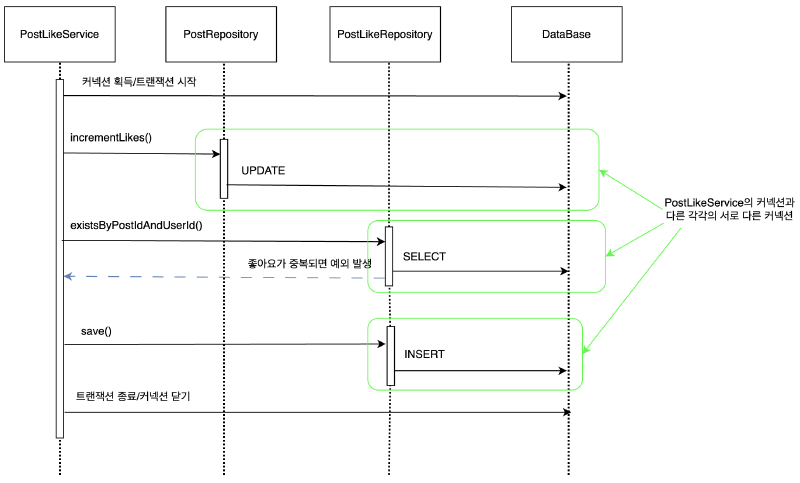
위의 코드를 실행하면 2번째 테스트는 실패하게 된다.
그 이유는 PostLikeService에서 사용된 Connection이 PostRepository, PostLikeRepository에서 사용된 Connection과 서로 다른 커넥션이기 때문이다.
테스트를 성공시키기 위해서는 PostLikeService와 각각의 Repository에서 동일한 Connection을 사용할 필요가 있다.
트랜잭션을 유지하려면 트랜잭션의 시작부터 끝까지 같은 데이터베이스 커넥션을 유지해야한다.
결국 같은 커넥션을 동기화하기 위해서 가장 간단하게는 파라미터로 커넥션을 전달할 수 있다.
하지만, 파라미터로 커넥션을 전달하는 방법은 코드가 지저분해지는 것은 물론이고, 커넥션을 넘기는 메서드와 넘기지 않는 메서드를 중복해서 만들어야 하는 등 여러가지 단점들이 많다. 또한 DB 커넥션을 비롯한 리소스의 깔끔한 처리를 가능하게 했던 JdbcTemplate 도 더 이상 활용할 수 없다.
이 문제를 해결하기 위해 스프링이 제안하는 방법은 독립적인 트랜잭션 동기화 방식이다.
스프링이 제공하는 트랜잭션#
트랜잭션 동기화란?
PostLikeService에서 트랜잭션을 시작하기 위해 만든 Connection 오브젝트를 특별한 저장소(ThreadLocal)에 보관해두고,
이후에 호출되는 Repository의 메소드에서는(정확히는 JdbcTemplate) 저장된 Connection을 가져다가 사용하게 하는 것이다.
스프링에서는 이를 위해 PlatformTransactionManager 이용한 트랜잭션 추상화 기능을 제공한다.
트랜잭션 동기화가 되어 있는 채로 JdbcTemplate 을 사용하면 JdbcTemplate의 작업에서 동기화시킨 DB커넥션을 사용하게 된다.
PostLikeService
@Service
@RequiredArgsConstructor
public class PostLikeService {

    private final PostRepository postRepository;
    private final PostLikeRepository postLikeRepository;
    private final PlatformTransactionManager transactionManager;

    public void likePost(Long postId, Long userId) throws SQLException {
        TransactionStatus status = transactionManager.getTransaction(new DefaultTransactionDefinition());

        try {
            // 먼저 좋아요 수를 증가시키고
            postRepository.incrementLikes(postId);

            // 그 다음 중복 체크에서 예외를 발생시키면,
            // 예외 이후 rollback으로 인해 likes 수가 되돌아갔는지 검증이 가능함
            if (postLikeRepository.existsByPostIdAndUserId(postId, userId)) {
                throw new IllegalStateException("이미 좋아요를 누른 게시글입니다.");
            }

            postLikeRepository.save(new PostLike(postId, userId, LocalDateTime.now()));
            transactionManager.commit(status);
        } catch (Exception e) {
            transactionManager.rollback(status);
            throw e;
        }
    }
}
트랜잭션을 사용하는 로직을 살펴보면 다음과 같은 패턴이 반복되는 것을 확인할 수 있다.
다른 서비스에서 트랜잭션을 시작하려면 try , catch , finally를 포함한 성공시 커밋, 실패시 롤백 코드가 반복될 것이다.
스프링은 반복 문제를 해결하기 위해 템플릿 콜백 패턴을 적용한 TransactionTemplate을 제공한다.
PostLikeService
@Service
public class PostLikeService {

    private final PostRepository postRepository;
    private final PostLikeRepository postLikeRepository;
    private final TransactionTemplate transactionTemplate;

    public PostLikeService(PostRepository postRepository, PostLikeRepository postLikeRepository, PlatformTransactionManager txManager) {
        this.postRepository = postRepository;
        this.postLikeRepository = postLikeRepository;
        this.transactionTemplate = new TransactionTemplate(txManager);
    }

    public void likePost(Long postId, Long userId) {
        transactionTemplate.executeWithoutResult(status -> {
            postRepository.incrementLikes(postId);

            if (postLikeRepository.existsByPostIdAndUserId(postId, userId)) {
                throw new IllegalStateException("이미 좋아요를 누른 게시글입니다.");
            }

            postLikeRepository.save(new PostLike(postId, userId, LocalDateTime.now()));
        });
    }
}
서비스 로직은 가급적 핵심 비즈니스 로직만 있어야 한다. 하지만 트랜잭션 기술을 사용하려면 어쩔 수 없이 트랜잭션 코드가 나와야 한다. 어떻게 하면 이 문제를 해결할 수 있을까?
@Transactional을 사용하면 스프링이 AOP를 적용해서 이 문제를 해결해준다.
PostLikeService
@Service
public class PostLikeService {

    private final PostRepository postRepository;
    private final PostLikeRepository postLikeRepository;

    public PostLikeService(PostRepository postRepository, PostLikeRepository postLikeRepository) {
        this.postRepository = postRepository;
        this.postLikeRepository = postLikeRepository;
    }

    @Transactional
    public void likePost(Long postId, Long userId) {
        postRepository.incrementLikes(postId);

        if (postLikeRepository.existsByPostIdAndUserId(postId, userId)) {
            throw new IllegalStateException("이미 좋아요를 누른 게시글입니다.");
        }

        postLikeRepository.save(new PostLike(postId, userId, LocalDateTime.now()));
    }
}
@Transactional을 활성화 하는 설정
@Transactional이 붙은 클래스를 탐지하여 Proxy 객체를 자동으로 생성하기 위해서는 @EnableTransactionManagement가 활성화되어야 한다.
만약, 이 설정을 잊어버리면 메서드 또는 클래스에 @Transactional을 붙여도 Proxy가 생성되지 않고 트랜잭션 제어가 되지 않으니 주의해야 한다.
하지만 스프링 부트를 사용할 때는 자동 구성(Auto-Configuration) 메커니즘에 의해 트랜잭션 관리가 활성화된다.
스프링 부트는 @SpringBootApplication에 포함된 @EnableAutoConfiguration을 통해 여러 Auto-Configuration 클래스를 읽어들이는데, 그 중 하나인 TransactionAutoConfiguration 클래스에서 트랜잭션 관리를 자동으로 설정한다.
따라서 @EnableTransactionManagement를 직접 명시하지 않아도 된다.
3.2 선언적 트랜잭션 vs 프로그래밍적 트랜잭션#
선언적 트랜잭션과 프로그래밍적 트랜잭션#
선언적 트랜잭션이란?
Spring 프레임워크의 선언적 트랜잭션 관리는 Spring AOP을 통해 가능하다.
과거에는 xml을 이용해서 작성하기도 했다.
동작방식
스프링이 프록시(proxy) 객체를 생성하여, @Transactional이 붙은 메서드가 호출될 때 트랜잭션을 시작하고, 메서드가 종료될 때 트랜잭션을 커밋하거나 롤백한다.
예외 발생, 메서드 종료 시점 등에 따라 트랜잭션을 자동 관리함.
@Service
public class PostLikeService {

    private final PostRepository postRepository;
    private final PostLikeRepository postLikeRepository;

    public PostLikeService(PostRepository postRepository, PostLikeRepository postLikeRepository) {
        this.postRepository = postRepository;
        this.postLikeRepository = postLikeRepository;
    }

    @Transactional
    public void likePost(Long postId, Long userId) {
        postRepository.incrementLikes(postId);

        if (postLikeRepository.existsByPostIdAndUserId(postId, userId)) {
            throw new IllegalStateException("이미 좋아요를 누른 게시글입니다.");
        }

        postLikeRepository.save(new PostLike(postId, userId, LocalDateTime.now()));
    }
}
장점
- 간결성: 트랜잭션 제어 코드를 직접 작성할 필요 없이, 어노테이션만 붙이면 된다.
- 관심사 분리: 비즈니스 로직과 트랜잭션 로직이 분리. 코드 가독성 및 유지보수성 향상.
- 일관성: 프레임워크가 일관된 방식으로 트랜잭션을 처리해주므로, 실수로 인한 누락이나 중복이 적다.
단점
- 세밀한 제어가 어려움: 기본 동작 외에 특수한 트랜잭션 경계(부분 커밋, 매우 복잡한 흐름)를 제어하기 까다롭다.
- 프록시 제한: 내부 메서드 호출에는
@Transactional이 적용되지 않는 등 AOP 프록시 한계가 있다. - 기술적 이해 필요: 동적 프록시, AOP, 예외 롤백 규칙 등에 대한 이해가 부족하면 예상치 못한 동작이 발생할 수 있다.
프로그래밍적 트랜잭션이란?
코드 레벨에서 명시적으로 트랜잭션 시작, 커밋, 롤백을 수행하는 방식
트랜잭션 관련 코드를 직접 작성하는 것으로 스프링 프레임워크는 프로그래밍적 트랜잭션 관리를 위한 두 가지 수단을 제공한다.
TransactionTemplateorTransactionalOperatorTransactionManager를 이용
Spring 팀은 일반적으로 프로그래밍 방식의 트랜잭션 관리를 위해 TransactionTemplate을, 리액티브 코드에는 TransactionalOperator를 권장한다.
TransactionTemplate 예시
@Service
public class PostLikeService {

    private final PostRepository postRepository;
    private final PostLikeRepository postLikeRepository;
    private final TransactionTemplate transactionTemplate;

    public PostLikeService(PostRepository postRepository, PostLikeRepository postLikeRepository, PlatformTransactionManager txManager) {
        this.postRepository = postRepository;
        this.postLikeRepository = postLikeRepository;
        this.transactionTemplate = new TransactionTemplate(txManager);
    }

    public void likePost(Long postId, Long userId) {
        transactionTemplate.executeWithoutResult(status -> {
            postRepository.incrementLikes(postId);

            if (postLikeRepository.existsByPostIdAndUserId(postId, userId)) {
                throw new IllegalStateException("이미 좋아요를 누른 게시글입니다.");
            }

            postLikeRepository.save(new PostLike(postId, userId, LocalDateTime.now()));
        });
    }
}
transactionTemplate.execute() 블록 안의 코드를 트랜잭션 범위로 설정하고, 종료 시점에 커밋 또는 롤백을 수행한다.
TransactionManager 예시
@Service
@RequiredArgsConstructor
public class PostLikeService {

    private final PostRepository postRepository;
    private final PostLikeRepository postLikeRepository;
    private final PlatformTransactionManager transactionManager;

    public void likePost(Long postId, Long userId) throws SQLException {
        TransactionStatus status = transactionManager.getTransaction(new DefaultTransactionDefinition());

        try {
            // 먼저 좋아요 수를 증가시키고
            postRepository.incrementLikes(postId);

            // 그 다음 중복 체크에서 예외를 발생시키면,
            // 예외 이후 rollback으로 인해 likes 수가 되돌아갔는지 검증이 가능함
            if (postLikeRepository.existsByPostIdAndUserId(postId, userId)) {
                throw new IllegalStateException("이미 좋아요를 누른 게시글입니다.");
            }

            postLikeRepository.save(new PostLike(postId, userId, LocalDateTime.now()));
            transactionManager.commit(status);
        } catch (Exception e) {
            transactionManager.rollback(status);
            throw e;
        }
    }
}
장점
- 세밀한 제어: 트랜잭션 중간에 커밋, 롤백을 결정하거나 특정 조건에 따라 동적으로 트랜잭션 범위를 조정할 수 있다.
- 명시적 흐름: 로직에서 트랜잭션 경계가 어디인지 직관적으로 알 수 있어 디버깅이 쉬울 수 있다.
단점
- 코드 중복: 트랜잭션 시작, 커밋, 롤백 같은 코드가 여러 군데에 반복될 수 있다.
- 비즈니스 로직과 결합: 트랜잭션 로직이 비즈니스 코드와 섞여서 가독성이 떨어질 수 있다.
- 추가 학습 곡선:
PlatformTransactionManager,TransactionDefinition,TransactionStatus등 스프링 트랜잭션 API에 대한 학습이 필요하다.
선언적 트랜잭션 vs 프로그래밍적 트랜잭션
프로그래밍적 트랜잭션 관리는 일반적으로 트랜잭션 작업 수가 적은 경우에만 사용하는 것이 좋다.
예를 들어 특정 업데이트 작업에 대해서만 트랜잭션이 필요한 웹 애플리케이션이 있는 경우 Spring AOP나 다른 기술을 사용하여 프록시를 설정하고 싶지 않을 수 있다.
이 경우 TransactionTemplate을 사용하는 것이 좋은 방법일 수 있다.
반면에 애플리케이션에 수많은 트랜잭션 작업이 있는 경우 선언적 트랜잭션 관리가 일반적으로 가치가 있다. 트랜잭션 관리를 비즈니스 로직과 분리하여 구성할 수 있다.
Spring 프레임워크를 사용하면 선언적 트랜잭션 관리의 구성 비용이 크게 줄어든다.
일반적인 웹/서비스 개발
대부분의 경우, 간단히
@Transactional을 사용하는 선언적 트랜잭션이 더 효율적.코드가 깔끔하고, 유지보수하기 쉬우며, 스프링이 일관적으로 관리해주기 때문.
특수한 트랜잭션 흐름
예를 들어, 한 메서드에서 여러 번 부분 커밋을 하거나, 특정 조건에서만 롤백을 해야 하는 등의 복잡한 시나리오에서는 프로그래밍적 트랜잭션이 유연할 수 있다.
혼합 사용
대부분 선언적 트랜잭션을 사용하되, 아주 세밀한 트랜잭션 경계가 필요한 일부 구간에서 프로그래밍적 트랜잭션을 사용하는 방식도 가능하다.
세밀한 트랜잭션 제어 예시#
PostLikeProgrammaticService
@Slf4j
@Service
@RequiredArgsConstructor
public class PostLikeProgrammaticService {

    private final PostRepository postRepository;
    private final PostLikeRepository postLikeRepository;
    private final PlatformTransactionManager transactionManager;

    /**
     * 여러 게시글에 좋아요를 누르는 메서드
     * @param partialAllowed true이면 일부 게시글 실패 시 롤백하지 않고 나머지 성공 허용
     */
    public void likeMultiplePosts(List<Long> postIds, Long userId, boolean partialAllowed) {
        TransactionTemplate txTemplate = new TransactionTemplate(transactionManager);

        if (!partialAllowed) {
            txTemplate.executeWithoutResult(status -> {
                for (Long postId : postIds) {
                    // 좋아요 로직에서 예외가 발생하면 트랜잭션 전체 롤백
                    likeSinglePostOrThrow(postId, userId);
                }
            });
            return;
        }

        // partialAllowed == true인 경우 -> 부분 성공 허용
        // "각 게시글마다 별도의 트랜잭션"으로 처리 (중첩 트랜잭션 or 반복 트랜잭션)
        for (Long postId : postIds) {
            try {
                txTemplate.executeWithoutResult(status -> {
                    likeSinglePostOrThrow(postId, userId);
                });
            } catch (Exception e) {
                // 특정 게시글이 실패해도 로그만 남기고 넘어감
                log.info("게시글 {} 좋아요 실패: {}", postId, e.getMessage());
            }
        }
    }

    /**
     * 단일 게시글에 좋아요 수행하고, 중복 좋아요면 예외 발생
     * (중복 좋아요 시도 등으로 예외가 발생해도 그대로 throw해서 롤백 유도)
     */
    private void likeSinglePostOrThrow(Long postId, Long userId) {
        if (postLikeRepository.existsByPostIdAndUserId(postId, userId)) {
            throw new IllegalStateException("이미 좋아요를 누른 게시글입니다. (postId=" + postId + ")");
        }
        postRepository.incrementLikes(postId);
        postLikeRepository.save(new PostLike(postId, userId, LocalDateTime.now()));
    }
}
PostLikeProgrammaticServiceTest
@SpringBootTest
class PostLikeProgrammaticServiceTest {

    @Autowired
    PostLikeProgrammaticService postLikeProgrammaticService;

    @Autowired
    PostRepository postRepository;

    @Autowired
    PostLikeRepository postLikeRepository;

    @BeforeEach
    void init() throws SQLException {
        // 3개의 게시글을 미리 생성
        postRepository.save(Post.create(1L, "Title1", "Content1"));
        postRepository.save(Post.create(2L, "Title2", "Content2"));
        postRepository.save(Post.create(3L, "Title3", "Content3"));
    }

    @AfterEach
    void clear() {
        postLikeRepository.deleteAll();
        postRepository.deleteAll();
    }

    @DisplayName("All-or-Nothing 모드에서 하나라도 실패 시 전체 롤백")
    @Test
    void likeMultiplePostsAllOrNothingFail() throws SQLException {
        // given
        List<Long> postIds = Arrays.asList(1L, 2L, 3L);
        Long userId = 100L;

        // 2번 게시글에 좋아요 넣어 중복 상황을 만들기
        postLikeRepository.save(new PostLike(2L, userId, LocalDateTime.now()));

        // when - then
        // 2번 게시글에서 예외 -> 전체 롤백
        assertThrows(IllegalStateException.class, () ->
                postLikeProgrammaticService.likeMultiplePosts(postIds, userId, false) // partialAllowed = false
        );

        // then: 1, 3번 게시글 좋아요도 실패해야 함 -> likes=0, post_like 테이블도 변화 없음
        assertEquals(0, postRepository.findById(1L).getLikes());
        assertEquals(0, postRepository.findById(2L).getLikes()); // 기존에 있는 likes만 반영 (지금은 0)
        assertEquals(0, postRepository.findById(3L).getLikes());

        // 2번 게시글 좋아요는 이미 있음
        assertTrue(postLikeRepository.existsByPostIdAndUserId(2L, userId));

        // 나머지 게시글 좋아요는 없음
        assertFalse(postLikeRepository.existsByPostIdAndUserId(1L, userId));
        assertFalse(postLikeRepository.existsByPostIdAndUserId(3L, userId));
    }

    @Test
    @DisplayName("PartialAllowed=true -> 실패한 게시글만 롤백, 나머지는 성공")
    void likeMultiplePostsPartialSuccess() throws SQLException {
        // given
        List<Long> postIds = Arrays.asList(1L, 2L, 3L);
        Long userId = 100L;

        // 이미 1번 게시글에 좋아요 -> 1번 게시글에서 예외 예상
        postLikeRepository.save(new PostLike(1L, userId, LocalDateTime.now()));

        // when
        postLikeProgrammaticService.likeMultiplePosts(postIds, userId, true); // partialAllowed = true

        // then
        // 1) 1번 게시글 -> 실패(중복), 롤백됨 (likes 변화 없음)
        assertEquals(0, postRepository.findById(1L).getLikes());

        // 2) 2번, 3번 게시글 -> 성공 (likes=1)
        assertEquals(1, postRepository.findById(2L).getLikes());
        assertEquals(1, postRepository.findById(3L).getLikes());

        // post_like -> 1번은 기존 1개 레코드만, 2번과 3번 추가됨
        assertTrue(postLikeRepository.existsByPostIdAndUserId(1L, userId));
        assertTrue(postLikeRepository.existsByPostIdAndUserId(2L, userId));
        assertTrue(postLikeRepository.existsByPostIdAndUserId(3L, userId));
    }
}
All-or-Nothing vs PartialSuccess
한 메서드에서 모든 게시글 좋아요를 처리하되, 일부 실패 시 전부 롤백할지, 실패한 게시글만 롤백할지를 동적으로 제어한다.
부분 성공 허용 시, 게시글마다 새로운 트랜잭션을 열어 좋아요를 시도함으로써 개별 롤백이 가능해진다.
내부에서 중복 예외(IllegalStateException)가 발생하면 트랜잭션을 롤백하도록 하고, 그 예외를 받아 필요 시 로그만 남기고 넘어갈 수 있다.
만약, 선언적 트랜잭션(@Transactional)으로 단일 메서드에 묶기만 하면 “All-or-Nothing”이 되어버려 부분 성공과 같은 트랜잭션 범위를 유연하게 조절하는 것이 어렵다.
3.3 트랜잭션의 내부 구조#
트랜잭션 매니저와 트랜잭션 동기화 매니저#
PlatformTransactionManager(트랜잭션 매니저)
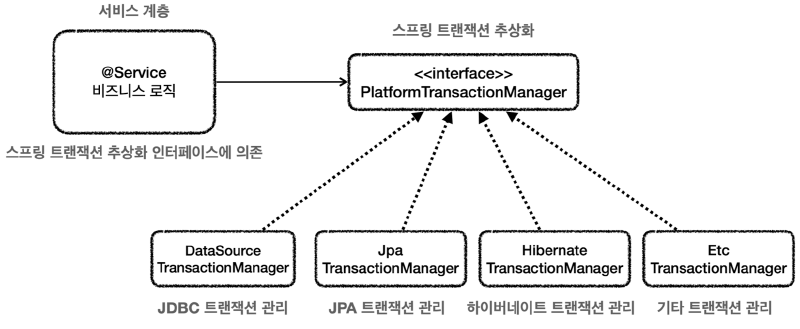
출처: 김영한의 스프링 DB1
구현 기술에 따른 트랜잭션 사용법
트랜잭션은 구현 기술마다 사용하는 방법이 다르다.
JDBC:
connection.setAutoCommit(false), connection.commit(), connection.rollback()
JPA:
tx = entityManager.getTransaction()
tx.begin(), tx.commit(), tx.rollback()
Hibernate:
tx = session.beginTransaction()
tx.commit(), tx.rollback()
만약 데이터베이스 접근 기술을 JDBC에서 JPA로 변경한다면 서비스 계층의 트랜잭션 시작 코드를 수정해야한다.
이러한 문제를 해결하기 위해 PlatformTransactionManager 을 이용한 트랜잭션 추상화 기술을 스프링은 제공하며, 주로 사용하는 데이터 접근 기술에 대한 트랜잭션 매니저의 구현체도 제공한다.
여기에 더해서 스프링 부트는 어떤 데이터 접근 기술을 사용하는지를 자동으로 인식해서 적절한 트랜잭션 매니저를 선택해서 스프링빈으로 등록해주기 때문에 트랜잭션 매니저를 선택하고 등록하는 과정도 생략할 수 있다.
예를 들어서 JdbcTemplate , MyBatis를 사용하면 DataSourceTransactionManager(JdbcTransactionManager) 를 스프링빈으로 등록하고, JPA를 사용하면 JpaTransactionManager를 스프링 빈으로 등록해준다.
TransactionSynchronizationManager(트랜잭션 동기화 매니저)와 DataSourceUtils
스프링은 멀티스레드 환경에서도 안전한 트랜잭션 동기화 방법을 구현하기 위해 TransactionSynchronizationManager를 제공한다. 이것은 쓰레드 로컬( ThreadLocal )을 사용해서 커넥션을 동기화해준다.
**“트랜잭션 매니저”**는 내부에서 이 “**트랜잭션 동기화 매니저”**를 사용한다.
트랜잭션 동기화 매니저는 쓰레드 로컬을 사용하기 때문에 멀티쓰레드 상황에 안전하게 커넥션을 동기화 할 수 있다.
커넥션이 필요하면 DataSourceUtils 에서 제공하는 getConnection() 메소드를 통해 DB 커넥션을 가져올 수 있다.
DataSource에서 커넥션을 직접 가져오지 않고, 스프링이 제공하는 유틸리티 메소드를 쓰는 이유는 이 DataSourceUtils의 getConnection() 메소드는 Connection 오브젝트를 DataSource에서 가져올 뿐만 아니라 트랜잭션 동기화에 사용하도록 저장소(ThreadLocal)에 바인딩해주기 때문이다.
트랜잭션 예시의 내부 구조#
TransactionTemplate을 사용한 경우 내부 구조
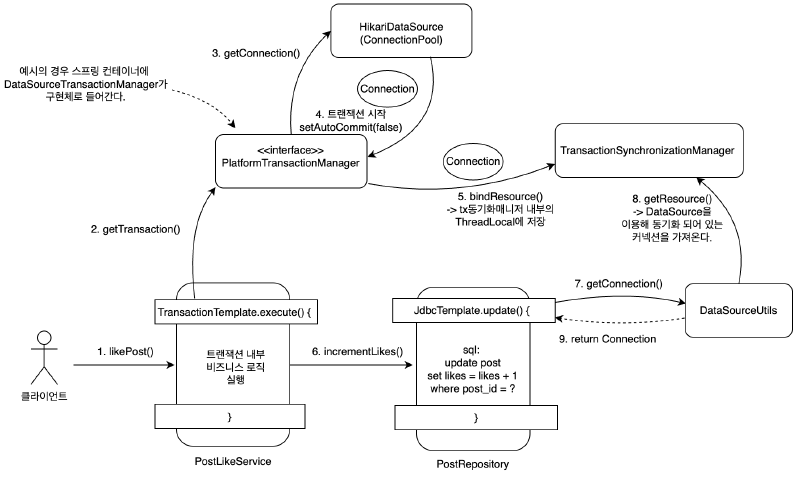
JdbcTemplate은 내부적으로 DataSourceUtils을 이용한다.
@Transactional을 사용한 경우 내부 구조
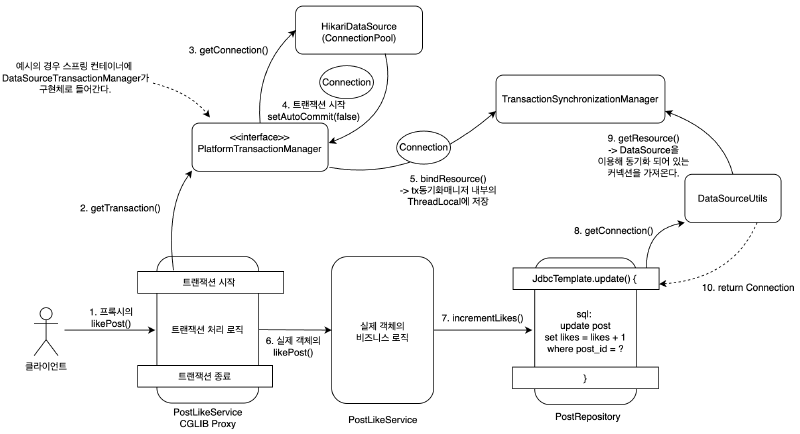
트랜잭션 적용 범위(메서드, 클래스 단위)#
스프링에서 우선순위는 항상 더 구체적이고 자세한 것이 높은 우선순위를 가진다.
예를 들어서 메서드와 클래스에 애노테이션을 붙일 수 있다면 더 구체적인 메서드가 더 높은 우선순위를 가진다.
인터페이스와 해당 인터페이스를 구현한 클래스에 애노테이션을 붙일 수 있다면 더 구체적인 클래스가 더 높은 우선순위를 가진다.
// test lombok
testCompileOnly('org.projectlombok:lombok')
testAnnotationProcessor('org.projectlombok:lombok')
@SpringBootTest
public class TxLevelTest {
@Autowired
LevelService service;
@Test
void orderTest() {
service.write();
service.read();
}
@TestConfiguration
static class TxApplyLevelConfig {
@Bean
LevelService levelService() {
return new LevelService();
}
}
@Slf4j
@Transactional(readOnly = true)
static class LevelService {
@Transactional(readOnly = false)
public void write() {
log.info("call write");
printTxInfo();
}
public void read() {
log.info("call read");
printTxInfo();
}
private void printTxInfo() {
boolean txActive = TransactionSynchronizationManager.isActualTransactionActive();
log.info("tx active={}", txActive);
boolean readOnly = TransactionSynchronizationManager.isCurrentTransactionReadOnly();
log.info("tx readOnly={}", readOnly);
}
}
}클래스 레벨: @Transactional(readOnly = true)
기본적으로 이 클래스 내 모든 메서드가 “읽기 전용” 트랜잭션으로 동작하게 된다.
메서드 레벨: @Transactional(readOnly = false)
클래스 레벨에서 읽기 전용을 설정했더라도, 메서드 수준에서 별도의 설정(여기서는 readOnly = false)을 선언하면 이 메서드가 우선 적용된다.
결과적으로, write() 메서드는 읽기 전용이 아닌 트랜잭션으로 동작한다.
트랜잭션 AOP의 주의 사항1#
PostLikeService
@Service
public class PostLikeService {

    private final PostRepository postRepository;
    private final PostLikeRepository postLikeRepository;

    public PostLikeService(PostRepository postRepository, PostLikeRepository postLikeRepository) {
        this.postRepository = postRepository;
        this.postLikeRepository = postLikeRepository;
    }

    @Transactional
    public void likePost(Long postId, Long userId) {
        // postRepository.incrementLikes(postId);
        Post post = postRepository.findById(postId);
        post.increaseLikes();
        postRepository.update(post);

        if (postLikeRepository.existsByPostIdAndUserId(postId, userId)) {
            throw new IllegalStateException("이미 좋아요를 누른 게시글입니다.");
        }

        postLikeRepository.save(new PostLike(postId, userId, LocalDateTime.now()));
    }
}
PostRepository
@Repository
public class PostRepository {
    private final JdbcTemplate jdbcTemplate;

    public PostRepository(DataSource dataSource) {
        this.jdbcTemplate = new JdbcTemplate(dataSource);
    }

    public void save(Post post) {
        String sql = "insert into post(post_id, title, content, likes) values(?, ?, ?, ?)";
        jdbcTemplate.update(sql, post.getPostId(), post.getTitle(), post.getContent(), post.getLikes());
    }

    public void incrementLikes(Long postId) {
        String sql = "update post set likes = likes + 1 where post_id = ?";
        jdbcTemplate.update(sql, postId);
    }

		// 추가
    public void update(Post post) {
        String sql = "update post set title = ?, content = ?, likes = ? where post_id = ?";
        jdbcTemplate.update(sql, post.getTitle(), post.getContent(), post.getLikes(), post.getPostId());
    }

    public Post findById(Long id) {
        String sql = "select * from post where post_id = ?";
        return jdbcTemplate.queryForObject(sql, new DataClassRowMapper<>(Post.class), id);
    }

    public void deleteAll() {
        String sql = "delete from post";
        jdbcTemplate.update(sql);
    }
}
PostLikeSyncTest
@SpringBootTest
public class PostLikeSyncTest {

    @Autowired
    private PostRepository postRepository;

    @Autowired
    private PostLikeService postLikeService;

    @Autowired
    private PostLikeRepository postLikeRepository;

    @BeforeEach
    void init() {
        postRepository.deleteAll();
        postLikeRepository.deleteAll();
        // 초기 게시글 생성
        postRepository.save(Post.create(10L, "title", "content"));
    }

    @AfterEach
    void clear() {
        postRepository.deleteAll();
        postLikeRepository.deleteAll();
    }

    @DisplayName("게시글 좋아요 동시성 테스트")
    @Test
    void unLikeSync() throws Exception {
        // given
        int threadCount = 400;

        ExecutorService executorService = Executors.newFixedThreadPool(threadCount);
        CountDownLatch latch = new CountDownLatch(threadCount);

        // when
        for (int i = 0; i < threadCount; i++) {
            Long userId = (long) i;
            executorService.submit(() -> {
                try {
                    postLikeService.likePost(10L, userId);
                } finally {
                    latch.countDown();
                }
            });
        }

        latch.await();
        executorService.shutdown();

        // then
        Post post = postRepository.findById(10L);
        assertThat(post.getLikes()).isEqualTo(400);
    }
}
위의 코드는 likes 컬럼에 경쟁조건이 일어나는 동시성 예제이며 테스트는 실패한다.
그 이유는 동시에 여러 스레드가 같은 게시글에 대해 좋아요를 누르는 과정에서, DB로부터 읽어 온 “likes”를 각각 메모리에 올려서 1씩 증가한 뒤 다시 업데이트하기 때문이다.
즉, 다음과 같은 전형적인 레이스 컨디션(race condition) 문제가 발생하게 된다.
스레드 A와 스레드 B가 각각 거의 동시에
postRepository.findById(10L)를 통해 게시글을 읽어옴.예를 들어, 두 스레드 모두
likes = 0인 상태의 Post 객체를 가져온다고 가정.각 스레드는 가져온 Post 객체의
likes를 1 증가시킨 뒤(post.increaseLikes())postRepository.update(post)를 호출함.A 스레드는 DB에
likes = 1로 업데이트B 스레드는 DB에
likes = 1로 업데이트결과적으로 B가 A 다음에 DB 업데이트를 수행하면 최종 결과가 1로만 반영되어, 두 번(스레드 수만큼)의 증가가 누락된다.
주석으로 변경한 기존의 incrementLikes() 메서드는 DB 수준에서 “likes” 컬럼을 직접 원자적(atomic)으로 증가시키는 쿼리를 사용했다.
따라서 “읽고 → 메모리에서 +1 → DB에 다시 쓰기” 과정에서 발생하는 레이스 컨디션을 피할 수 있었다.
하지만 또 다른 방법으로 synchronized 키워드를 사용하는 방법을 생각할 수 있다.
동일 JVM 내에서 동시에 들어오는 여러 스레드가 이 메서드를 동시에 진입할 수 없으므로(하나의 스레드가 종료될 때까지 다른 스레드 대기), 레이스 컨디션을 피할 수 있다.
PostLikeService
@Service
public class PostLikeServiceProxy {

    private final PostRepository postRepository;
    private final PostLikeRepository postLikeRepository;

    public PostLikeServiceProxy(PostRepository postRepository, PostLikeRepository postLikeRepository) {
        this.postRepository = postRepository;
        this.postLikeRepository = postLikeRepository;
    }

    public void likePost(Long postId, Long userId) {
		    // 트랜잭션 시작
		    // 여러 스레드가 대기
		    // PostLikeService.likePost() 호출
        // 트랜잭션 종료
    }
}
@Service
public class PostLikeService {
private final PostRepository postRepository;
private final PostLikeRepository postLikeRepository;
public PostLikeService(PostRepository postRepository, PostLikeRepository postLikeRepository) {
this.postRepository = postRepository;
this.postLikeRepository = postLikeRepository;
}
@Transactional
public synchronized void likePost(Long postId, Long userId) {
// 비즈니스 시작
// postRepository.incrementLikes(postId);
Post post = postRepository.findById(postId);
post.increaseLikes();
postRepository.update(post);
if (postLikeRepository.existsByPostIdAndUserId(postId, userId)) {
throw new IllegalStateException("이미 좋아요를 누른 게시글입니다.");
}
postLikeRepository.save(new PostLike(postId, userId, LocalDateTime.now()));
}
}하지만, 그럼에도 테스트 케이스가 실패하는 것을 볼 수 있다.
이것은 스프링의 @Transactional 애너테이션의 동작방식 때문이다.
프록시 방식을 사용하기 때문에 프록시 클래스의 likePost() 메서드에는 synchronized가 적용되어 있지 않다.
따라서 프록시 클래스의 likePost() 메서드 안에서 트랜잭션의 커밋 또는 롤백이 종료되기 전에 다른 스레드가 postLikeService.likePost() 메서드에 접근하여 이전 스레드가 커밋하기 전 상태의 자원을 바라볼 수 있다.
참고로 @Transactional 애너테이션을 없애면 테스트는 통과한다.
트랜잭션 AOP의 주의 사항2#
@Transactional을 적용하면 프록시 객체가 요청을 먼저 받아서 트랜잭션을 처리하고, 실제 객체를 호출해준다.
따라서 트랜잭션을 적용하려면 항상 프록시를 통해서 대상 객체(Target)을 호출해야 한다.
이렇게 해야 프록시에서 먼저 트랜잭션을 적용하고, 이후에 대상 객체를 호출하게 된다.
만약, 프록시를 거치지 않고 대상 객체를 직접 호출하게 되면 AOP가 적용되지 않고, 트랜잭션도 적용되지 않는다.
트랜잭션 제어 로그 확인
logging:
  level:
    org:
      springframework:
        transaction:
          interceptor: TRACE
        jdbc:
          support:
            JdbcTransactionManager: TRACE
TxInternalCallTest
@Slf4j
@SpringBootTest
public class TxInternalCallTest {

    @Autowired
    private TxInternalCallService txInternalCallService;

    @DisplayName("프록시 확인")
    @Test
    void printProxy() {
        log.info("callService class={}", txInternalCallService.getClass());
    }

    @DisplayName("externalMethod에 의한 internalMethod 호출 테스트")
    @Test
    void external() throws Exception {
        txInternalCallService.externalMethod();
    }

    @DisplayName("internalMethod 단독 호출 테스트")
    @Test
    void internal() throws Exception {
        txInternalCallService.internalMethod();
    }

    @TestConfiguration
    static class TxInternalCallTestConfig {
        @Bean
        public TxInternalCallService txInternalCallService() {
            return new TxInternalCallService();
        }
    }

    @Service
    static class TxInternalCallService {

        public void externalMethod() {
            log.info("call externalMethod()");
            printTx();
            internalMethod();
        }

        @Transactional
        public void internalMethod() {
            log.info("call internalMethod()");
            printTx();
        }

        private void printTx() {
            boolean txActive = TransactionSynchronizationManager.isActualTransactionActive();
            log.info("txActive: {}", txActive);
        }
    }
}
예상대로 internalMethod()에서 트랜잭션이 전혀 적용되지 않았다.
왜 이런 문제가 발생하는 것일까?
@Transactional이 하나라도 있으면 트랜잭션 프록시 객체가 만들어진다.
그리고 TxInternalCallService 빈을 주입 받으면 트랜잭션 프록시 객체가 대신 주입된다.
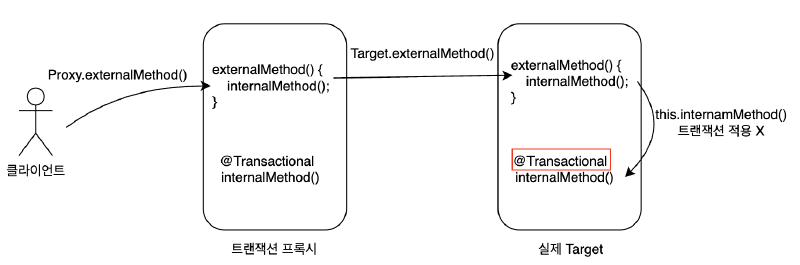
그렇다면 어떻게 해결할 것인가?
가장 간단한 방법은 internalMethod()을 별도의 클래스로 분리하는 것이다.
@Slf4j
@SpringBootTest
public class TxInternalCallTest {

    @Autowired
    private ExternalCallService externalCallService;

    @DisplayName("프록시 확인")
    @Test
    void printProxy() {
        log.info("callService class={}", externalCallService.getClass());
    }

    @DisplayName("externalMethod에 의한 internalMethod 호출 테스트")
    @Test
    void external() throws Exception {
        externalCallService.externalMethod();
    }

    @TestConfiguration
    static class TxInternalCallTestConfig {
        @Bean
        public ExternalCallService txInternalCallService() {
            return new ExternalCallService(internalCall());
        }

        @Bean
        public TxInternalCall internalCall() {
            return new TxInternalCall();
        }
    }

    static class ExternalCallService {
        private final TxInternalCall txInternalCall;

        public ExternalCallService(TxInternalCall txInternalCall) {
            this.txInternalCall = txInternalCall;
        }

        public void externalMethod() {
            log.info("call externalMethod()");
            printTx();
            txInternalCall.internalMethod();
        }

        private void printTx() {
            boolean txActive = TransactionSynchronizationManager.isActualTransactionActive();
            log.info("txActive: {}", txActive);
        }
    }

    static class TxInternalCall {

        @Transactional
        public void internalMethod() {
            log.info("call internalMethod()");
            printTx();
        }

        private void printTx() {
            boolean txActive = TransactionSynchronizationManager.isActualTransactionActive();
            log.info("txActive: {}", txActive);
        }
    }
}
이 방법 외에도 SpringAOP를 프록시 기반이 아닌 컴파일 시점이나 클래스로드 시점에 Java 코드를 조작하는 방법도 있다.
3.4 트랜잭션의 전파(Propagation) 속성#
트랜잭션의 전파와 속성#
트랜잭션 전파(Propagation)는 하나의 트랜잭션 안에서 또 다른 트랜잭션 메서드를 호출할 때, 이들의 관계를 어떻게 관리할지를 결정하기 위한 메커니즘이다.
여러 레이어(컨트롤러, 서비스, 리포지토리 등)나 여러 모듈에 걸쳐서 트랜잭션이 걸쳐 있을 수 있기 때문에, “현재 트랜잭션이 이미 존재하는 경우에는 합류할지, 새로운 트랜잭션을 열지, 아니면 에러로 처리할지” 등을 명시적으로 설정할 필요가 있다.
스프링은 다양한 트랜잭션 전파 옵션을 제공한다. 전파 옵션에 별도의 설정을 하지 않으면 REQUIRED가 기본으로 사용된다.
REQUIRED
가장 많이 사용하는 기본 설정이다. 기존 트랜잭션이 없으면 생성하고, 있으면 참여한다. 트랜잭션이 필수라는 의미로 이해하면 된다.
REQUIRES_NEW
항상 독립적인 새 트랜잭션을 생성한다. 기존 트랜잭션이 있으면 잠시 중단(suspend)시키고, 내부 작업을 별도로 커밋 또는 롤백한다.
SUPPORTS
트랜잭션을 지원한다는 뜻이다. 기존 트랜잭션이 없으면, 없는대로 진행하고, 있으면 참여한다.
NOT_SUPPORTED
트랜잭션을 지원하지 않는다는 의미이다.
MANDATORY
의무사항이다. 트랜잭션이 반드시 있어야 한다. 기존 트랜잭션이 없으면 예외가 발생한다.
NEVER
트랜잭션을 사용하지 않는다는 의미이다. 기존 트랜잭션이 있으면 예외가 발생한다. 기존 트랜잭션도 허용하지 않는다.
NESTED
기존 트랜잭션 없음: 새로운 트랜잭션을 생성한다. 기존 트랜잭션 있음: 중첩 트랜잭션을 만든다.
전파 속성 사용 예시#
Log 스키마 생성
drop table log if exists cascade;

create table log (
    log_id bigint primary key auto_increment,
    msg varchar(255),
    created_at timestamp
);
Log
@ToString
@NoArgsConstructor
@Getter
public class Log {
    private Long logId;
    private String msg;
    private LocalDateTime createdAt;

    private Log(String msg, LocalDateTime createdAt) {
        this.msg = msg;
        this.createdAt = createdAt;
    }

    private Log(Long logId, String msg, LocalDateTime createdAt) {
        this.logId = logId;
        this.msg = msg;
        this.createdAt = createdAt;
    }

    public static Log create(String msg) {
        return new Log(msg, LocalDateTime.now());
    }
}
LogRepository
@Slf4j
@RequiredArgsConstructor
@Repository
public class LogRepository {
    private final JdbcTemplate jdbcTemplate;

    @Transactional(propagation = Propagation.REQUIRES_NEW)
    public void save(Log lg) {
        log.info("save log: {}", lg);
        String sql = "insert into log(msg, created_at) values(?, ?)";
        jdbcTemplate.update(sql, lg.getMsg(), Timestamp.valueOf(lg.getCreatedAt()));
    }

    public List<Log> findAll() {
        log.info("find all logs");
        String sql = "select * from log";
        return jdbcTemplate.query(sql, new DataClassRowMapper<>(Log.class));
    }

    public void deleteAll() {
        log.info("delete all logs");
        String sql = "delete from log";
        jdbcTemplate.update(sql);
    }
}
PostLikeLogService
@Service
public class PostLikeLogService {
    private final PostLikeService postLikeService;
    private final LogRepository logRepository;

    public PostLikeLogService(PostLikeService postLikeService, LogRepository logRepository) {
        this.postLikeService = postLikeService;
        this.logRepository = logRepository;
    }

    @Transactional
    public void likePost(Long postId, Long userId) {
        postLikeService.likePost(postId, userId);
        logRepository.save(Log.create("Post liked. postId=" + postId + ", userId=" + userId));

        throw new RuntimeException("강제 예외 발생!");
    }
}
PostLikeLogServiceTest
@SpringBootTest
class PostLikeLogServiceTest {
    @Autowired
    private PostLikeLogService postLikeLogService;

    @Autowired
    private PostRepository postRepository;

    @Autowired
    private PostLikeRepository postLikeRepository;

    @Autowired
    private LogRepository logRepository;

    @BeforeEach
    void before() {
        postRepository.deleteAll();
        postLikeRepository.deleteAll();
        logRepository.deleteAll();
        postRepository.save(Post.create(10L, "title", "content"));
    }

    @AfterEach
    void clear() {
        postRepository.deleteAll();
        postLikeRepository.deleteAll();
        logRepository.deleteAll();

    }

    @DisplayName("Post 좋아요 로그 테스트")
    @Test
    void postLikeLog() throws Exception {
        assertThrows(RuntimeException.class, () -> postLikeLogService.likePost(10L, 1L));
        assertEquals(1, logRepository.findAll().size());
    }
}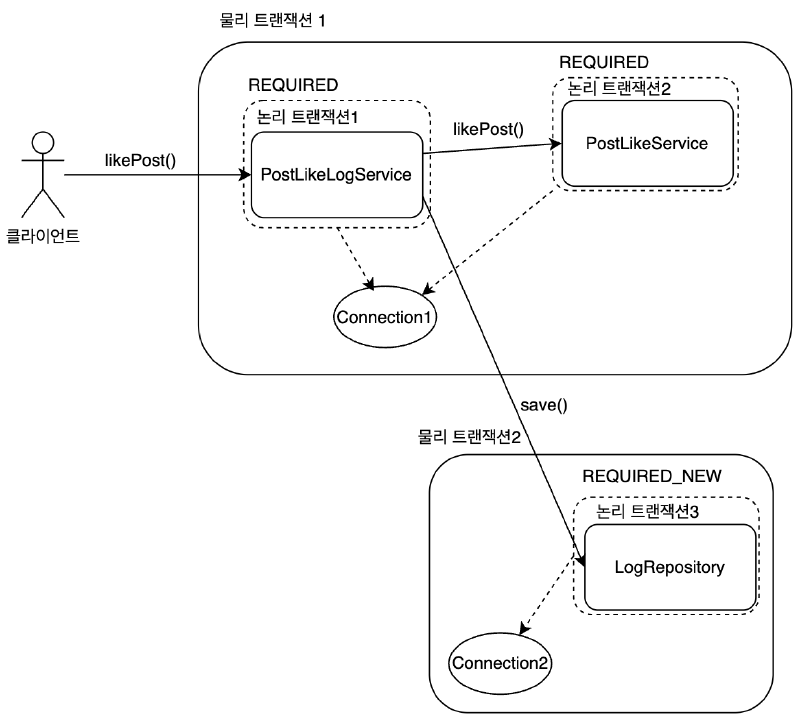
핵심은 같은 트랜잭션 내에서 발생한 예외로 인해 전체가 롤백되더라도, REQUIRES_NEW를 사용한 트랜잭션 작업은 커밋되어 데이터베이스에 남는다는 것이다.
그리고 이 글처럼 JdbcTemplate과 DataSourceTransactionManager를 사용하는 환경에서는, 바깥 트랜잭션이 이미 커넥션(Connection1)을 점유한 상태에서 REQUIRES_NEW가 내부 트랜잭션용 커넥션(Connection2)을 추가로 가져오게 된다.
즉, 하나의 HTTP 요청 안에서도 이 구간에서는 커넥션이 최대 2개까지 동시에 점유될 수 있다.
전체 흐름
클라이언트가
PostLikeLogService.likePost()를 호출한다.이 메서드는
@Transactional(기본값:REQUIRED)이므로 논리 트랜잭션1(→ 물리 트랜잭션1)으로 묶인다.PostLikeService.likePost()를 호출하여 게시글 좋아요를 처리한다.PostLikeService.likePost()역시@Transactional(기본값:REQUIRED)로 동일 트랜잭션에 합류한다.쿼리는 동일한 Connection(
Connection1)을 통해 DB에 반영된다.LogRepository.save()를 호출한다.이 메서드는
@Transactional(propagation = Propagation.REQUIRES_NEW)이므로 새로운 논리 트랜잭션2(→ 물리 트랜잭션2)를 생성하고, 별도 Connection(Connection2)을 가져온다.이때 바깥 트랜잭션의
Connection1은 종료되는 것이 아니라 잠시 중단된 채 유지되고, 내부 트랜잭션은Connection2로 실행된다.로그를 insert 한 뒤, 이
REQUIRES_NEW트랜잭션은 즉시 커밋된다.PostLikeLogService.likePost()안에서RuntimeException을 강제 발생시킨다.이 예외로 인해 물리 트랜잭션1은 롤백된다.
하지만 이미
REQUIRES_NEW로 처리된 로그 저장은 별도의 물리 트랜잭션에서 커밋이 끝났으므로, 롤백되지 않고 남아있다.
왜 로그는 남고, 좋아요는 롤백될까?
기본( REQUIRED ) 트랜잭션에 속한 좋아요 작업은 예외 발생 시 같이 롤백된다.
그러나 REQUIRES_NEW는 “부모 트랜잭션을 잠시 중단(suspend)하고, 완전히 독립된 새 트랜잭션으로 동작”하기 때문에, 로그 저장이 이미 다른 물리 트랜잭션에서 커밋이 확정된다.
결과적으로, 부모 트랜잭션이 롤백되더라도 로그 데이터는 롤백되지 않고 DB에 남게 된다.
따라서 REQUIRES_NEW를 자주 사용하면 동시에 필요한 커넥션 수가 증가하므로, 커넥션 풀 크기와 트랜잭션 설계를 함께 고려해야 한다.
반대로, 바깥 트랜잭션이 없는 상태에서 REQUIRES_NEW 메서드만 단독 호출된다면 결국 트랜잭션 1개, 커넥션 1개만 사용한다.
만약 REQUIRES_NEW를 사용하지 않았다면?
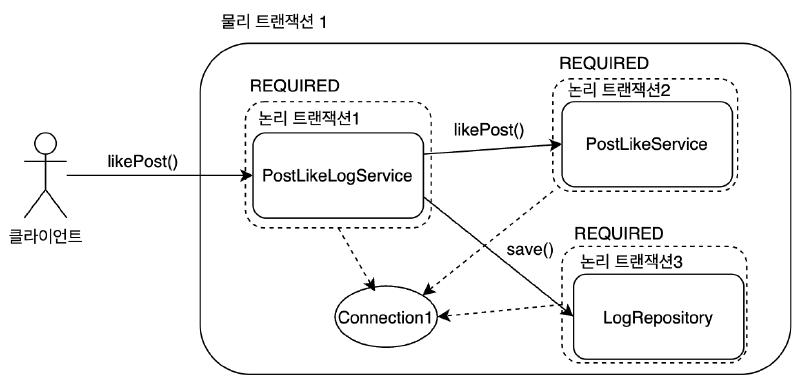
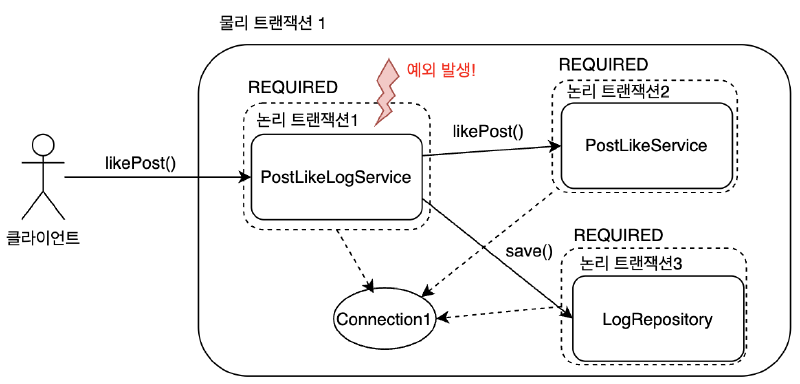
LogRepository.save()에 @Transactional(propagation = Propagation.REQUIRED)와 같이 별도 전파 설정 없이 부모 트랜잭션과 동일하게 동작한다면, 다음과 같은 결과가 나온다.
PostLikeLogService.likePost()→postLikeService.likePost()→logRepository.save()가 동일 트랜잭션으로 묶인다.RuntimeException으로 인해, 모든 작업이 한 트랜잭션 내에서 롤백된다.- 따라서 좋아요도 롤백되고, 로그 또한 DB에 남지 않는다.
4. 실습: Spring JDBC를 이용한 CRUD 구현#
4.1 프로젝트 구성#
MySQL 데이터베이스 설치
MAC 사용자:
brew update
brew install mysql
mysql.server start
WINDOW 사용자:
https://dev.mysql.com/downloads/mysql/
IntelliJ Database 연결
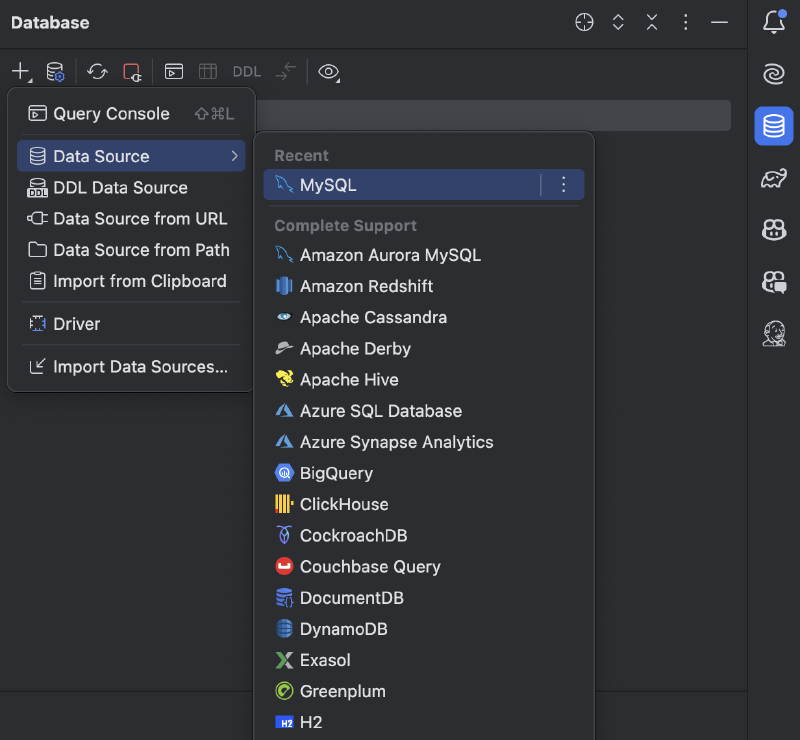
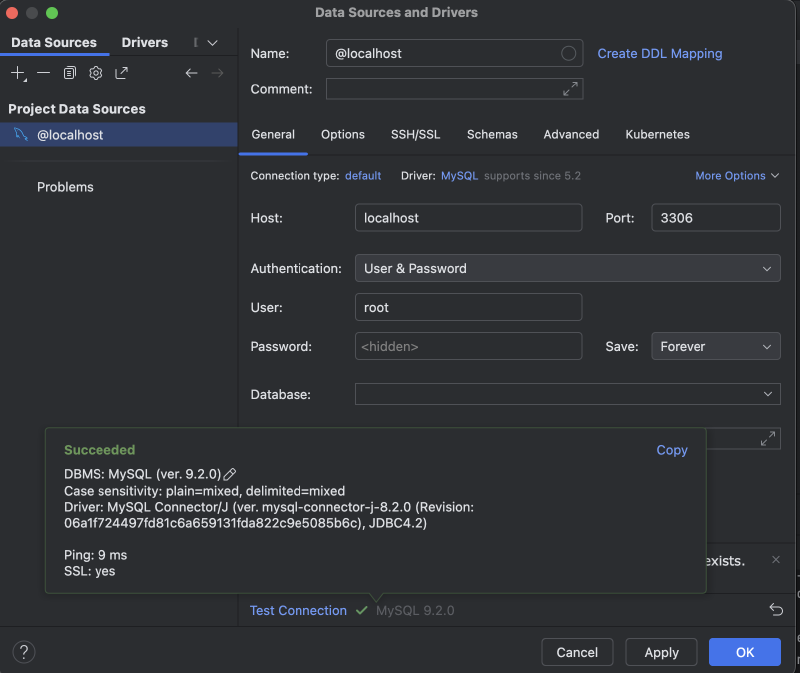
mirco-blog 스키마 생성
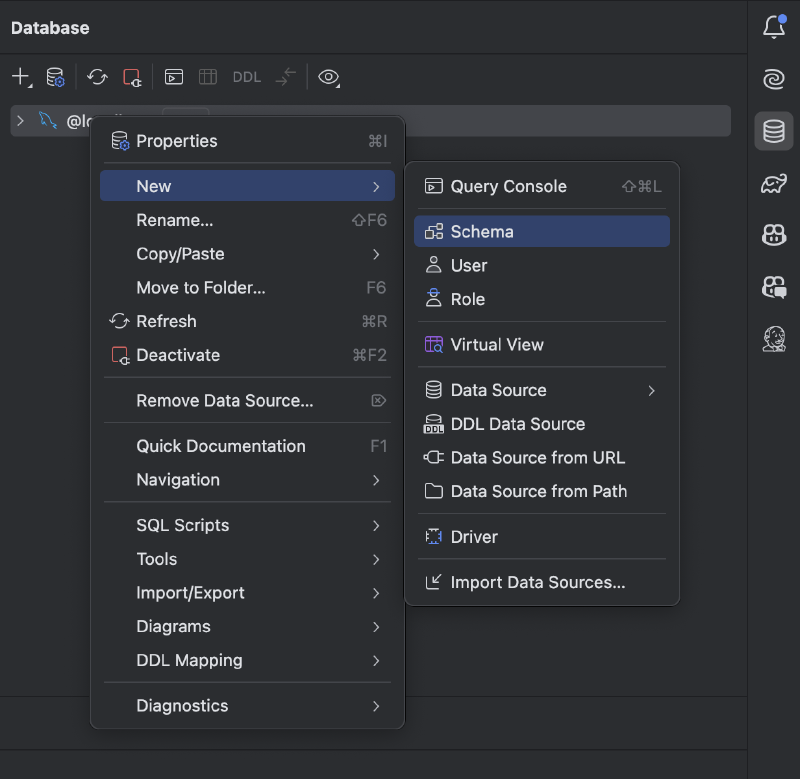
프로젝트 생성
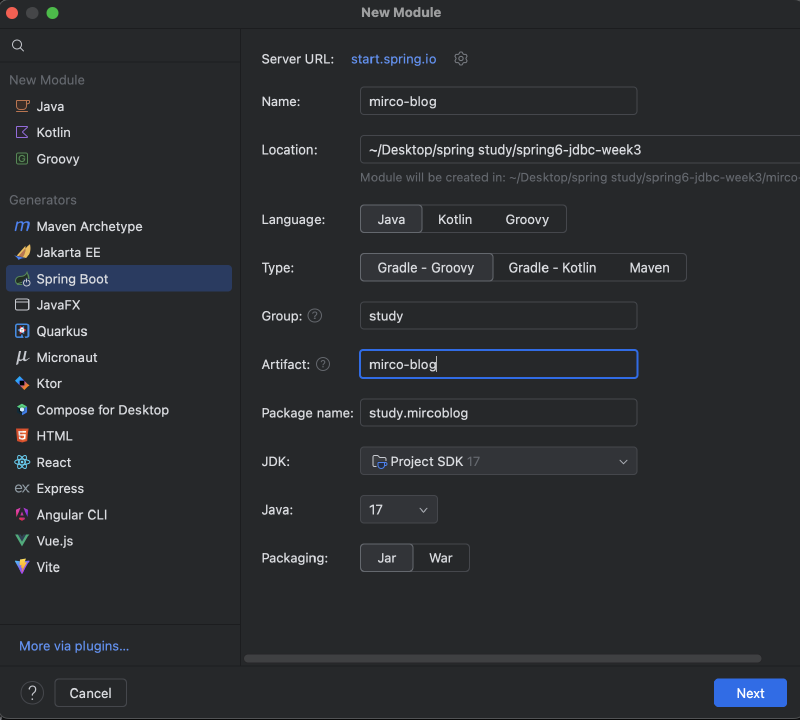
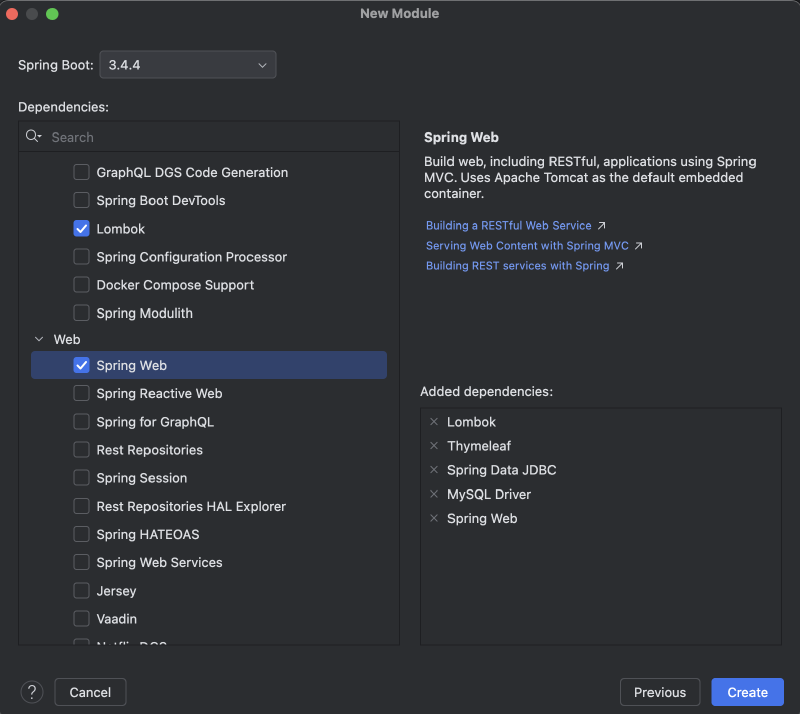
application.yml
spring:
  datasource:
    url: jdbc:mysql://localhost:3306/micro-blog
    username: root
    password:
    driver-class-name: com.mysql.cj.jdbc.Driver
    hikari:
      maximum-pool-size: 10
4.2 CRUD와 Join을 활용한 마이크로 블로그 예제 작성#
DB 스키마 생성
DROP TABLE IF EXISTS comment;
DROP TABLE IF EXISTS post;

CREATE TABLE post (
    id BIGINT PRIMARY KEY AUTO_INCREMENT,
    title VARCHAR(255) NOT NULL,
    content TEXT NOT NULL,
    created_at TIMESTAMP DEFAULT CURRENT_TIMESTAMP
);

CREATE TABLE comment (
    id BIGINT PRIMARY KEY AUTO_INCREMENT,
    post_id BIGINT NOT NULL,
    content TEXT NOT NULL,
    created_at TIMESTAMP DEFAULT CURRENT_TIMESTAMP,
    CONSTRAINT fk_comment_post
        FOREIGN KEY (post_id) REFERENCES post (id)
        ON DELETE CASCADE
);

-- 샘플 데이터
INSERT INTO post (title, content) VALUES
('첫 번째 게시글', '블로그 예제 시작!'),
('두 번째 게시글', 'thymeleaf와 jdbc를 이용한 예제');

INSERT INTO comment (post_id, content) VALUES
(1, '첫 댓글!'),
(1, '두 번째 댓글'),
(2, '두 번째 게시글의 첫 댓글');
Post
@ToString
@Getter @Setter
@NoArgsConstructor
@EqualsAndHashCode
public class Post {
    private Long id;
    private String title;
    private String content;
    private LocalDateTime createdAt;

    private Post(Long id, String title, String content, LocalDateTime createdAt) {
        this.id = id;
        this.title = title;
        this.content = content;
        this.createdAt = createdAt;
    }

    public static Post create(String title, String content) {
        return new Post(null, title, content, LocalDateTime.now());
    }

    public static Post of(Long id, String title, String content, LocalDateTime createdAt) {
        return new Post(id, title, content, createdAt);
    }
}
Comment
@ToString
@Getter @Setter
@NoArgsConstructor
@EqualsAndHashCode
public class Comment {
    private Long id;
    private Long postId;
    private String content;
    private LocalDateTime createdAt;

    private Comment(Long id, Long postId, String content, LocalDateTime createdAt) {
        this.id = id;
        this.postId = postId;
        this.content = content;
        this.createdAt = createdAt;
    }

    public static Comment create(Long postId, String content) {
        return new Comment(null, postId, content, LocalDateTime.now());
    }
}
PostRepository
@Repository
@RequiredArgsConstructor
public class PostRepository {
    private final JdbcTemplate jdbcTemplate;

    // 게시글 저장
    public void save(Post post) {
        String sql = "insert into post (title, content, created_at) values (?, ?, ?)";
        jdbcTemplate.update(sql, post.getTitle(), post.getContent(), post.getCreatedAt());
    }

    // 게시글 수정
    public void update(Post post) {
        String sql = "update post set title = ?, content = ? where id = ?";
        jdbcTemplate.update(sql, post.getTitle(), post.getContent(), post.getId());
    }

    // 게시글 단건 조회
    public Post findById(Long id) {
        String sql = "select * from post where id = ?";
        return jdbcTemplate.queryForObject(sql, new BeanPropertyRowMapper<>(Post.class), id);
    }

    // 모든 게시글 조회 (댓글 개수 Join)
    public List<PostWithCommentCount> findAllWithCommentCount() {
        String sql = """
            select p.*, count(c.id) as comment_count
              from post p
              left join comment c on p.id = c.post_id
              group by p.id
              order by p.id desc
            """;
        return jdbcTemplate.query(sql, new BeanPropertyRowMapper<>(PostWithCommentCount.class));
    }

    // 게시글 삭제
    public void deleteById(Long id) {
        String sql = "delete from post where id = ?";
        jdbcTemplate.update(sql, id);
    }
}
CommentRepository
@Repository
@RequiredArgsConstructor
public class CommentRepository {
    private final JdbcTemplate jdbcTemplate;

    // 댓글 저장
    public void save(Comment comment) {
        String sql = "insert into comment (post_id, content, created_at) values (?, ?, ?)";
        jdbcTemplate.update(sql,
                comment.getPostId(),
                comment.getContent(),
                comment.getCreatedAt());
    }

    // 특정 게시글의 모든 댓글 조회
    public List<Comment> findByPostId(Long postId) {
        String sql = "select * from comment where post_id = ? order by id desc";
        return jdbcTemplate.query(sql, new BeanPropertyRowMapper<>(Comment.class), postId);
    }

    // 댓글 삭제
    public void deleteById(Long id) {
        String sql = "delete from comment where id = ?";
        jdbcTemplate.update(sql, id);
    }
}
PostService
@Transactional
@RequiredArgsConstructor
@Service
public class PostService {
    private final PostRepository postRepository;
    private final CommentRepository commentRepository;

    public List<PostWithCommentCount> getPostsWithCommentCount() {
        return postRepository.findAllWithCommentCount();
    }

    public PostDetailDto getPostDetail(Long id) {
        Post post = postRepository.findById(id);
        List<Comment> comments = commentRepository.findByPostId(id);
        return PostDetailDto.of(post, comments);
    }

    public void createPost(Post post) {
        postRepository.save(post);
    }

    public void updatePost(Post post) {
        postRepository.update(post);
    }

    public void deletePost(Long id) {
        postRepository.deleteById(id);
    }
}
CommentService
@Transactional
@RequiredArgsConstructor
@Service
public class CommentService {
    private final CommentRepository commentRepository;

    public void createComment(Comment comment) {
        commentRepository.save(comment);
    }

    public void deleteComment(Long id) {
        commentRepository.deleteById(id);
    }
}
PostController
@Controller
@RequiredArgsConstructor
@RequestMapping("/posts")
public class PostController {

    private final PostService postService;

    @GetMapping
    public String list(Model model) {
        List<PostWithCommentCount> posts = postService.getPostsWithCommentCount();
        model.addAttribute("posts", posts);
        return "post_list";
    }

    @GetMapping("/{id}")
    public String detail(@PathVariable(name = "id") Long id, Model model) {
        PostDetailDto postDetailDto = postService.getPostDetail(id);
        model.addAttribute("postDetail", postDetailDto);
        return "post_detail";
    }

    @GetMapping("/new")
    public String newForm(Model model) {
        model.addAttribute("post", new Post()); // 폼 바인딩용
        return "post_form";
    }

    @PostMapping
    public String create(@RequestParam String title,
                         @RequestParam String content) {
        Post post = Post.create(title, content);
        postService.createPost(post);
        return "redirect:/posts";
    }

    @GetMapping("/{id}/edit")
    public String editForm(@PathVariable(name = "id") Long id, Model model) {
        Post post = postService.getPostDetail(id).toPost();
        model.addAttribute("post", post);
        return "post_form";
    }

    @PostMapping("/{id}/edit")
    public String update(@PathVariable(name = "id") Long id,
                         @RequestParam String title,
                         @RequestParam String content) {
        Post post = Post.of(id, title, content, null);
        postService.updatePost(post);
        return "redirect:/posts/" + id;
    }

    @PostMapping("/{id}/delete")
    public String delete(@PathVariable(name = "id") Long id) {
        postService.deletePost(id);
        return "redirect:/posts";
    }
}
CommentController
@Controller
@RequiredArgsConstructor
@RequestMapping("/posts/{postId}/comments")
public class CommentController {

    private final CommentService commentService;

    @PostMapping
    public String createComment(@PathVariable(name = "postId") Long postId,
                                @RequestParam String content) {
        Comment comment = Comment.create(postId, content);
        commentService.createComment(comment);
        return "redirect:/posts/" + postId;
    }

    @PostMapping("/{commentId}/delete")
    public String deleteComment(@PathVariable(name = "postId") Long postId,
                                @PathVariable(name = "commentId") Long commentId) {
        commentService.deleteComment(commentId);
        return "redirect:/posts/" + postId;
    }
}
PostDetailDto
@ToString
@Getter
@EqualsAndHashCode
public class PostDetailDto {
    private final Long id;
    private final String title;
    private final String content;
    private final LocalDateTime createdAt;
    private final List<Comment> comments;

    private PostDetailDto(Long id, String title, String content, LocalDateTime createdAt, List<Comment> comments) {
        this.id = id;
        this.title = title;
        this.content = content;
        this.createdAt = createdAt;
        this.comments = comments;
    }

    public static PostDetailDto of(Post post, List<Comment> comments) {
        return new PostDetailDto(
                post.getId(),
                post.getTitle(),
                post.getContent(),
                post.getCreatedAt(),
                comments
        );
    }

    public Post toPost() {
        return Post.of(id, title, content, createdAt);
    }
}
PostWithCommentCount
@ToString
@Getter @Setter
@NoArgsConstructor
@EqualsAndHashCode
public class PostWithCommentCount {
    private Long id;
    private String title;
    private String content;
    private LocalDateTime createdAt;
    private int commentCount;

    private PostWithCommentCount(Long id, String title, String content, int commentCount) {
        this.id = id;
        this.title = title;
        this.content = content;
        this.commentCount = commentCount;
    }
}
post_list.html
<!DOCTYPE html>
<html xmlns:th="http://www.thymeleaf.org">
<head>
    <title>게시글 목록</title>
</head>
<body>
<h1>게시글 목록</h1>
<a th:href="@{/posts/new}">새 글 작성</a>

<table border="1">
    <tr>
        <th>ID</th>
        <th>제목</th>
        <th>댓글 수</th>
    </tr>
    <tr th:each="post : ${posts}">
        <td th:text="${post.id}"></td>
        <td>
            <a th:href="@{/posts/{id}(id=${post.id})}"
               th:text="${post.title}">제목</a>
        </td>
        <td th:text="${post.commentCount}"></td>
    </tr>
</table>
</body>
</html>
post_detail.html
<!DOCTYPE html>
<html xmlns:th="http://www.thymeleaf.org">
<head>
    <title>게시글 상세</title>
</head>
<body>
<h1 th:text="${postDetail.title}">제목</h1>
<p th:text="${postDetail.content}">내용</p>
<p>작성일:
    <span th:text="${#temporals.format(postDetail.createdAt, 'yyyy-MM-dd HH:mm')}"></span>
</p>

<hr/>
<h2>댓글</h2>
<div th:each="comment : ${postDetail.comments}">
    <p th:text="${comment.content}">댓글내용</p>
    <small th:text="${#temporals.format(comment.createdAt, 'yyyy-MM-dd HH:mm')}"></small>
    <form th:action="@{/posts/{postId}/comments/{commentId}/delete(postId=${postDetail.id}, commentId=${comment.id})}"
          method="post">
        <button type="submit">삭제</button>
    </form>
    <hr/>
</div>

<!-- 댓글 작성 -->
<form th:action="@{/posts/{id}/comments(id=${postDetail.id})}" method="post">
    <textarea name="content" rows="3" cols="40"></textarea>
    <button type="submit">댓글 작성</button>
</form>

<hr/>
<!-- 게시글 수정, 삭제 -->
<form th:action="@{/posts/{id}/edit(id=${postDetail.id})}" method="get">
    <button type="submit">수정하기</button>
</form>
<form th:action="@{/posts/{id}/delete(id=${postDetail.id})}" method="post">
    <button type="submit">삭제하기</button>
</form>
<a th:href="@{/posts}">목록으로 돌아가기</a>
</body>
</html>
post_form.html
<!DOCTYPE html>
<html xmlns:th="http://www.thymeleaf.org">
<head>
    <title>게시글 작성/수정</title>
</head>
<body>
<h1>게시글 작성/수정</h1>

<form th:if="${post.id == null}"
      th:action="@{/posts}"
      method="post">
    <p>제목: <input type="text" name="title"/></p>
    <p>내용: <textarea name="content" rows="5" cols="40"></textarea></p>
    <button type="submit">작성</button>
</form>

<form th:if="${post.id != null}"
      th:action="@{/posts/{id}/edit(id=${post.id})}"
      method="post">
    <p>제목: <input type="text" name="title" th:value="${post.title}"/></p>
    <p>내용: <textarea name="content" rows="5" cols="40"
                     th:text="${post.content}"></textarea></p>
    <button type="submit">수정</button>
</form>

<a th:href="@{/posts}">목록으로 돌아가기</a>
</body>
</html>출처:
토비의 스프링
그림으로 배우는 스프링6 입문
김영한의 스프링 DB 1, 2
https://docs.spring.io/spring-framework/reference/data-access.html
https://github.com/brettwooldridge/HikariCP?tab=readme-ov-file